ChatGPT Projects genuinely organize a document-heavy workstream — files, custom instructions, and related chats held together in one place — and GPT-5.6's 1.05-million-token context window means a Project's contents can be read in real depth. Turning that organized workspace into a production document workflow, where every file is processed the same way and the result is defensible later, is a different job than the one Projects is built to do.
Per OpenAI's documentation, Projects are "smart workspaces that keep everything related to a long-running effort in one place," and the file limits are concrete rather than vague: Free plans allow 5 files per project, Go and Plus plans 25, and Edu, Pro, Business, and Enterprise plans 40, with up to 10 files uploaded concurrently and unlimited projects per account. Project instructions override global custom instructions, and Business, Enterprise, and Edu workspaces support up to 100 collaborators per project with edit or chat-only access levels.
That's real, well-documented infrastructure for a team working repeatedly against a shared set of documents. It's also infrastructure built for organizing and chatting about files, not for guaranteeing that every file in a set gets processed against a defined schema and produces a structured, cited result.
This is part of a series of articles about AI Build vs Buy.
What ChatGPT Projects Do Well
ChatGPT Projects give a team real, documented capability for organizing document work around a specific effort.
- Files, custom instructions, and related chats stay together in one workspace, with per-project instructions overriding global settings — so a team doesn't have to restate document-handling conventions in every conversation.
- File capacity scales by plan, up to 40 files per project on Business, Enterprise, and Edu plans, with links from Google Drive and Slack channels also supported.
- Collaboration is real: up to 100 collaborators on paid plans, with "Edit" access for managing files and instructions and "Chat" access for members who only need to interact with existing content.
- Project-only memory mode restricts ChatGPT's context to exactly what's in that project, useful when a team wants to be certain nothing from outside the workspace bleeds into a response.
- GPT-5.6's 1.05-million-token context window can hold a substantial bundle of a project's files in a single pass for deep, in-context reading.
Nine free AI document tools — pick your workflow
What a Document Workflow Needs That Projects Doesn't Include
A document workflow needs every file in a project processed against a fixed schema, not a well-organized space for asking questions about whichever files happen to be there.
- Projects have hard file-count limits — as low as 5 on Free plans, 40 on the highest paid tiers — which is a real constraint for a document set that grows past that number, not just a soft guideline.
- Nothing in Projects defines an extraction schema. Custom instructions shape tone and approach; they don't enforce a field list, units, or handling for a missing value the way a structured pipeline does.
- Field-level citation has to be requested in conversation and delivered as prose. There's no structural guarantee binding an extracted value to its exact source location the way a purpose-built extraction pipeline enforces on every field.
- Per OpenAI's documentation, versioning is limited to conversation branching — exploring an alternative direction without altering the original — not a formal version-control or rollback system for project knowledge or instructions.
- Deletion is permanent, and while a 30-day system retention window follows, there's no described mechanism for reconstructing which project instructions were active when a specific past output was produced.
A Large Context Window Answers a Different Question Than Exhaustive Coverage Does
A 1.05-million-token context window determines how much a model can read in one pass; it says nothing about whether every document in a project actually gets read, processed, and turned into a structured result on a defined schedule.
Those are separate guarantees. Reading capacity is about what fits; workflow completeness is about what's checked. A team relying on Projects for document analysis at scale has to build the second guarantee itself — a process confirming every file was processed, not just that the ones a person happened to ask about got a good answer.
Who Owns the Instructions, the Coverage Record, and the Re-Validation
The custom instructions that tell a Project how to handle its documents are the actual extraction logic, and per OpenAI's own documentation, there's no version-control system tracking changes to that logic over time — only conversation branching, which explores alternatives rather than recording history.
Two obligations follow. First, when a value from a project is questioned later, reconstructing which instructions were active and whether the file in question was fully processed means checking chat history, not querying a governed record. Second, when the underlying model version changes, or a document format shifts, re-confirming the project's instructions still produce correct output is scheduled work your team owns — nothing in Projects re-validates that automatically before a new model version reaches your workflow.
Related articles: chatgpt mcp document workflows and chatgpt work document workflows.
ChatGPT Projects Compared With a Purpose-Built Document Platform
| Requirement | ChatGPT Projects | Purpose-Built Platform |
|---|---|---|
| Organizes files and instructions around a workstream | Yes | Yes |
| File capacity for a document set | Up to 40 per project, plan-dependent | Scales to portfolio size |
| Guarantees every file in the set is processed | Not by design | Yes, by design |
| Extraction schema enforced per field | You define it in custom instructions | Built with you, enforced on output |
| Field-level citation to source | Requested in conversation, not structural | Enforced on every field |
| Version history of instructions and knowledge | Branching only, not formal versioning | Built in |
| Re-validation when the model changes | Your team | Vendor benchmarks and validates |
| Delivery into existing systems (Yardi, MRI, CRM) | Manual export from chat | Structured push into existing systems |
| Who owns the accuracy of the outcome | Your team | Shared with the vendor |
When ChatGPT Projects Are the Right Choice
ChatGPT Projects are the right tool for document work organized around a specific effort, reviewed by the people working inside it, rather than a repeatable production pipeline.
- A team's shared reference workspace. Keeping the documents, policies, and context for one deal or one matter together, with instructions the whole team can rely on, is exactly what Projects is built for.
- Deep reading of a bounded set of documents. A handful of related files — well within the file limit — read together in depth benefits directly from a large context window.
- Collaborative exploration. Multiple people asking questions against the same document set, each reading and judging the answer themselves, plays to Projects' collaboration features.
- Low volume. Below a few hundred documents a year, or within a single project's file limit, the infrastructure a purpose-built platform adds is often more than the workflow needs.
The dividing line isn't how well-organized the workspace is. It's whether every document in it needs to produce a consistent, cited, structured result someone can defend later, not just a good answer to whatever was asked in the moment.
How Kolena Works
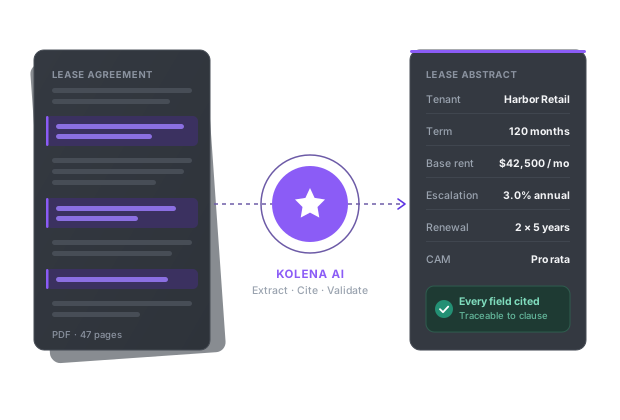
Kolena is an AI document automation platform built for commercial real estate, lending, insurance, and financial services teams that need every document in a set processed the same way, at whatever scale the portfolio requires — not bounded by a per-project file limit. Kolena deploys AI agents that read your documents and apply your specific rubric or extraction template, returning structured outputs with every field cited to its exact location in the source.
Kolena reads PDFs, scans, emails, spreadsheets, images, and audio or video, and pushes structured results into the systems teams already use, including Yardi, MRI, Salesforce, and Snowflake. Every run produces a full audit trail, and Kolena benchmarks leading models against real document tasks and routes each step to the best performer, so a model version change is validated before it reaches your workflow. Kolena is SOC 2 Type II certified, processes onshore, and does not train on customer data.
One private lending customer uses Kolena this way, cutting UCC filing review labor by 96% and taking loan-file turnaround from roughly five days to hours — every file in the portfolio processed to the same standard, not bounded by how many fit in a single workspace.