ChatGPT can connect to your documents wherever they live today, through Apps and connectors for everyday use and full Model Context Protocol client support in developer mode for custom integrations. What that connection solves is where the documents are and how ChatGPT reaches them; it doesn't, on its own, define what should come out of a document once ChatGPT opens it, and that second problem is the one a document workflow actually has to solve.
The Model Context Protocol, per its own documentation, is "an open-source standard for connecting AI applications to external systems" — a standard way to plug in data sources and tools, not a specific product. ChatGPT implements it two ways: Apps, a curated set of connectors including document and productivity integrations, and developer mode, which OpenAI's own documentation describes as providing "full Model Context Protocol client support for all tools, both read and write" — real, current capability, alongside an explicit warning that it is "powerful but dangerous."
That warning is worth sitting with, because it names exactly the gap "we'll connect it over MCP" glosses over: connectivity and consequence are two different problems, and only the first one gets solved by adding a connector.
This is part of a series of articles about AI Build vs Buy.
What ChatGPT's MCP Support Does Well
ChatGPT's MCP implementation is genuinely capable infrastructure, both for everyday connectors and for custom developer integrations.
- Apps can search information, take actions, perform research with citations, and sync data to a knowledge base, with a tiered permission system — "always ask," "any changes," "important actions," or "never ask" — governing how much confirmation a given action requires.
- Developer mode exposes whatever tools a connected MCP server provides, for both read and write operations, with developers controlling tool availability and able to "toggle tools on or off and refresh apps to pull new tools, descriptions, and server instructions."
- Write actions default to requiring user confirmation, and the system respects a server's
readOnlyHintannotation — tools that don't declare themselves read-only are treated as write actions by default, a conservative default worth noting. - For Business, Enterprise, and Edu customers, per OpenAI's documentation, "OpenAI does not use information accessed from connectors to train models by default," and all app calls are logged in the OpenAI Compliance Logs platform.
- Enterprise and Business admins get real governance levers: role-based access control, action control configuration (allow all, read-only, or custom actions), parameter constraints on action arguments, and domain restrictions for account connections.
Nine free AI document tools — pick your workflow
What a Document Workflow Needs That MCP Connectivity Doesn't Include
A document workflow needs a defined, verifiable outcome for every file in a set — not a connection that takes whatever action a conversation asks of it in the moment.
- Nothing in MCP or ChatGPT's connector framework defines an extraction schema. Connectors read and write data; what should be pulled out of a document — which fields, in what units, with what handling for a missing value — isn't part of what the protocol or the connector standardizes.
- OpenAI's own documentation is blunt about developer mode's risk surface: prompt injection, model errors on write operations, and malicious MCP servers attempting data theft are named risks, not hypotheticals, and the guidance is to "carefully review the tool input" before approving any write action.
- Constraints on connector actions restrict what an agent can do, but per OpenAI's documentation, they don't filter the data an action returns — a distinction worth understanding before assuming a domain restriction on outbound email also limits what a connector can read.
- Field-level citation isn't part of what a connector provides. Whatever ChatGPT states in a response is prose, not a structural pointer binding an extracted value to its exact source location the way a purpose-built pipeline enforces on every field.
- The full connector directory changes frequently and isn't comprehensively documented in one place — OpenAI directs users to the live Plugins Directory rather than publishing a fixed list, which means the specific document systems available to connect can shift without notice.
Connectivity Isn't the Same Problem as Consistency
Connecting ChatGPT to a document repository over MCP answers where the documents come from. It doesn't answer whether two people, each asking ChatGPT to summarize the same document on two different days, get back the same structure, the same field boundaries, and the same treatment of an edge case.
OpenAI's own "powerful but dangerous" framing for developer mode exists because connecting a tool with write access is a meaningfully different risk than connecting one with read access, and getting that permission model right is necessary but not sufficient. The schema, the consistency, and the verification step that turns "ChatGPT read the document" into "this value is correct and formatted the way our downstream system expects" are decisions a document workflow has to make explicitly, on top of the connection, not decisions the connection makes for it.
Who Owns the Tool Configuration, the Output Record, and the Re-Validation
Deciding which MCP servers to trust, which tools to enable, and which write actions to allow is a configuration your team owns and has to actively maintain — per OpenAI's documentation, developers are responsible for reviewing "action-oriented tool names and descriptions" and adding server instructions covering sequences, rate limits, and tool relationships.
Two further ownership questions follow. First, the record of what ChatGPT extracted through a connector and from where lives in chat history and app-call logs, not in a governed, structured store built specifically for document-workflow audit review. Second, when an MCP server's tools change, or the underlying model version changes, re-confirming that document handling through the connector still behaves correctly is work your team schedules and performs — the same maintenance obligation that shows up everywhere else in this cluster.
Related articles: chatgpt projects document analysis and chatgpt work document workflows.
ChatGPT's MCP Support Compared With a Purpose-Built Document Platform
| Requirement | ChatGPT via Apps / MCP Developer Mode | Purpose-Built Platform |
|---|---|---|
| Reads and writes documents in connected systems | Yes | Via direct integration, configured for the workflow |
| Guarantees every document in a repository is processed | Not by design — action-by-action, not a batch guarantee | Yes, by design |
| Extraction schema enforced per field | Not standardized by MCP or the connector | Built with you, enforced on output |
| Field-level citation to source location | Whatever ChatGPT states in the response | Enforced on every field |
| Structured, queryable output record | Lives in chat history and app-call logs | Built in |
| Independent check on extracted values | You build it | Built in |
| Write-action risk explicitly flagged | Yes, "powerful but dangerous" per OpenAI | Governed by platform-native validation |
| Re-validation when model or MCP server changes | Your team | Vendor benchmarks and validates |
| Delivery into other systems (Yardi, MRI, CRM) | Manual, from chat or app output | Structured push into existing systems |
| Who is accountable for the result | Your team | Shared with the vendor |
When Connecting ChatGPT Over MCP Is the Right Choice
Connecting ChatGPT to a document system over MCP is the right call when the job is finding and acting on a specific item, not producing a structured result across every document in a set.
- Ad hoc search and retrieval. Finding a specific document or checking its current status is exactly the kind of action-oriented task connectors handle well, with one answer a person reads and verifies.
- Routine actions tied to documents that already live in a connected system. Drafting a message that references a file, or updating a record from a document's contents, uses connector write actions within their documented, confirmable scope.
- Custom integrations built and maintained by engineering. Developer mode's full read/write MCP access is a legitimate foundation for a team with the capacity to review tool configurations and monitor for the risks OpenAI names directly.
- Low volume. Below a few hundred documents a year, the cost of building schema enforcement, structured output, and an audit datastore on top of a connector usually exceeds what that infrastructure would save.
The dividing line isn't whether ChatGPT can reach the documents — connectors and developer mode handle that well. It's whether every document in the set needs to produce a consistent, cited, structured result someone can defend later, rather than an answer to whatever was asked in the moment.
How Kolena Works
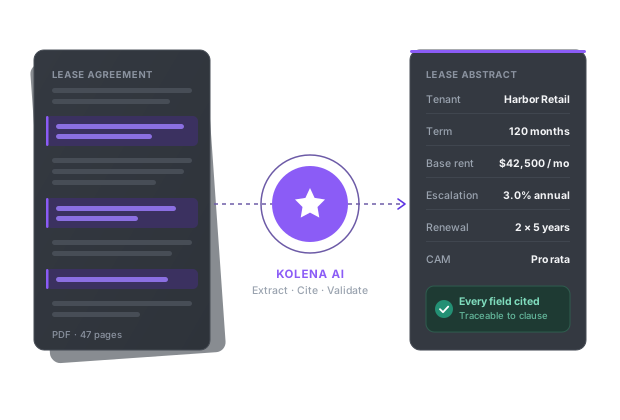
Kolena is an AI document automation platform built for commercial real estate, lending, insurance, and financial services teams that need every document in a set processed the same way, not a connector that answers one request at a time. Kolena deploys AI agents that read your documents — wherever they live — and apply your specific rubric or extraction template, returning structured outputs with every field cited to its exact location in the source.
Kolena reads PDFs, scans, emails, spreadsheets, images, and audio or video, and pushes structured results into the systems teams already use, including Yardi, MRI, Salesforce, and Snowflake. Every run produces a full audit trail stored in a governed record, not chat history, and Kolena benchmarks leading models against real document tasks and routes each step to the best performer. Kolena is SOC 2 Type II certified, processes onshore, and does not train on customer data.
One lease abstraction customer realized approximately $100,000 in efficiency gains across 58 leases working this way — every lease in the set processed to the same standard, not the ones a query happened to surface.