Claude can connect to SharePoint over MCP today, through Anthropic's own Microsoft 365 connector, and it genuinely searches, reads, and — when an admin enables it — writes documents there under your existing permissions. What it solves is where the documents live and how Claude reaches them; it doesn't, on its own, define what should come out of a lease or a loan file once Claude opens it, and that second problem is the one a document workflow actually has to solve.
The Model Context Protocol, per its own documentation, is "an open-source standard for connecting AI applications to external systems" — Anthropic describes it as a USB-C port for AI applications, a standard way to plug in data sources, tools, and workflows rather than a specific product. The Microsoft 365 connector is Anthropic's own concrete implementation of that standard for SharePoint, OneDrive, Outlook, and Teams, and it's a real, security-reviewed piece of enterprise infrastructure, not a demo integration.
That's exactly why "we'll connect it to SharePoint over MCP" sounds like it answers the document-workflow question. It answers the connectivity question. What happens after Claude opens a document from that SharePoint site — whether the output is consistent, cited, and something you could reproduce for an auditor eight months later — is a separate question the connector doesn't address.
This is part of a series of articles about AI Build vs Buy.
What Claude's MCP Connector to SharePoint Does Well
The Microsoft 365 connector is a genuinely capable, enterprise-reviewed piece of infrastructure, and it's worth naming what it actually does before getting to what it doesn't.
- It searches SharePoint tenant-wide, reads and writes files in SharePoint and OneDrive, and manages email and calendar in Outlook, with Teams available read-only — real actions against real Microsoft 365 data, not a mockup.
- Permissions are delegated: per Anthropic's documentation, Claude "can only access Microsoft 365 data they already have permission for" and cannot bypass SharePoint sharing settings or folder permissions. Delegated access also means the connector inherently respects your organization's existing data loss prevention policies with no special configuration.
- Write actions — uploading, updating, or deleting files — are optional and admin-gated, "blocked by default" until an organization owner explicitly enables them and Microsoft Entra re-consent is completed.
- Every Graph API call the connector makes is logged in Microsoft 365's own audit logs, and Anthropic separately logs authentication and tool execution events. The connector is built on SOC 2 Type II and ISO 27001 certified infrastructure and is Microsoft publisher-verified.
Nine free AI document tools — pick your workflow
What a Document Workflow Needs That a SharePoint Connector Doesn't Include
A document workflow needs a defined outcome for every file in a set, not a connection that retrieves whatever is relevant to the question asked of it in the moment.
- Per Anthropic's documentation, the connector "retrieves data only during active queries" and doesn't cache file content beyond the response cycle — a pattern built for conversational search and action, not a batch job that guarantees every document in a SharePoint site gets opened and processed.
- SharePoint search through the connector requires tenant-wide
Sites.Read.Allpermission; per Anthropic's own documentation, site-specific search scoping "is not supported." That's a real access-scope decision a security team has to accept as-is, not one a document workflow can narrow down per use case. - Nothing in the connector defines an extraction schema. It reads and writes files; what should be pulled out of a lease or a loan file — which fields, in what units, with what handling for a missing value — is not part of what MCP or the connector standardizes.
- Tool call results are stored in your chat history, visible to "the user who requested the Claude chat," not written to a structured, queryable output separate from the conversation. There's no field-level citation format beyond whatever Claude states in that chat response.
- Write tools reject any message containing attachments — a specific, documented constraint worth knowing before assuming a SharePoint-in, output-out pipeline runs end to end without a person handling the attachment step manually.
Connectivity Isn't the Same Problem as Consistency
"We'll connect it to SharePoint over MCP" answers where the documents come from. It doesn't answer whether two people, each asking Claude to summarize the same lease's escalation clause on two different days, get back the same structure, the same field boundaries, and the same treatment of an edge case.
Connecting the pipe doesn't standardize what flows through it. MCP and the Microsoft 365 connector solve access — reliably and securely, per Anthropic's own security documentation — but the schema, the consistency, and the verification step that turns "Claude read the document" into "this value is correct and formatted the way our downstream system expects" are decisions a document workflow has to make explicitly, on top of the connection, not decisions the connection makes for it.
Who Owns the Access Scope, the Output Record, and the Re-Validation
Accepting tenant-wide SharePoint search access, rather than a narrower purpose-built scope, is a decision your security team makes and owns when it grants Entra consent — the connector doesn't offer a document-workflow-specific alternative.
Two further ownership questions follow. First, the record of what Claude extracted and from where lives in chat history rather than in a governed, structured store built for audit review — reconstructing what happened on a specific file some months ago means finding the right chat, not querying a data table. Second, when Microsoft changes Graph API behavior, when the connector is updated, or when the underlying model version changes, re-confirming that document handling through the connector still behaves correctly is work your team schedules and performs, the same maintenance obligation that shows up everywhere else in this cluster.
Related articles: chatgpt mcp document workflows and chatgpt projects document analysis.
Claude's MCP Connector Compared With a Purpose-Built Document Platform
The connector and a purpose-built platform can both start from the same SharePoint site, and the table below shows who owns each requirement once a document is opened.
| Requirement | Claude via MCP / Microsoft 365 Connector | Purpose-Built Platform |
|---|---|---|
| Reads and writes SharePoint under existing permissions | Yes | Via direct integration, configured for the workflow |
| Guarantees every document in a site is processed | Not by design — query-time retrieval, not a batch guarantee | Yes, by design |
| Extraction schema enforced per field | Not standardized by MCP or the connector | Built with you, enforced on output |
| Field-level citation to source location | Whatever Claude states in the chat response | Enforced on every field |
| Structured, queryable output record | Lives in chat history | Built in |
| Independent check on extracted values | You build it | Built in |
| Access scope narrowed to the workflow | Tenant-wide search only, per current documentation | Scoped to the integration you configure |
| Re-validation when model or connector changes | Your team | Vendor benchmarks and validates |
| Delivery into other systems (Yardi, MRI, CRM) | Manual, from chat output | Structured push into existing systems |
| Who is accountable for the result | Your team | Shared with the vendor |
When Connecting Claude to SharePoint Over MCP Is the Right Choice
Connecting Claude to SharePoint over MCP is the right call when the job is finding and acting on a specific file, not producing a structured result across every file in a set.
- Ad hoc search and retrieval. "Find me the latest signed version of this lease" is exactly the query-time retrieval the connector is built for, with one answer a person reads and verifies.
- Routine communication tied to files that already live in SharePoint. Drafting a follow-up email that references a document, or updating a calendar entry from a meeting file, uses the connector's write actions well within its documented scope.
- Small-scale lookups where tenant-wide search access is an acceptable tradeoff. Teams comfortable granting broad read access for a handful of monthly queries get real value without needing a narrower integration.
- Low volume. Below a few hundred documents a year, the cost of building schema enforcement, structured output, and an audit datastore on top of the connector usually exceeds what that infrastructure would save.
The dividing line isn't whether Claude can reach the documents — the connector handles that well. It's whether every document in the set needs to produce a consistent, cited, structured result someone can defend later, rather than an answer to whatever was asked in the moment.
How Kolena Works
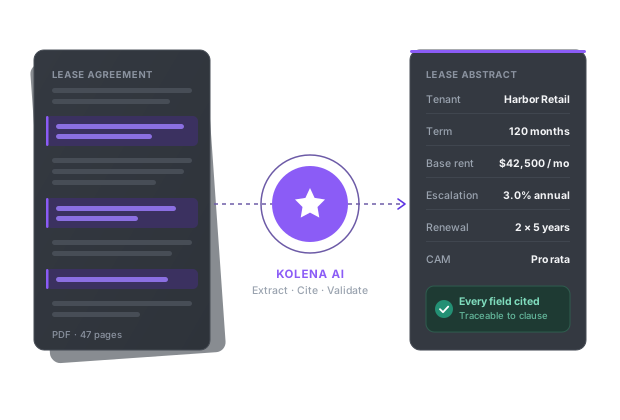
Kolena is an AI document automation platform built for commercial real estate, lending, insurance, and financial services teams that need every document in a set processed the same way, not a connector that answers one query at a time. Kolena deploys AI agents that read your documents — wherever they live, including systems like SharePoint — and apply your specific rubric or extraction template, returning structured outputs with every field cited to its exact location in the source.
Kolena reads PDFs, scans, emails, spreadsheets, images, and audio or video, and pushes structured results into the systems teams already use, including Yardi, MRI, Salesforce, and Snowflake. Every run produces a full audit trail stored in a governed record, not a chat history — the specific clause, line, or figure that justified each value, and which template and instructions were in force when it ran. Kolena also benchmarks leading models against real document tasks and routes each step to the best performer, so a model version change is validated before it reaches your workflow instead of becoming re-validation work your team has to schedule. Kolena is SOC 2 Type II certified, processes onshore, and does not train on customer data.
One lease abstraction customer realized approximately $100,000 in efficiency gains across 58 leases working this way — every lease in the set processed to the same standard, not the ones a query happened to surface.