TL;DR: Intelligent document processing solutions extract, classify, validate and route document data into business systems. Kolena is best for cited, audit-ready extraction in regulated industries, Rossum for transactional finance documents, ABBYY Vantage for broad OCR coverage, and Google Document AI for API-first pipelines.
What Are Intelligent Document Processing Solutions?
Intelligent document processing (IDP) solutions are AI-driven software tools that automatically capture, extract, classify, and validate data from structured, semi-structured, and unstructured documents. They can process structured documents such as forms and invoices, as well as unstructured or semi-structured content such as contracts, emails, and reports.
Core capabilities of IDP solutions:
Multi-format document ingestion: Accepts PDFs, scans, images, forms, email attachments, spreadsheets, and other document formats from multiple input channels.
Intelligent data extraction: Uses OCR, computer vision, NLP, and AI models to extract text, fields, tables, entities, and relationships from documents.
Human-in-the-loop review and continuous learning: Routes uncertain results to reviewers and uses corrections as feedback to improve future processing accuracy.
Automated document classification: Identifies document types automatically so each file is routed to the correct extraction and processing workflow.
Document splitting and separation: Detects document boundaries within multi-document files and separates pages into the correct logical documents.
Data validation and confidence scoring: Checks extracted values against rules and external data while assigning confidence scores to determine when human review is required.
Workflow automation: Triggers approvals, exception handling, notifications, case creation, and other business processes after document processing.
API and enterprise application integrations: Connects extracted data with ERP, CRM, document management, workflow, and other enterprise systems.
Document search and semantic retrieval: Enables keyword, field-based, and meaning-based searches across processed documents and extracted information.
Audit trails and processing analytics: Records processing decisions and tracks metrics such as accuracy, exception rates, processing time, and straight-through processing.
Nine free AI document tools — pick your workflow
Intelligent Document Processing Solutions at a Glance
The table below summarizes the key differences between the solutions covered in this guide, including what each one is built around and where buyers most often run into friction. We explore each solution in more detail in the sections that follow.
How Do Intelligent Document Processing Solutions Work?
Intelligent document processing solutions combine optical character recognition (OCR), computer vision, natural language processing (NLP), and machine learning to convert unstructured or semi-structured documents into usable data. When a document enters the system, preprocessing techniques can correct rotation, remove noise, detect page boundaries, and improve image quality before OCR converts scanned text into machine-readable characters. Computer vision and layout analysis then help the system understand the spatial structure of the page, such as where tables, headers, labels, checkboxes, signatures, and individual fields appear.
After the document has been digitized, classification and extraction models determine what the document is and which information should be captured. Traditional systems may use templates, regular expressions, and predefined field coordinates, while more advanced IDP platforms use transformer-based document models and multimodal AI that analyze text together with page layout and visual context. These models can identify entities and relationships such as an invoice number associated with a particular label, connect table headers with the correct rows and columns, and extract information even when the same document type appears in many different layouts.
The extracted data then passes through validation, confidence scoring, and workflow logic before it is sent to downstream systems. The platform can verify formats, perform mathematical checks, compare values across documents, and query external systems such as an ERP, CRM, or database to confirm that the information is consistent. Fields that exceed configured confidence thresholds can be processed automatically, while uncertain or conflicting values are routed to human reviewers. Corrections made during review can also be captured as feedback for model improvement, helping the system become more accurate as it processes additional document variations.
Related content: Read our article about AI lease abstraction software
Intelligent Document Processing Use Cases
Intelligent document processing (IDP) helps organizations classify documents, extract key data, validate it against business rules or source systems, and route exceptions for review. Common use cases include:
Accounts payable and invoice processing: IDP extracts invoice details such as supplier names, invoice numbers, dates, line items, taxes, totals, and payment terms, then validates them against purchase orders, contracts, and vendor records.
Customer and vendor onboarding: IDP classifies onboarding documents and extracts legal names, addresses, registration numbers, tax details, and contact information to reduce manual entry and identify incomplete applications.
Know your customer and identity verification: IDP extracts data from passports, driver’s licenses, identity cards, utility bills, and other KYC documents for use in identity verification, sanctions screening, and compliance workflows.
Loan and mortgage processing: IDP classifies application forms, bank statements, tax documents, pay slips, and property records, then extracts and validates applicant, income, account, and property information.
Insurance claims processing: IDP extracts policy numbers, claim dates, costs, parties involved, and service details from claim forms, invoices, medical records, estimates, reports, and photos to support claims handling.
Government forms and applications: IDP processes applications, permits, tax forms, benefit claims, licenses, and supporting documents, extracting applicant details and routing incomplete or ambiguous submissions for review.
Core Capabilities of Intelligent Document Processing Solutions
Multi-Format Document Ingestion
IDP solutions can ingest documents from many sources and in a wide range of formats, including PDFs, scanned images, Word documents, spreadsheets, email attachments, digital forms, and image files. Documents may enter the platform through APIs, email inboxes, cloud storage, shared folders, scanners, file transfer systems, or enterprise applications.
A flexible ingestion layer helps organizations process documents without creating a separate manual workflow for every source or format. Many platforms also support batch uploads, scheduled imports, and event-driven ingestion so documents can be processed automatically as soon as they arrive. The system may capture metadata such as file names, source systems, timestamps, and sender information to support routing and downstream processing.
Intelligent Data Extraction
IDP solutions use optical character recognition (OCR) to convert scanned documents, images, and image-based PDFs into machine-readable text. More advanced systems can also recognize handwriting, checkboxes, signatures, tables, and other visual elements that traditional OCR may struggle to interpret. Image preprocessing techniques such as deskewing, rotation correction, denoising, and contrast adjustment can improve recognition accuracy before extraction begins.
Beyond recognizing individual characters, modern IDP platforms analyze the structure and visual layout of the document. Computer vision and multimodal models can identify headers, sections, tables, columns, labels, key-value pairs, and relationships between nearby elements. This allows the system to understand that a number next to “Invoice Total,” for example, represents a specific field rather than simply another piece of text on the page.
Human-in-the-Loop Review and Continuous Learning
Intelligent data extraction identifies and captures the specific information required from a document, such as names, dates, account numbers, addresses, monetary amounts, line items, clauses, or transaction details. Depending on the platform, extraction may use templates, regular expressions, rules, machine learning models, natural language processing, transformer-based document models, or multimodal AI.
More advanced IDP systems can extract data from documents with varying layouts without requiring a separate template for every format. They can identify entities, associate values with the correct labels, reconstruct tables, and understand relationships between fields based on both textual and visual context. Extracted data is then converted into structured formats such as JSON, XML, or database fields so it can be validated, searched, analyzed, or passed to downstream business systems.
Automated Document Classification
Automated classification determines what type of document has entered the system before extraction begins. IDP platforms can use keywords, text patterns, page layout, visual characteristics, metadata, machine learning models, or multimodal AI to distinguish between documents such as invoices, contracts, purchase orders, bank statements, tax forms, and applications.
Accurate classification is important because different document types typically require different extraction schemas, validation rules, and business workflows. Once a document has been classified, the platform can automatically route it to the appropriate processing pipeline. More advanced systems can also classify documents with previously unseen layouts without relying on rigid templates.
Document Splitting and Separation
Document splitting identifies where individual documents begin and end within a larger file or scanned batch. For example, a single PDF may contain an application form, identity document, bank statement, and supporting letter that need to be processed separately.
IDP solutions can use page content, layout changes, barcodes, separator pages, document classifications, or machine learning models to divide these files automatically. They may also group pages that belong to the same logical document. This reduces manual document preparation and helps ensure that each document is processed using the correct extraction and validation logic.
Data Validation and Confidence Scoring
IDP platforms validate extracted information to determine whether it is complete, accurate, and consistent with business requirements. Validation can include checking data types, date and number formats, mandatory fields, totals, relationships between fields, and predefined business rules.
Extracted values are often assigned confidence scores that indicate how certain the system is about a particular result. These scores can be used to create automation thresholds: high-confidence data can move directly to downstream systems, while lower-confidence values are routed for review. IDP platforms may also compare extracted data against databases, ERP systems, customer records, or other documents to detect discrepancies.
Related content: Read our article about AI claims processing
Workflow Automation
Workflow automation connects document understanding with the broader business process. Once documents have been classified, extracted, and validated, the IDP platform can trigger actions such as approvals, notifications, exception handling, case creation, or data updates.
For example, a valid invoice might automatically proceed to accounts payable, while an invoice with a mismatched purchase order could be routed to an employee for investigation. Workflows can include conditional rules, approval chains, human review queues, service-level targets, and escalation paths. This allows organizations to automate the complete document-driven process rather than only the extraction step.
API and Enterprise Application Integrations
IDP platforms typically provide APIs, webhooks, prebuilt connectors, and integration frameworks for exchanging documents and structured data with other systems. Common integrations include ERP, CRM, document management, claims management, loan origination, case management, and workflow automation platforms.
Integrations allow extracted information to flow directly into systems of record without employees manually copying data between applications. They can also support bidirectional processes. For example, an IDP system may retrieve vendor records from an ERP platform to validate an invoice before writing the processed transaction back into the same system.
Document Search and Semantic Retrieval
Document search capabilities allow users and applications to locate information across processed documents using extracted text, metadata, entities, and structured fields. Users may search by document type, customer name, invoice number, date, contract clause, transaction amount, or another relevant attribute.
More advanced platforms support semantic retrieval, which searches based on the meaning of a query rather than requiring an exact keyword match. This can make it easier to find related clauses, records, transactions, or evidence across large document repositories. Some solutions also combine semantic search with generative AI to support natural-language questions over document collections.
Audit Trails and Processing Analytics
IDP solutions can maintain detailed records of how each document was processed, including ingestion time, classification decisions, extracted values, confidence scores, validation results, human corrections, workflow actions, and exported data. These audit trails provide traceability for compliance, quality assurance, troubleshooting, and internal reviews.
Processing analytics give organizations visibility into how effectively document automation is operating. Common metrics include document volumes, extraction accuracy, exception rates, straight-through processing rates, human review rates, processing times, and error patterns. Teams can use these insights to identify bottlenecks, improve models and workflows, and measure the business impact of IDP deployment.
Notable Intelligent Document Processing Solutions
How we selected these solutions: We shortlisted intelligent document processing solutions based on multi-format ingestion, automated classification and document splitting, data extraction and validation, confidence scoring and human review, workflow automation, and integration with enterprise systems.
AI-Native Document Processing Platforms
1. Kolena
Best for: Document workflows in real estate, insurance and finance
Strengths: Citations, confidence scores and reasoning on every value
Things to consider: Per-run file and page caps; pricing is not published
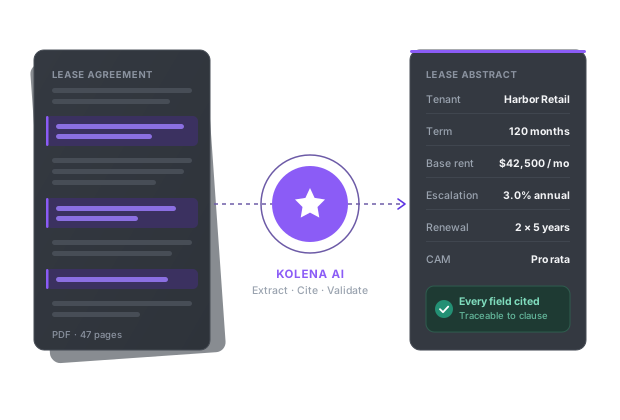
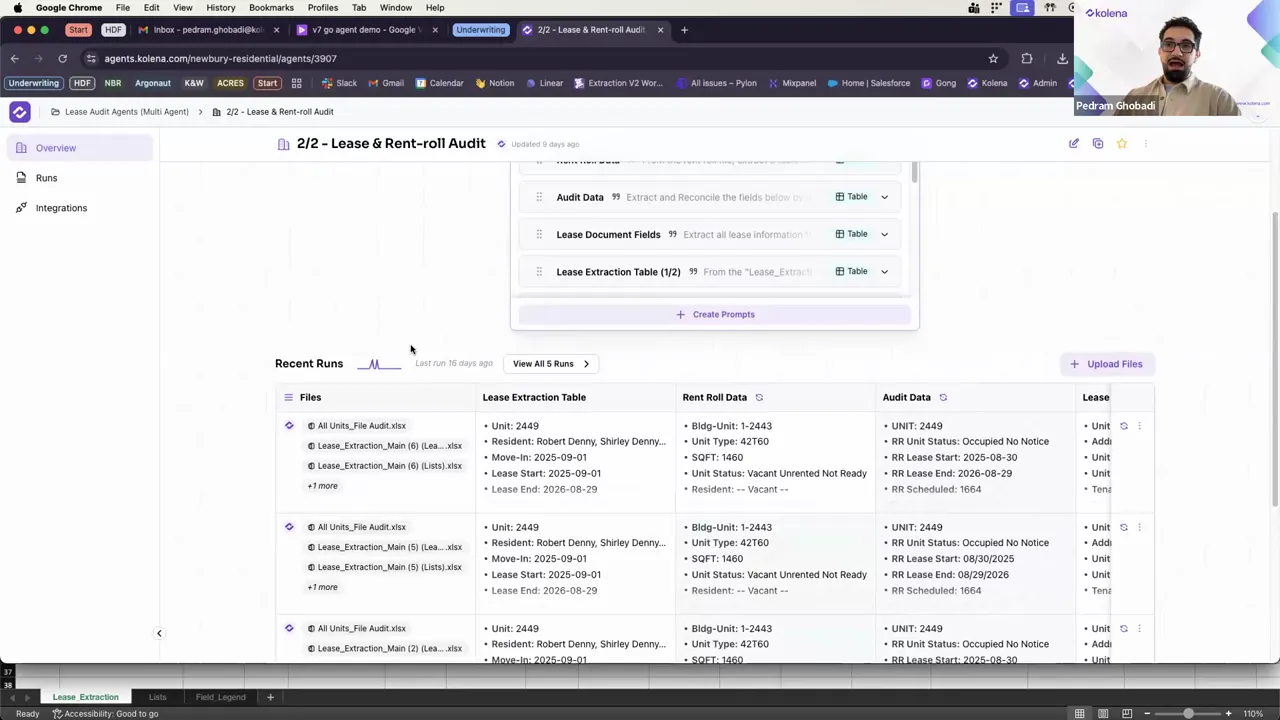
Kolena is an AI platform that handles underwriting, lease abstraction, compliance audits, loan validation and other document workflows. It parses data from PDFs, spreadsheets, emails, scans and audio files, detects document types automatically, and extracts the specific fields a process requires.
Extracted values are then checked against business rules and cross-references, with anomalies flagged for attention. Every result carries reasoning, a confidence score and a citation pointing back to the source. Structured outputs are pushed into existing systems, and prebuilt automations cover real estate, insurance, banking and finance workflows.
Key features include:
Multi-format parsing: Ingests PDFs, spreadsheets, emails, scanned files and audio, detecting document types automatically without a separate conversion step.
Rule-based validation: Applies business rules and cross-checks across fields and documents, flagging anomalies before results reach downstream systems.
Traceable output: Attaches reasoning, confidence scores and citations to each extracted value so reviewers can verify where a figure came from.
Prebuilt industry automations: Ships with workflows for real estate, insurance, banking and finance that can be adapted to specific policy, compliance and reporting requirements.
Prompt optimization: Rewrites user input into more precise instructions automatically, removing the need for manual prompt engineering.
Parallel processing: Runs hundreds or thousands of documents at once to handle portfolio-level volume.
System integrations: Connects to Excel, Yardi, MRI, VTS, Salesforce, Box, Drive and SharePoint, and exports structured results into reports, spreadsheets, CRMs and dashboards.
Limitations (based on publicly available sources):
Per-run processing caps: A single agent run accepts up to 300 files, 2 GB in total and 1,000 pages, so larger batches need to be divided.
Prompt attachment limits: Up to five files of 5 MB each can be attached to a prompt, with a 20 MB ceiling when uploading a file to create prompts.
Pricing not published: Plans are quoted on request rather than listed publicly, so cost modelling requires a conversation with the vendor.
Source: Kolena
2. Rossum

Best for: Transactional finance and supply chain paperwork
Strengths: Proprietary transactional LLM covering 276 languages
Things to consider: Bulk export caps and add-on pricing for SSO
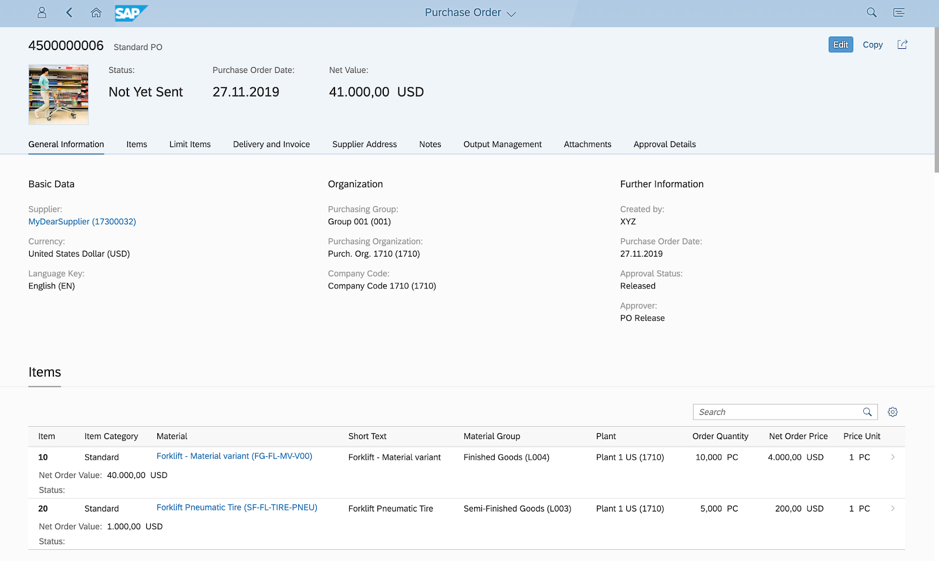
Rossum is a cloud-native platform for processing transactional documents such as invoices, purchase orders and bills of lading. Documents arrive through email, scanners, PEPPOL, shared drives and EDI, and the platform filters out spam and duplicates before classification and routing.
A proprietary transactional language model reads structured and unstructured documents across 276 languages and handles handwriting. Extracted data is validated against master data, ERP records and third-party APIs, and additional values such as GL, tax and HS codes can be inferred. Rossum was acquired by Coupa and continues to be sold as a standalone platform.
Key features include:
Multi-channel ingestion: Accepts documents via email, scanners, PEPPOL, shared drives and EDI, and imports structured formats including XML and UBL alongside PDFs.
Document splitting and routing: Separates multi-document files and routes each item to the right queue, with duplicate detection applied on intake.
Master Data Hub: Matches extracted values against supplier and customer master data, ERPs and external APIs to validate entries against business logic.
Data normalization and inference: Standardizes dates, number formats and language, and computes codes needed to complete a transaction.
Approval workflows: Routes documents for approval based on custom criteria, sends alerts and generates vendor emails to resolve exceptions.
Prebuilt integrations: Connects to SAP, Coupa, NetSuite, Workday and Microsoft Dynamics through turnkey connectors and low-code extensions.
Reporting and archive: Tracks errors, exceptions, turnaround time and straight-through processing rate, with audit logs and searchable document archiving.
Limitations (as reported by users on G2):
Extension configuration: The configuration pages for extensions are described as unintuitive, which adds confusion during setup.
Bulk export cap: Downloads are limited to 500 documents at a time from a given queue and status.
Line item interface: The grid used for reviewing line items is reported as awkward to work with.
Pricing structure: Single sign-on is charged as an add-on, and a shift from per-invoice to per-page billing has made cost forecasting harder.
Source: Rossum
3. Hyperscience Hypercell

Best for: Regulated back-office work with strict deployment rules
Strengths: FedRAMP High, air-gapped options and modular blocks
Things to consider: High cost and significant IT effort to integrate
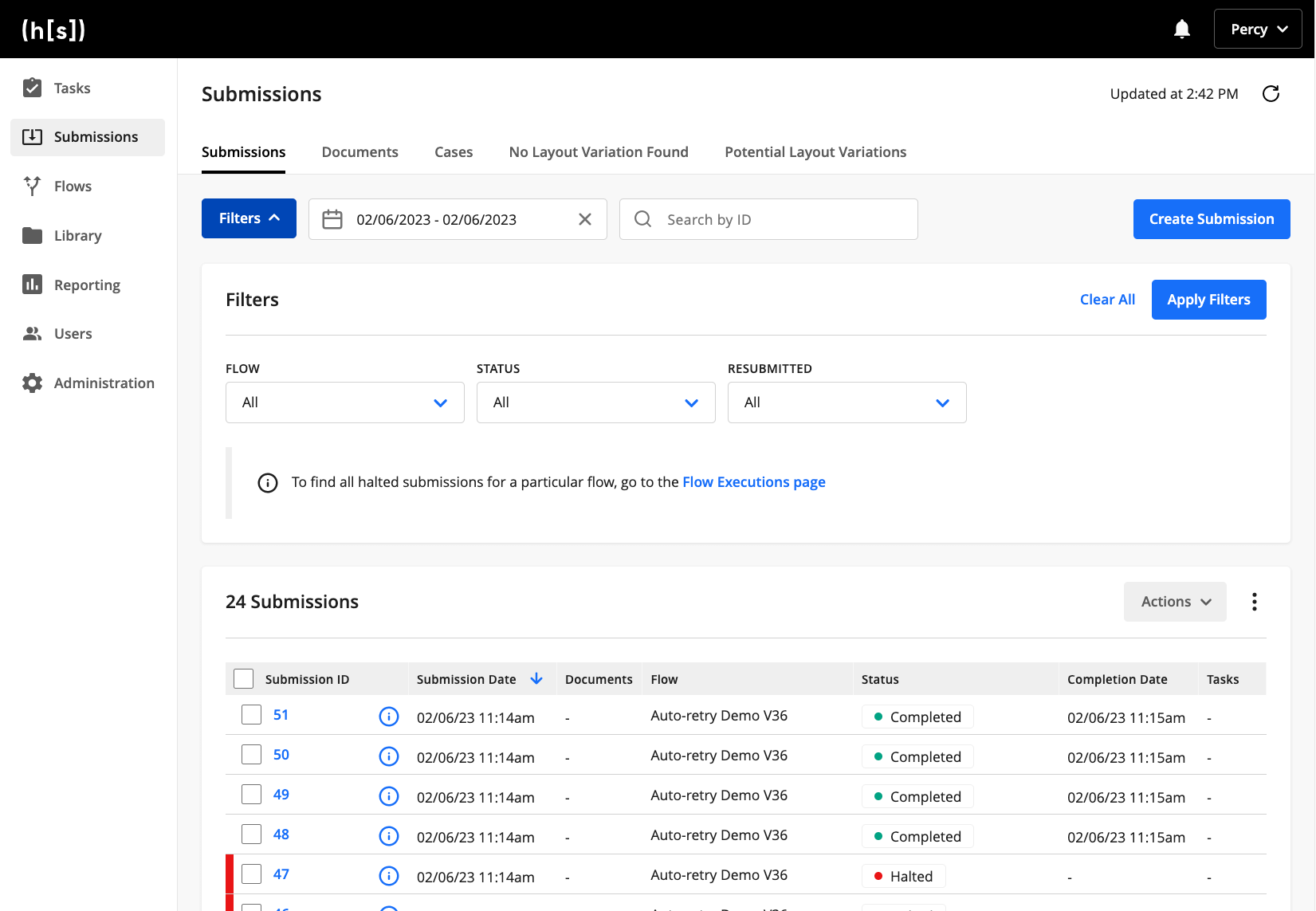
Hyperscience Hypercell is a modular AI platform for back-office document processing. Its architecture is built from Blocks, which are discrete functions such as ingestion, classification, extraction, validation, business rule enforcement and decisioning, connected into Flows that match a specific process.
The platform combines proprietary trainable and pretrained models with ORCA, a vision language model framework that processes varied documents without prior training. Redaction and masking protect sensitive data, and human-in-the-loop review handles exceptions. Deployment options span on-premises, private tenants on AWS, Google and Azure, vendor-hosted SaaS, and FedRAMP High authorized environments.
Key features include:
Blocks and flows: Assembles document workflows from prebuilt processing functions in a low-code interface, with custom code blocks for bespoke logic.
Zero-shot extraction: Uses the ORCA vision language model framework to process complex and varied documents through natural language prompts rather than model training.
Specialized models: Provides trainable and pretrained models for unstructured content and handwriting, plus a no-code trainer for building and fine-tuning models.
Agentic workflow orchestration: Manages document processes end to end with intelligent routing, decision automation and dynamic classification.
Redaction and masking: Removes sensitive information from documents such as medical records and correspondence to meet FOIA, GDPR and privacy requirements.
AI-in-the-loop review: Layers machine learning and vision language models across the pipeline so only complex exceptions reach a human reviewer.
Deployment flexibility: Runs on-premises, in a customer private tenant, as SaaS, or in FedRAMP High authorized cloud services, with API-first integration to downstream systems.
Limitations (as reported by users on G2):
Cost: Pricing is reported as high relative to alternatives, particularly for smaller organizations.
Template effort: Building and maintaining templates for every form and version is described as time consuming for teams handling many document types.
Integration and deployment: Connecting the platform to existing systems is reported to require substantial IT knowledge and effort.
Release pace: Frequent product changes make it difficult for some teams to keep up with new capabilities.
Tenancy model: Adjusting thresholds or enabling features for different use cases can require separate instances.
Source: Hyperscience
4. Instabase AI Hub

Best for: Multi-document packets such as loan and claim files
Strengths: Cross-document validation with governed release workflows
Things to consider: Cost and navigation; very small public review base
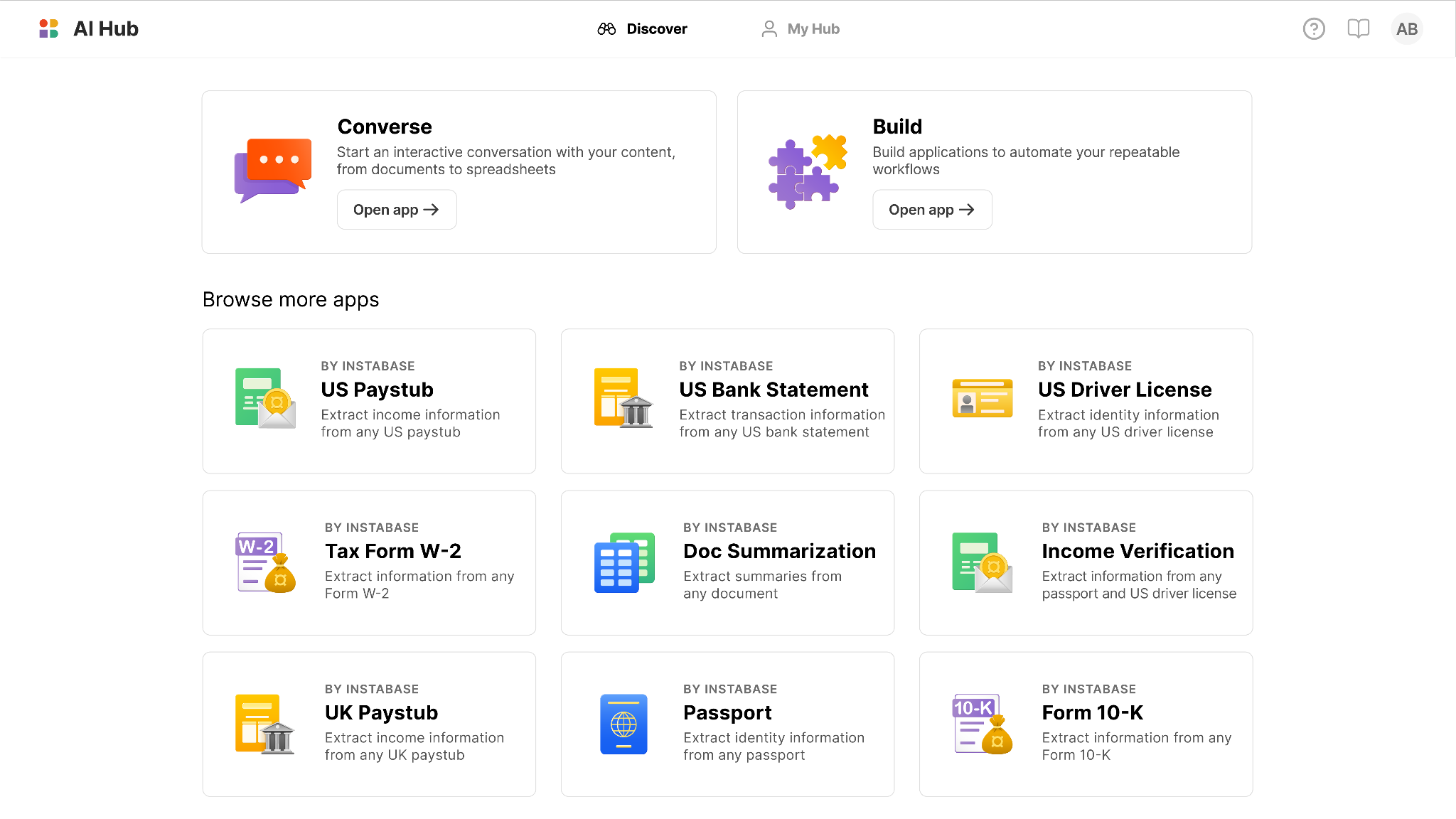
Instabase AI Hub processes interconnected document packets such as loan applications, insurance claims and trade finance files. It handles files in any layout or length, supports more than 160 languages and handwriting, and classifies and routes incoming correspondence including emails, attachments, chats and letters.
Beyond field extraction, the platform runs cross-document validations and multi-step business rules before results are released. Configuration is done in natural language without model training, and accuracy benchmarks, version control and governed release workflows control what reaches production.
Key features include:
Broad document coverage: Processes files across thousands of layouts, in over 160 languages, including handwritten text and documents spanning hundreds of pages.
Classification and splitting: Categorizes incoming correspondence, discerns intent, and splits multi-document packets into individual files routed to the right workflow.
Flexible extraction: Returns key-value pairs, fields, tables, natural language and visual elements, then cleans, enriches and standardizes results to a defined specification.
Natural language configuration: Lets users define fields and build end-to-end workflows without code, annotation or model training, starting from prebuilt apps for invoices, identity documents and annual reports.
Cross-document validation: Executes validations across documents, multi-step business rules and data quality checks to catch errors before release.
Governed deployment: Runs accuracy benchmarks against ground truth datasets, promotes changes through separated environments with approvals, and locks AI releases for defined periods.
Enterprise controls: Provides SSO, role-based access, deployment inside a customer virtual private cloud, and a security program aligned to SOC 2 Type II, GDPR, HIPAA and CCPA.
Limitations (as reported by users on G2):
Cost: Pricing is described as challenging compared with other options in the category.
Navigation: The interface is reported as unintuitive at times, making it harder to move around the product.
Learning and maintenance: Reviewers cite a learning curve and ongoing maintenance effort.
Limited review sample: G2 lists only two reviews for the product, so this feedback comes from a very small base and should be weighed accordingly.
Source: Instabase
Enterprise Capture and Content Platforms
5. ABBYY Vantage

Best for: Teams wanting prebuilt skills across many document types
Strengths: 150+ pretrained skills plus low-code skill designer
Things to consider: Setup effort, platform bugs and high licensing cost
ABBYY Vantage is a low-code intelligent document processing platform built on ABBYY's OCR technology. It processes structured, semi-structured and unstructured documents, including handwriting, barcodes and checkboxes, and captures files from email, mobile devices and shared repositories.
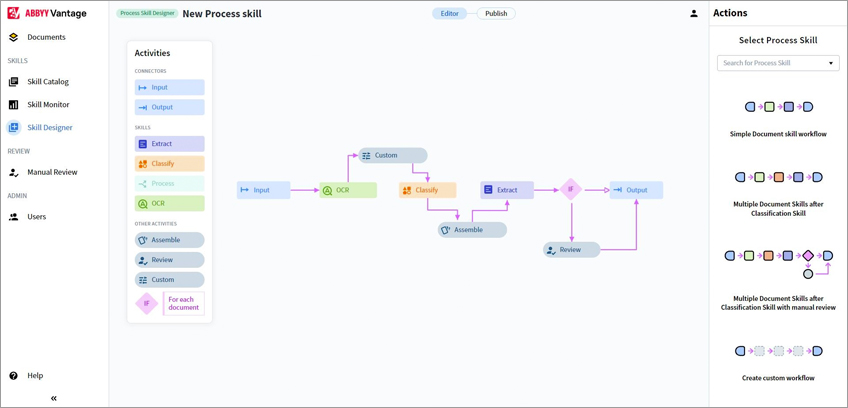
Processing is organized around Skills, which are pretrained extraction models covering more than 150 use cases and available from the ABBYY Marketplace. Teams can also design and train their own skills in the Skill Designer. Skills are then invoked from RPA, BPM, ECM and other automation platforms through prebuilt connectors or the REST API.
Key features include:
Pretrained document skills: Provides models for over 150 use cases covering invoices, purchase orders, contracts, tax forms and identity documents, with additional models available through the ABBYY Marketplace.
Skill Designer: Lets citizen developers design, train and publish custom document skills for structured and unstructured documents in a low-code interface.
OCR and ICR: Handles printed and handwritten text, barcodes and checkboxes as part of the capture stage.
Classification and splitting: Identifies document types and divides multi-document files before extraction rules are applied.
Validation and continuous learning: Combines automated validation with human-in-the-loop review, using collected statistical data to improve skill accuracy over time.
Quality and IDP analytics: Measures the performance of deployed skills and tracks straight-through processing rates to identify where automation is failing.
Automation integrations: Ships with out-of-the-box connectors for Microsoft Power Automate, Blue Prism, UiPath and Automation Anywhere, making skills discoverable from RPA, BPM and chatbots.
Limitations (as reported by users on G2):
Initial setup: Configuring document types, templates and advanced features is reported to take considerable time and often technical assistance.
Platform stability: Users report bugs and sessions freezing, particularly in Advanced Designer, with no dependable autosave during training.
Recognition on poor inputs: Skewed scans, handwriting and inconsistent layouts still produce errors that require manual review.
Licensing cost: Pricing is described as high for smaller organizations relative to simpler cloud alternatives.
Documentation: Guidance is reported to assume familiarity with ABBYY terminology and to cover complex implementations thinly.
Source: ABBYY
6. Tungsten Automation TotalAgility
Best for: Combining capture with process orchestration and RPA
Strengths: One platform for extraction, workflow and analytics
Things to consider: Handwriting and Arabic OCR; scripting often needed
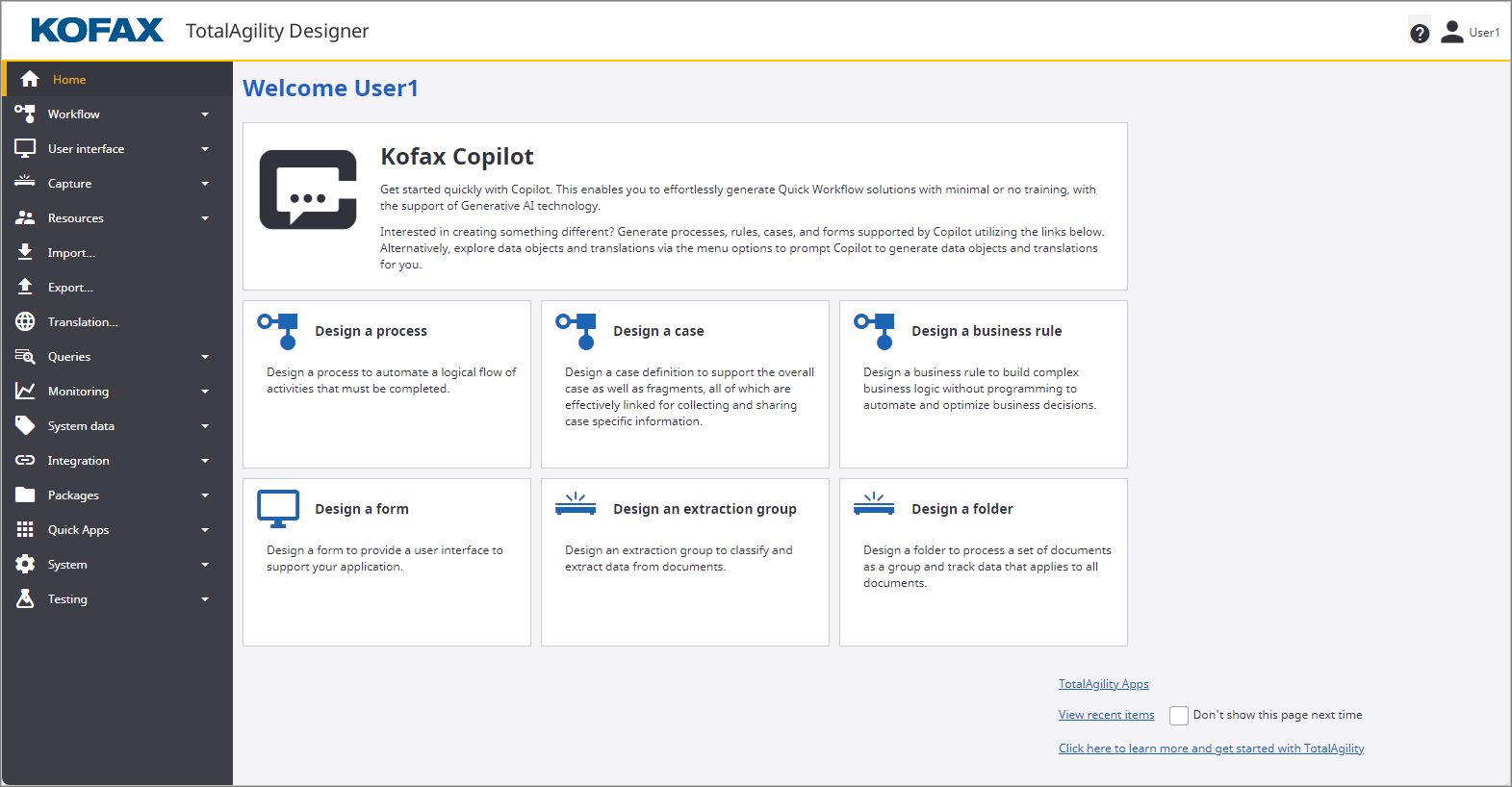
Tungsten Automation TotalAgility is an enterprise platform that pairs document processing with workflow orchestration. Its processing model moves through four stages: transforming incoming documents into structured data, orchestrating work across systems and teams, surfacing insights from unstructured content, and driving downstream outcomes.
The transform stage ingests, classifies, extracts and validates information from incoming documents to reduce manual data entry. Orchestration then coordinates people, processes and AI agents across systems. Prebuilt solutions are available through the Tungsten Marketplace, and the platform deploys in public cloud, private cloud or on-premises. Tungsten Automation was previously known as Kofax.
Key features include:
Document transformation: Ingests, classifies, extracts and validates data from incoming documents to feed straight-through processing.
Process orchestration: Automates end-to-end workflows across systems and teams, coordinating human tasks, process steps and AI agents.
Generative AI capabilities: Blends generative AI with document processing and orchestration within the same platform.
Content discovery: Surfaces patterns and knowledge held in unstructured content, including material held in archives.
Marketplace solutions: Offers prebuilt solutions through the Tungsten Marketplace to extend the platform to additional use cases.
System integration: Connects and synchronizes separate business systems so extracted data flows into existing applications.
Deployment options: Runs in public cloud, private cloud or on-premises environments.
Limitations (as reported by users on PeerSpot):
Pricing: Licensing is reported as higher than comparable products in the category.
Handwriting and language coverage: OCR accuracy on handwritten text and on Arabic is cited as needing improvement.
Low-code in practice: Users report needing custom scripts for tasks they expected to configure without code.
Support and training: Technical support is rated as average and learning materials are described as limited.
Integration gaps: Connections to RPA tools and file storage systems are cited as areas requiring work.
Source: Tungsten Automation
7. OpenText Capture

Best for: Organizations standardizing on OpenText content services
Strengths: Flexible deployment across cloud, hybrid and on-prem
Things to consider: No duplicate detection; volume licensing costs
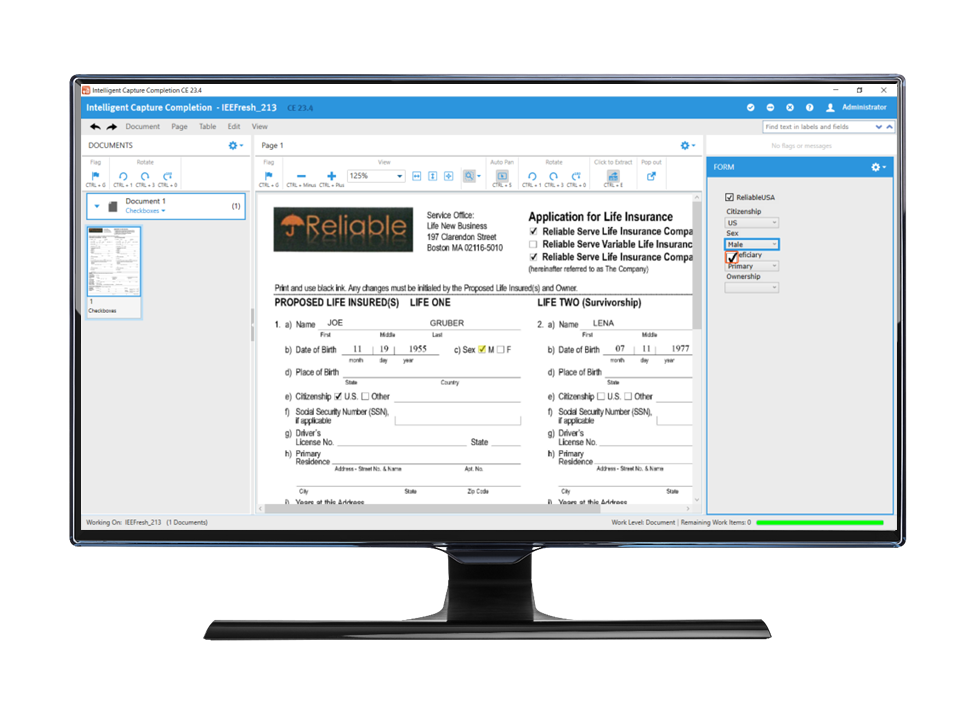
OpenText's capture and intelligent document processing portfolio combines information capture, machine learning and process automation within the Content Cloud. It targets document-driven processes including procure-to-pay, employee onboarding, know your customer checks, claims processing, customer service and regulatory reporting.
The portfolio spans several products rather than a single application, including OpenText Capture, Core Capture, Knowledge Discovery, Vendor Invoice Management for SAP Solutions and Process Automation. Extracted data is integrated into applications employees already use, and continuous machine learning refines capture accuracy as more documents are processed.
Key features include:
Multi-channel capture: Collects documents from a range of sources and converts them into actionable data that feeds downstream workflows.
Automatic classification and archiving: Classifies, files and archives documents using metadata drawn from structured, semi-structured and unstructured content.
Continuous machine learning: Trains and improves capture capabilities over time rather than relying on static rules.
SAP-specific processing: Provides Vendor Invoice Management and Core Capture for SAP Solutions to route captured content directly into SAP financial processes.
Process automation: Pairs capture with AI-powered process automation so extracted data triggers the next workflow step.
Knowledge discovery: Surfaces insights across repositories and formats once content has been captured and indexed.
Flexible deployment: Runs on-premises, in a private cloud, in a hybrid environment or as a SaaS public cloud service.
Limitations (as reported by users on PeerSpot):
Duplicate detection: The system is reported not to identify documents that have already been stored.
Handwritten content: Capturing handwritten information attached to email is described as unreliable.
Implementation skills: Setup carries medium complexity and .NET knowledge is reported as necessary to configure it effectively.
Licensing cost: Volume-based licensing is described as prohibitive for small and medium-sized organizations.
Reporting and mobile capture: Built-in reporting is reported as limited, and capture from smartphones is cited as an area needing improvement.
Source: OpenText
8. Hyland IDP

Best for: Hyland customers automating content-dependent processes
Strengths: Prompt-based design with automatic BPMN generation
Things to consider: 500-document batch cap; cloud-delivered only
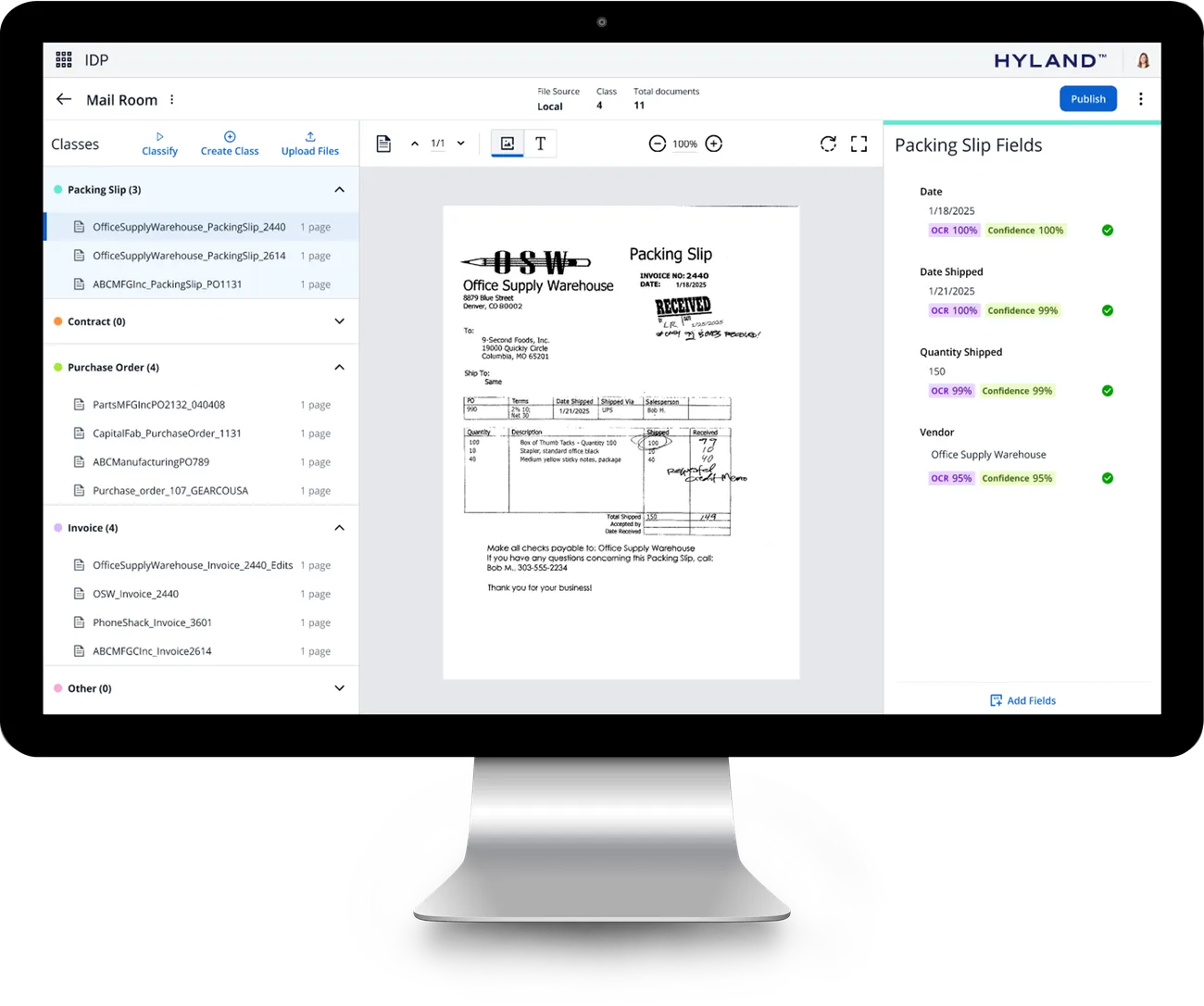
Hyland IDP provides document capture, separation, classification, extraction and enrichment built on the Hyland Content Innovation Cloud. It uses large language models to recognize printed text, handwritten and hand-printed text, optical marks such as checkboxes, radio buttons, stamps and watermarks, and data held in tables.
Configuration is driven by generative AI prompts with dynamic suggestions, prebuilt templates and low-code setup, and the platform generates BPMN-compliant processes automatically. Extracted content is validated and verified, with optional human-in-the-loop checks, then enriched with contextual metadata. As part of the Content Innovation Cloud, it also provides access to a process orchestration studio and a library of AI agents.
Key features include:
AI-native recognition: Reads printed text, handwritten and hand-printed text, optical marks including checkboxes and stamps, and tabular data.
Automatic separation: Distinguishes document types and separates individual documents from a set of scanned pages without relying on separator sheets.
Prompt-based configuration: Builds document automations using natural language prompts, intelligent field suggestions and a BPMN-compliant visual process designer.
Data extraction and enrichment: Pulls data and metadata from semi-structured and unstructured content, then enriches it with contextually relevant metadata.
Validation options: Checks the content, format and structure of processed documents, with human-in-the-loop verification available.
Content Innovation Cloud access: Connects to a process automation and orchestration studio, a library of AI agents and prebuilt integrations.
Prebuilt connectors: Integrates with enterprise tools including Microsoft 365, Salesforce, SAP and ServiceNow, and exposes an API for other business systems.
Limitations (based on publicly available sources):
Batch size cap: The processing limit for a single batch is 500 documents.
Cloud delivery: IDP runs inside the Content Innovation Cloud Studio Modeler, so on-premises repositories are reached through Content Federation Services rather than directly.
Connection scope: An IDP configuration can be used with only one content federation connection at a time.
Setup sequence: Administrators must create user groups, a service user and an external application before content federation can be used.
Source: Hyland
Cloud Document AI Services
9. Google Document AI

Best for: Developers building document pipelines on Google Cloud
Strengths: Custom extractor, splitter and classifier with few samples
Things to consider: Limited multilingual support; costs rise with volume
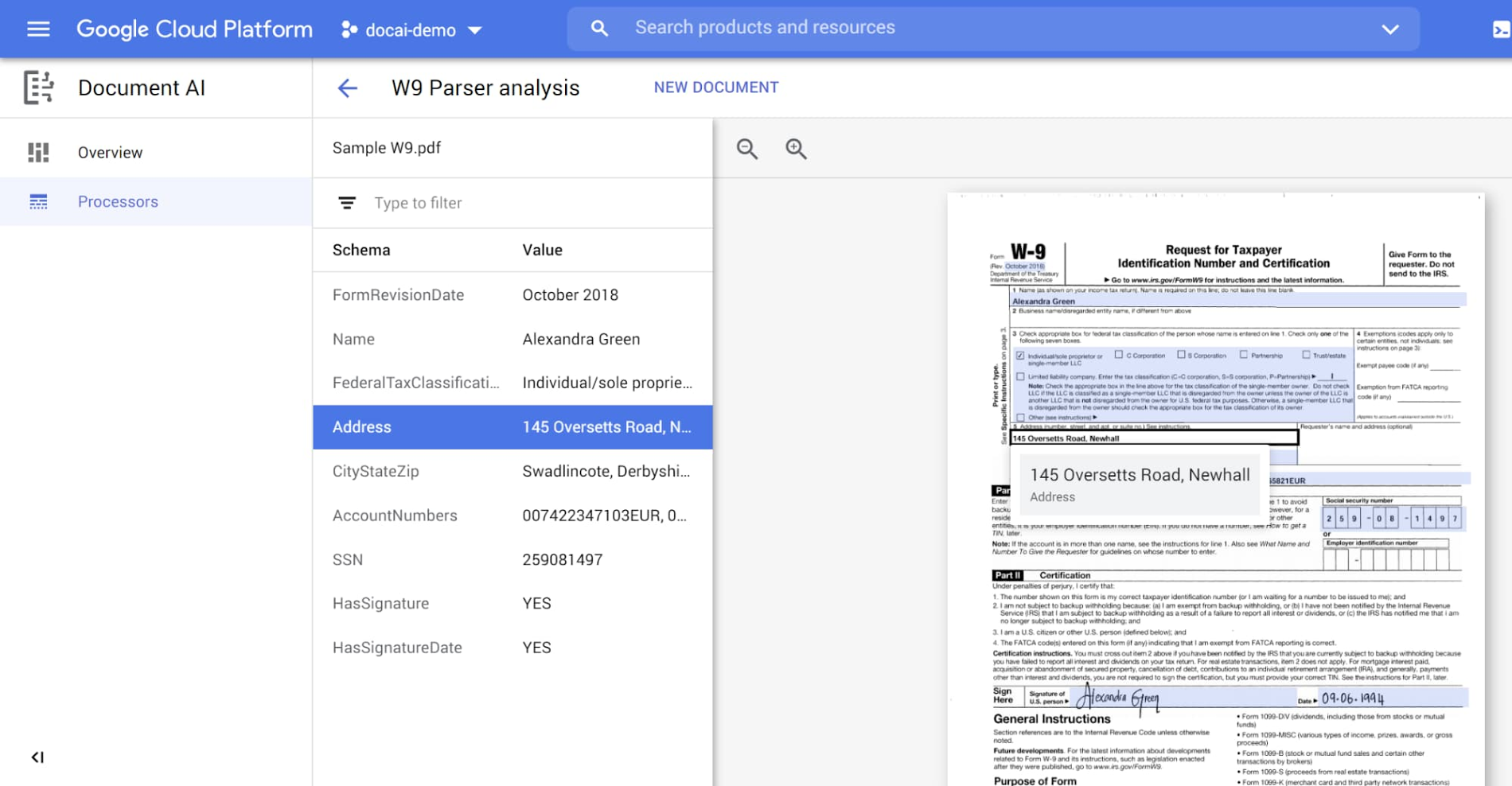
Google Document AI is a set of processors for extracting, classifying and splitting documents on Google Cloud. Processors are created through the Cloud Console or the API, which produces a prediction endpoint that documents are sent to for processing.
The custom extractor is powered by generative AI and works out of the box, with fine-tuning possible using as few as ten documents. A custom splitter divides composite files such as mortgage packages into their component documents, and a custom classifier assigns document types using few-shot learning and iterative auto-labeling. Pricing is charged per thousand pages processed and varies by parser.
Key features include:
Custom extractor: Extracts structured data from documents using generative AI, with accuracy improved by fine-tuning on as few as ten documents.
Custom splitter: Divides composite documents made up of multiple classes into separate logical documents, such as separating an application, income verification and photo ID within a mortgage package.
Custom classifier: Classifies documents using few-shot learning and iterative auto-labeling to reduce the number of samples needed.
Enterprise Document OCR: Detects and extracts text and layout information from documents, with configurable add-on features.
BigQuery integration: Extracts metadata directly into a BigQuery objects table so parsed data can be joined with other tables for analysis.
Performance monitoring: Reports precision, recall and F1 score for each parser through the Cloud Console.
Quota and capacity controls: Allows project quotas to be increased and capacity reservations to be requested for periods of high traffic.
Limitations (as reported by users on G2):
Language coverage: Multilingual support is reported as minimal.
Output consistency: Data extracted from PDFs is sometimes returned in an incorrect format, requiring model retraining.
Technical skill required: API knowledge is needed, which reviewers describe as a barrier for non-technical teams.
Documentation: Guidance is reported as cumbersome, with sections that are out of date and code examples that are not always helpful.
Cost at scale: Usage charges are reported to climb quickly as document volume grows.
Source: Google
10. Amazon Textract
Best for: AWS teams needing OCR plus structured extraction APIs
Strengths: Queries, table, signature and identity document features
Things to consider: Weak on handwriting and complex nested tables
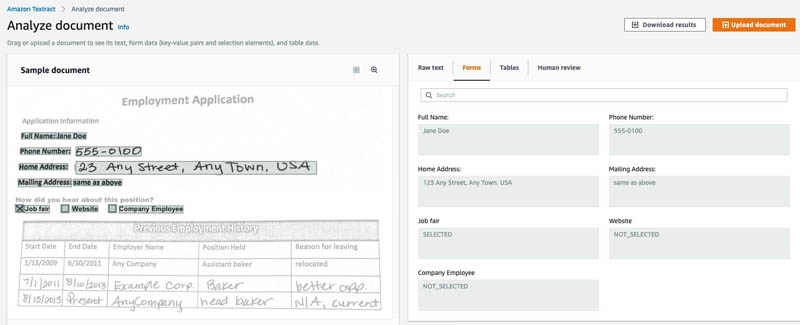
Amazon Textract is a machine learning service that extracts text, handwriting, layout elements and data from scanned documents. It returns extracted data with bounding box coordinates that frame each word, line, table or cell, along with a confidence score for every item it identifies.
Alongside general OCR, Textract provides feature types for forms, tables, signatures and layout elements, plus managed APIs for specific document classes. Queries let users request data using natural language questions without knowing the document structure, and Custom Queries can be tuned on as few as ten annotated sample documents. Billing is per page processed with no minimum fees.
Key features include:
Optical character recognition: Detects printed and handwritten text across various fonts and styles, including noisy or distorted text.
Form and table extraction: Identifies key-value pairs in forms and preserves the row and column structure of tables during extraction.
Query based extraction: Accepts natural language questions and returns the matching value, pretrained across paystubs, bank statements, W-2s, loan applications, mortgage notes, claims documents and insurance cards.
Custom Queries: Tunes the pretrained Queries feature on business-specific document types using as few as ten uploaded and annotated sample documents.
Layout and signature detection: Extracts paragraphs, titles, lists, headers and footers, and locates signatures on documents such as checks and loan forms.
Analyze Lending: Provides a preconfigured API that classifies and splits mortgage loan packages by document type.
Invoices, receipts and identity documents: Extracts vendor names, invoice numbers, item prices, totals and payment terms, and reads passports and driver's licenses without templates or configuration.
Limitations (as reported by users on G2):
Cost at volume: Charges are reported to become significant when processing large volumes or long, complex PDFs.
AWS knowledge required: Integrating the service into workflows is reported to require a solid understanding of AWS infrastructure.
Composite workflows: Achieving some results requires combining Textract with other AWS services, which reviewers describe as convoluted.
Handwriting accuracy: Results on handwritten items and documents with pencil marks are reported as less reliable.
Complex tables: Processing of complex or irregular table structures is cited as a weak point.
Source: Amazon
11. Azure AI Document Intelligence

Best for: Microsoft-centric teams needing edge or hybrid options
Strengths: Prebuilt models plus containerized deployment
Things to consider: Steep custom model curve; variable layouts cause errors
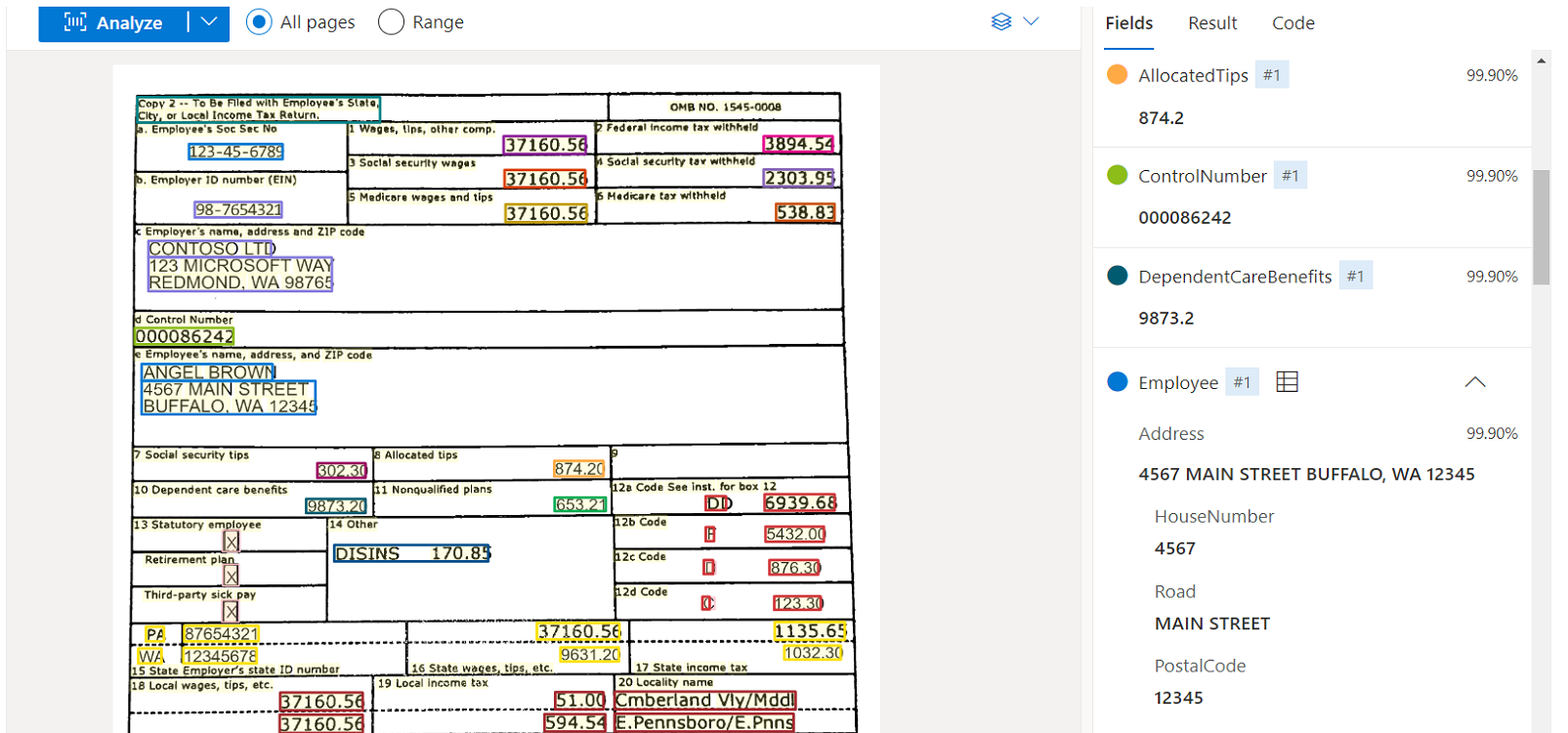
Azure AI Document Intelligence, now part of Azure Content Understanding in Foundry Tools, applies AI models to extract text, key-value pairs, tables and structures from documents. Prebuilt models and layout APIs cover forms, receipts, invoices and cards of various types without labeling by document type.
For documents that deviate from standard formats, custom extraction can be trained on a small number of examples, with human input used to refine the model. Container support allows the service to run at the edge, on-premises or in the cloud, and the REST interface integrates results into search indexes and business automation workflows.
Key features include:
Prebuilt models and layout APIs: Extract text, key-value pairs and tables from forms, receipts, invoices and cards without manual labeling or per-document coding.
Custom extraction: Trains on a small set of documents that deviate from traditional formats, with human feedback used to improve model accuracy.
Container deployment: Runs on Azure Kubernetes Service, Azure Container Instances or a Kubernetes cluster on Azure Stack, supporting edge and on-premises processing.
REST API integration: Feeds extracted output into search indexes, business processes and custom workflows through a single API.
Search index creation: Combines with Azure AI Search so specific values within documents and forms can be located directly.
Workflow automation: Pipes text, key-value pairs, tables and structures into back-end systems for claim, invoice and receipt processing.
Built-in security: Applies enterprise-grade security and privacy controls to both submitted data and trained models.
Limitations (as reported by users on G2):
Custom model learning curve: Training models beyond the prebuilt set requires careful labeling and data preparation.
Layout variability: Highly variable layouts, heavily nested tables and multi-column PDFs are reported to cause extraction errors.
Poor quality inputs: Accuracy falls on low-quality scans and on handwritten notes mixed with printed text.
Language coverage: Accuracy on regional and non-Latin scripts and mixed-language documents is cited as needing improvement, particularly within tables.
Cost at volume: Pricing is reported to scale quickly when processing large document volumes.
Source: Microsoft
Automation Platforms with Document Processing
12. UiPath IXP
Best for: Existing UiPath users extending automation to documents
Strengths: Handles documents and communications in one product
Things to consider: AI unit pricing is hard to predict; costs rise yearly
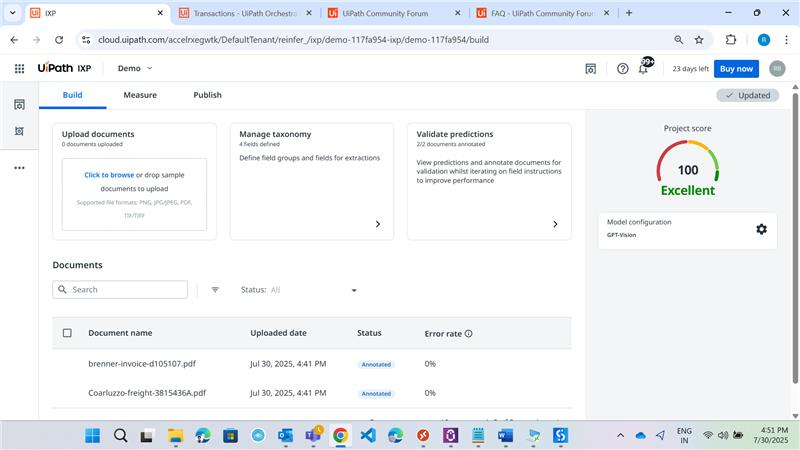
UiPath IXP is the intelligent document processing component of the UiPath platform, covering both documents and communications. Document Understanding handles structured and semi-structured files such as invoices and forms, while Generative Extraction handles unstructured content including contracts and reports.
The product also processes communications such as email and chat, extracting intent, sentiment and context. Extracted data flows directly into AI agents, RPA robots and orchestrated workflows on the same platform without a separate integration layer. Deployment options include Automation Cloud, self-hosted Automation Suite and hybrid configurations with regional data residency.
Key features include:
Document Understanding: Extracts data from structured and semi-structured documents including invoices, purchase orders and forms.
Generative Extraction: Handles unstructured content such as contracts and reports, with the platform selecting the appropriate model for each document type.
Communications processing: Pulls intent, sentiment and context from emails, chats and other messages alongside document data.
Document validation: Provides a customizable validation station where reviewers resolve inaccuracies and exceptions.
Native platform handoff: Passes extracted data directly to AI agents, RPA robots and orchestrated workflows without an intermediate integration layer.
Governance controls: Applies model controls, audit trails and data-protection safeguards, and does not train on customer data.
Deployment flexibility: Runs in Automation Cloud, self-hosted through Automation Suite, or hybrid, with FedRAMP-certified options for regulated industries.
Limitations (as reported by users on PeerSpot):
Licensing cost: Rising annual licensing costs are cited as a significant concern, particularly for smaller organizations.
Pricing model: Consumption is measured in AI units used during model training and processing, which reviewers describe as difficult to predict in advance.
Handwriting and signatures: Recognition accuracy on handwritten content and signatures is reported as needing improvement.
Document variety: Diverse formats and scanned documents still require manual validation in some workflows.
Ecosystem fit: The product is reported to work best within the UiPath platform, with limited applicability alongside other automation tools.
Support: Technical support responsiveness is cited as an area for improvement.
Source: UiPath
13. Automation Anywhere Document Automation

Best for: RPA teams routing document data into existing bots
Strengths: Process Reasoning Engine with high-volume extraction
Things to consider: Steep learning curve and inconsistent integrations
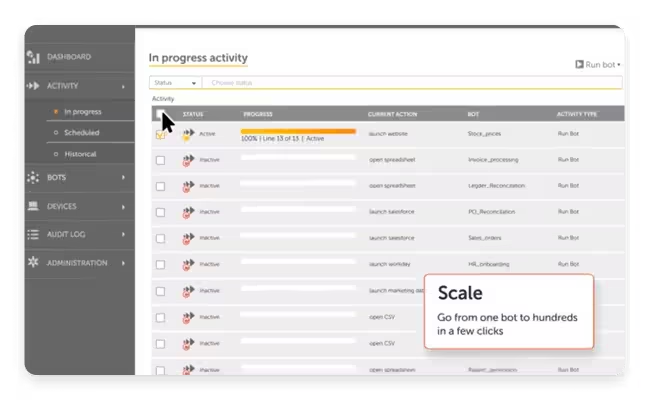
Automation Anywhere Document Automation is the intelligent document processing component of the company's Agentic Process Automation platform. It is powered by the Process Reasoning Engine and combines natural language processing, computer vision, generative AI and machine learning to classify, extract and validate data across document types.
The product handles emails, contracts, invoices, spreadsheets, purchase orders, medical reports, tax forms, insurance policies and financial statements, and interprets machine-printed text, handwriting, barcodes, QR codes, free-flowing text and tables. Extracted data is validated inside existing applications through Automation Co-Pilot, then handed to AI Agents for reasoning and action.
Key features include:
Process Reasoning Engine: Underpins classification, extraction and validation across structured, semi-structured and unstructured document types.
Broad content interpretation: Reads machine-printed and handwritten text, barcodes, QR codes, free-flowing text and tables alongside standard document formats.
In-workflow validation: Integrates and validates extracted data inside existing applications through Automation Co-Pilot rather than in a separate interface.
Cloud Extraction Service: Supports large-scale extraction for organizations processing high document volumes.
AI Agent handoff: Passes extracted and validated data to AI Agents within the Agentic Process Automation system for reasoning, decisioning and downstream action.
Compliance controls: Maintains full audit trails and protects sensitive data as documents move through the process.
Cross-function coverage: Applies to finance contracts and invoices, banking loan packages and deeds, healthcare intake forms, HR resumes and paystubs, logistics bills of lading, and manufacturing certificates.
Limitations (as reported by users on PeerSpot): These reviews cover the broader Automation Anywhere platform, which includes the document automation capability.
Licensing cost: Pricing is reported as high, with the complexity and expense cited as barriers for smaller organizations.
Learning curve: Building automations is reported to require an understanding of logical operations and scripting, with several months of training before users become productive.
Document configuration: Setting up extraction for unstructured data is described as complex and effort intensive.
Third-party integration: Connections to external applications are reported as unreliable in some environments.
Support responsiveness: Technical support turnaround is cited as slow by some reviewers.
Source: Automation Anywhere
14. Appian DocCenter

Best for: Regulated organizations wanting IDP inside a process layer
Strengths: Private AI architecture with HITRUST and FedRAMP
Things to consider: Per-user pricing and performance on large data sets
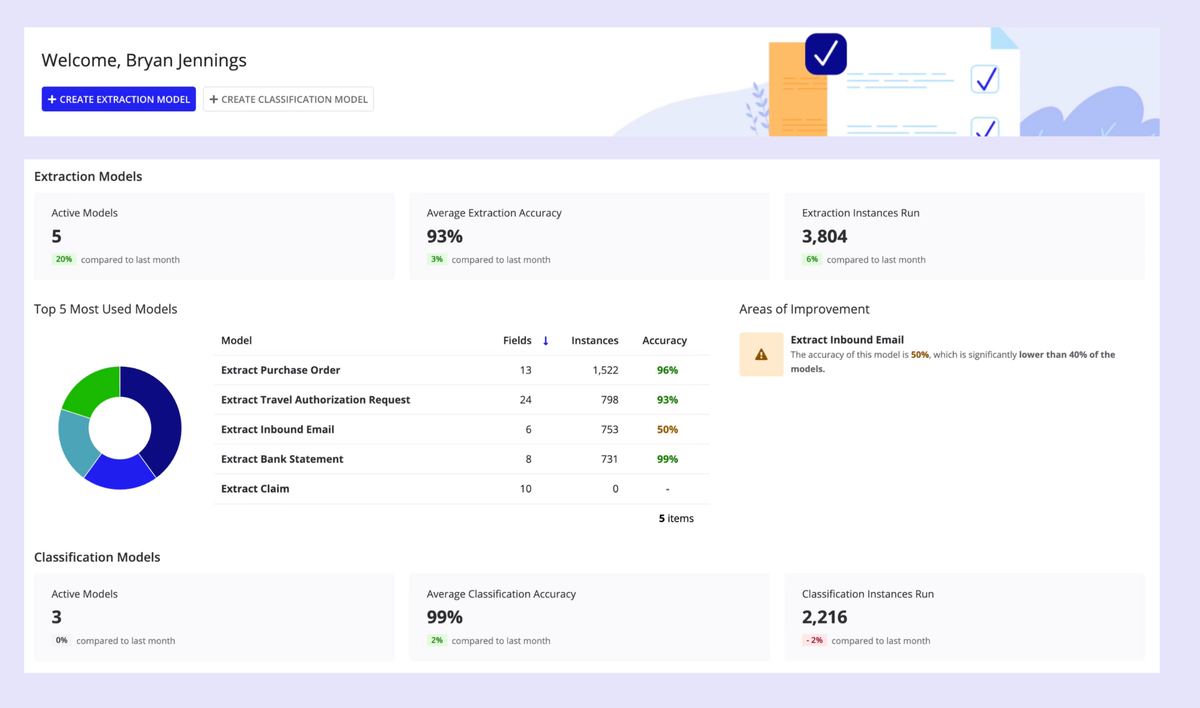
Appian DocCenter is a dedicated workspace for document automation within the Appian process platform. Developers and business users configure extraction and classification models there, including validation and post-processing rules, and Appian generates the prompts and application components automatically.
DocCenter processes structured documents such as tax forms and invoices, semi-structured files such as receipts and purchase orders, and unstructured content including legal contracts, emails and compliance reports. Because extraction sits inside the process layer rather than as a standalone step, validated data flows directly into downstream workflows without re-keying.
Key features include:
Model configuration: Sets up document extraction and classification models, including validation and post-processing rules, from a single workspace.
Auto-generated components: Builds prompts and application components automatically so models can be dropped into existing workflows.
Broad format support: Handles CSV, DOCX, EML, GIF, HTML, JPG, JPEG, MSG, PDF, PNG, TIFF and XLSX files, including varying layouts with tables, multi-line and merged cells.
Reconciliation and guardrails: Applies advanced reconciliation and AI guardrails to reduce manual intervention and flag inconsistencies or missing data.
Confidence scoring: Validates extracted content against known patterns and assigns confidence scores to reduce errors.
Private AI architecture: Keeps data within the customer environment, backed by data fabric security, audit logs, HITRUST and FedRAMP.
Process integration: Routes extracted data straight into Appian processes and AI agents to trigger tasks and update external systems.
Limitations (as reported by users on G2): These reviews cover the Appian platform, which includes the DocCenter capability.
Licensing cost: Per-user pricing is reported as high, which reviewers describe as a barrier for smaller organizations.
Learning curve: Mastering the platform for complex scenarios is reported to take time.
Interface flexibility: The user interface is described as rigid when building more involved interfaces.
Large data volumes: Performance is cited as a concern when handling very large data sets.
On-premises setup: The self-hosted deployment is reported as harder to configure than the cloud version, with recent capabilities arriving in the cloud product first.
Source: Appian
Conclusion
Intelligent document processing has become a foundational capability for modern enterprises looking to streamline operations and eliminate manual bottlenecks. By transforming unstructured files into structured, actionable data, these platforms significantly improve processing speed and data accuracy across diverse workflows. Organizations can reduce operational costs while minimizing human error in critical financial, legal, and administrative tasks. As document volumes continue to grow, adopting an automated extraction framework ensures long-term scalability and business agility.