Property managers and other real estate professionals need to analyze hundreds, even thousands, of utility bills every year. With utility bill analysis with AI, we can efficiently extract crucial information to spot unusual charges and optimize energy use. Let’s dive into how to set up an automation, or choose utility bill analysis software, to transform utility bill management.
How the automation process works:
Capture: Bills are gathered automatically from vendor emails, scanned PDFs, or utility portals.
Extraction: OCR and AI pull key fields such as account numbers, billing periods, consumption data, and total costs.
Validation: Data is cross-checked against past usage and tariffs to flag billing errors or anomalies.
Payment and integration: Approved data syncs into accounting or ERP systems for automated payment.
Popular utility bill automation platforms:
Arcadia: Manages the entire utility bill lifecycle from data capture to auditing.
EnergyCAP Bill Capture: Uses AI and human review to process bills from scanned files or vendor portals.
Affinda: Specializes in document automation and data extraction for finance workflows.
This articel is part of a comprehensive series on utility bill analysis.
Introduction to Utility Bill Automation
By leveraging AI, we can streamline the tedious process of manually reviewing bills. Imagine receiving utility bills and having all essential data extracted automatically. This not only saves time but also allows for a more accurate analysis of utility usage.
How the Automation Process Works
Utility bill automation follows four core stages that move data from the invoice to your accounting system without manual entry:
Capture: Invoices are automatically gathered from vendor emails, scanned PDFs, or utility portals.
Extraction: Optical Character Recognition (OCR) and AI extract key fields like account numbers, billing periods, consumption data, and total costs.
Validation: Systems cross-check data against past usage and tariffs to flag billing errors or anomalies.
Payment and integration: Approved data syncs directly into accounting software or enterprise resource planning (ERP) systems for automated payment.
Why Utility Bill Automation Matters
- Efficiency: Automating data extraction reduces human error and speeds up the process.
- Insights: Gain valuable insights into utility consumption habits.
- Cost Savings: Identify unusual charges and optimize energy use.
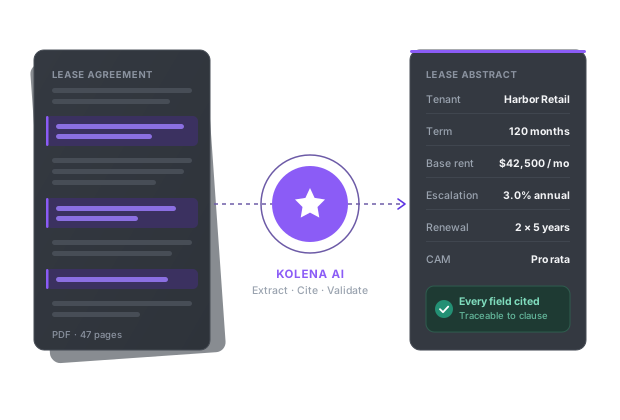
Nine free AI document tools — pick your workflow
Creating Your AI Agent
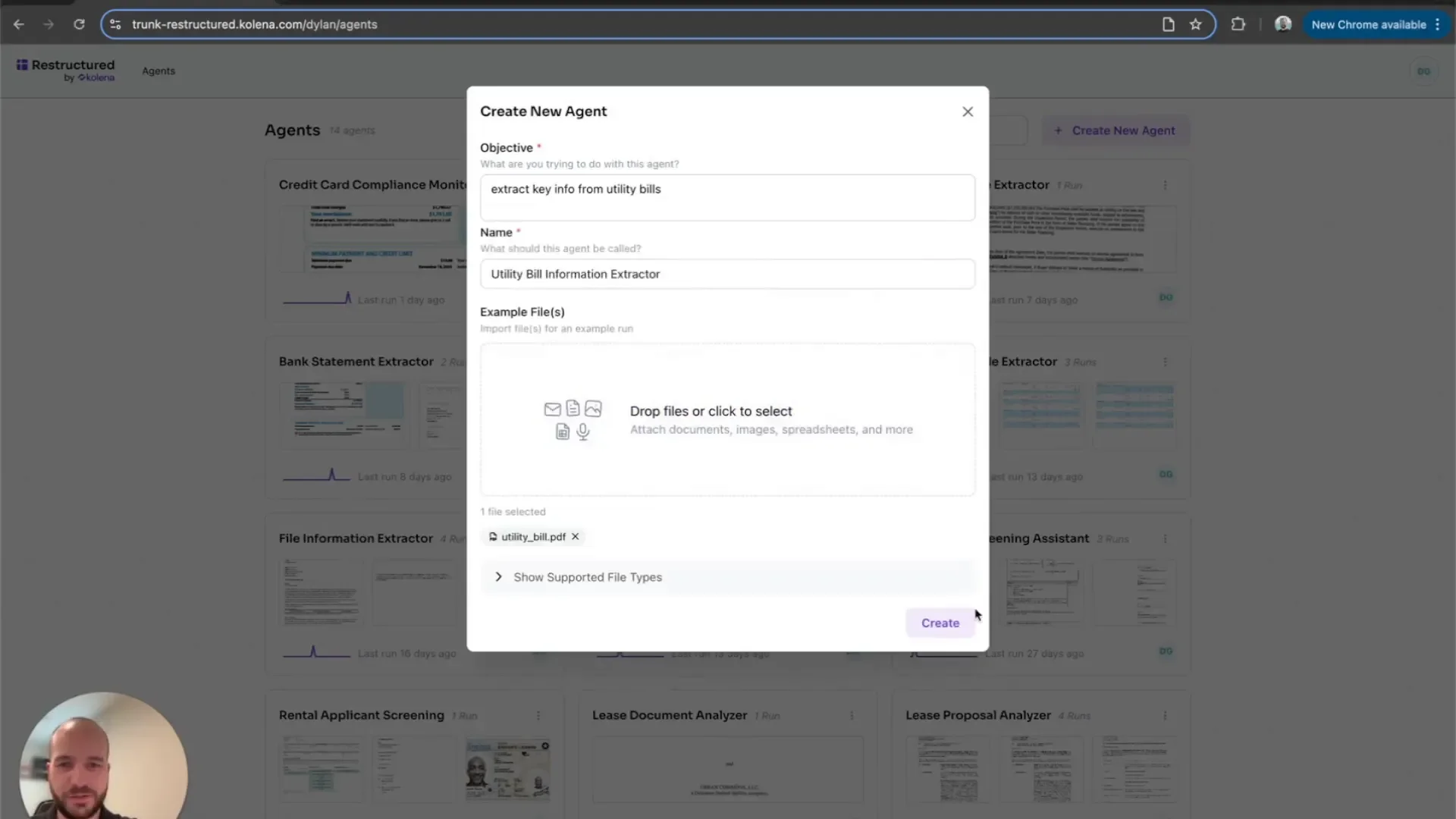
The first step in utility bill automation is creating your AI agent. This agent will be responsible for processing the utility bills and extracting the required data. Start by providing a brief description of the agent and a sample utility bill.
Setting Up the Agent
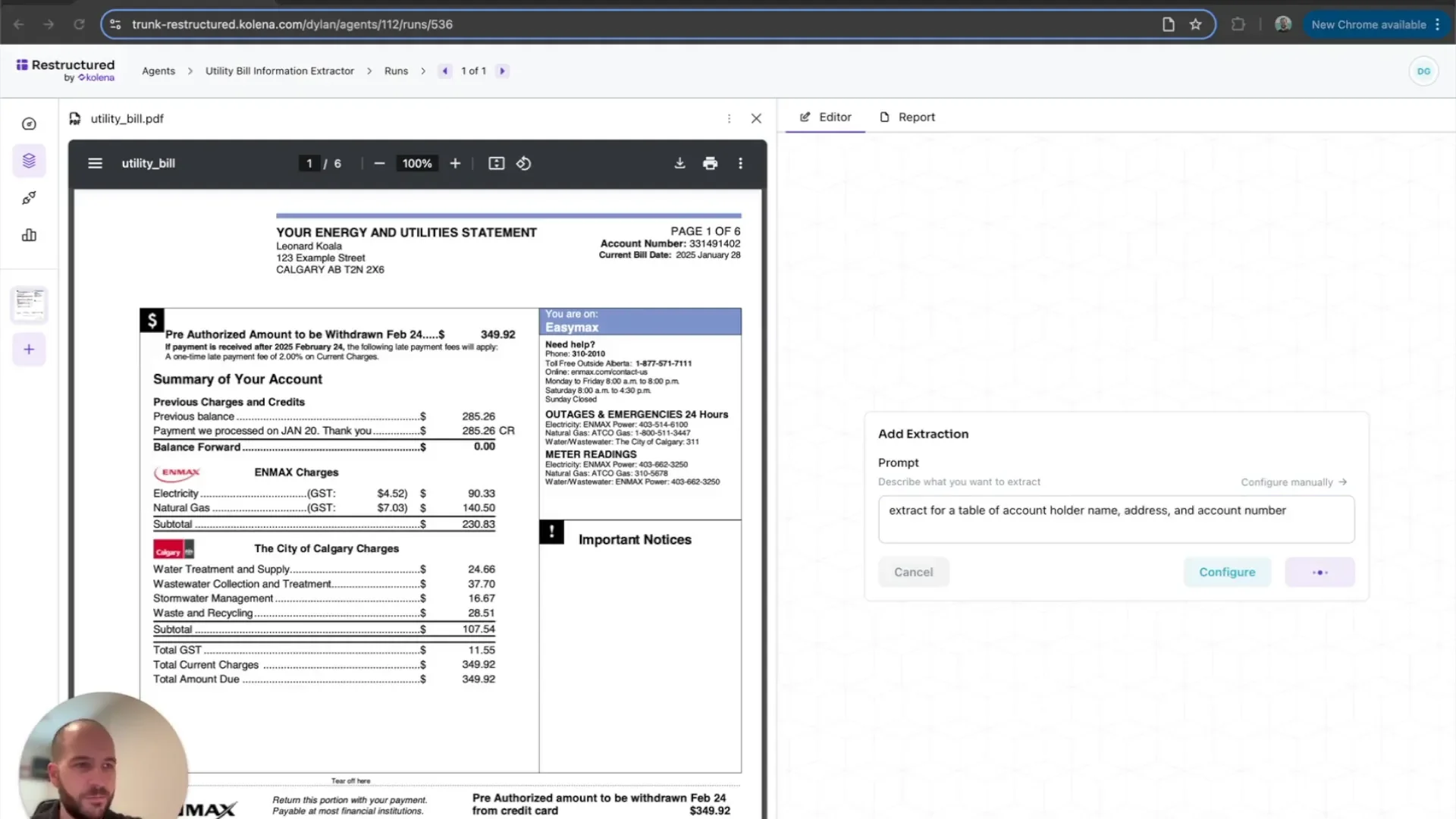
When setting up your agent, you will need to specify the type of information you want to extract. This could include account holder details, utility types, and billing amounts. Each piece of information plays a critical role in understanding utility usage.
Defining the Information to Extract
Next, define the specific information you want your agent to extract. This includes account holder information, utility types, and consumption details. A well-defined extraction process enhances the accuracy of the data.
Key Information to Extract
- Account Holder: Name, address, and account number.
- Utility Types: Identify the types of utilities included in the bill.
- Total Cost: The total amount due for the billing cycle.
- Consumption Data: Breakdown of usage by utility type.
Extracting Account Holder Details
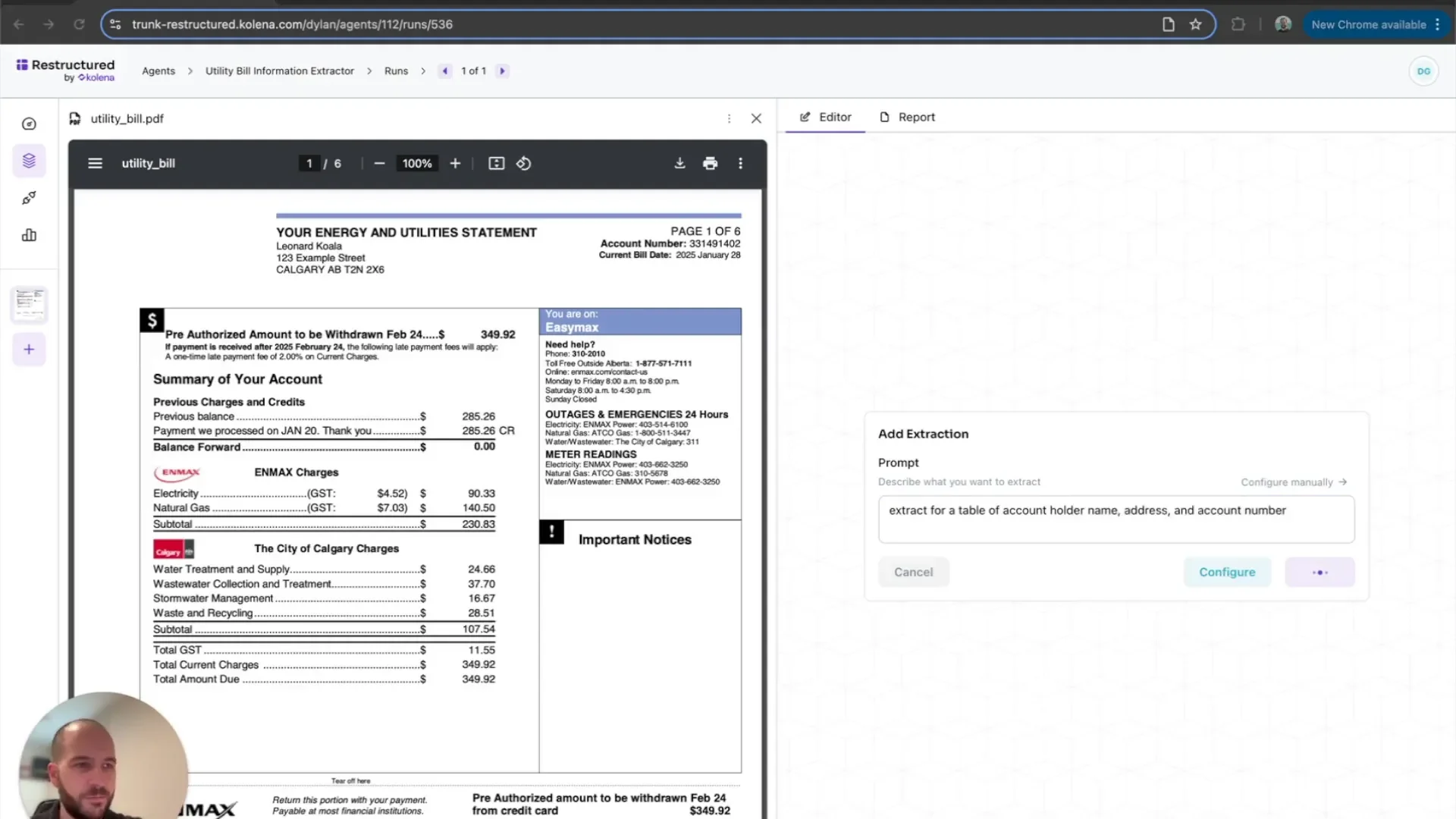
The account holder’s information is crucial for personalized utility management. Your agent should extract the name, address, and account number from each utility bill.
Why This Matters
Having accurate account holder details allows for better tracking of utility usage and billing. It also ensures that any alerts or notifications regarding usage or payments reach the correct individual.
Classifying Utility Types
Classifying utility types is essential for a comprehensive utility bill analysis with AI. Your agent should automatically identify whether the bill includes electricity, natural gas, water, or other utilities.
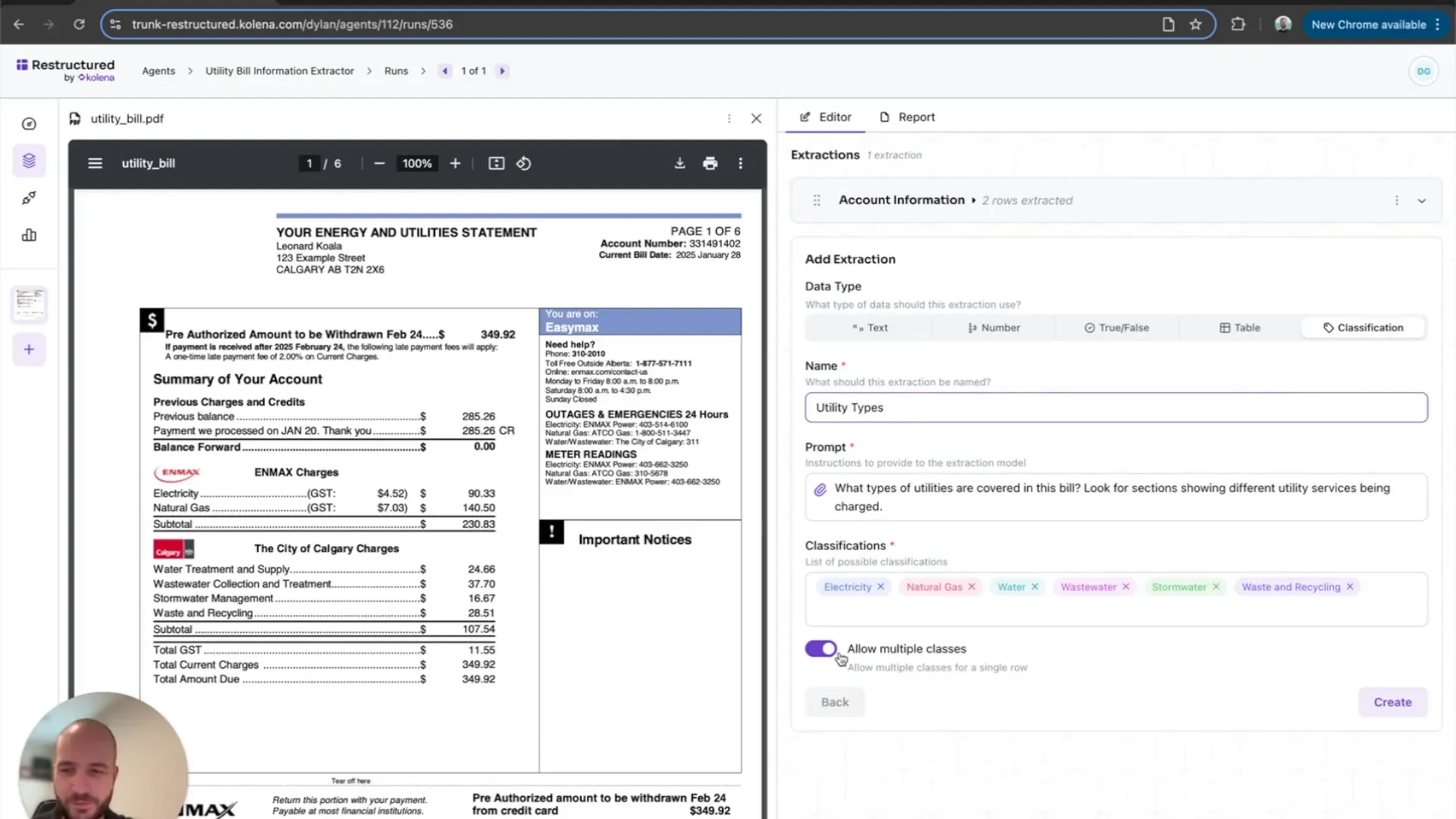
Multiple Classifications
Utility bills can often cover multiple services. Your agent should be equipped to handle this by tagging each type of utility present in the bill. This classification aids in better data analysis and comparison.
Identifying Key Data Points
Key data points such as total costs and consumption rates must be extracted for effective analysis. This enables you to monitor trends and identify any anomalies in utility usage.
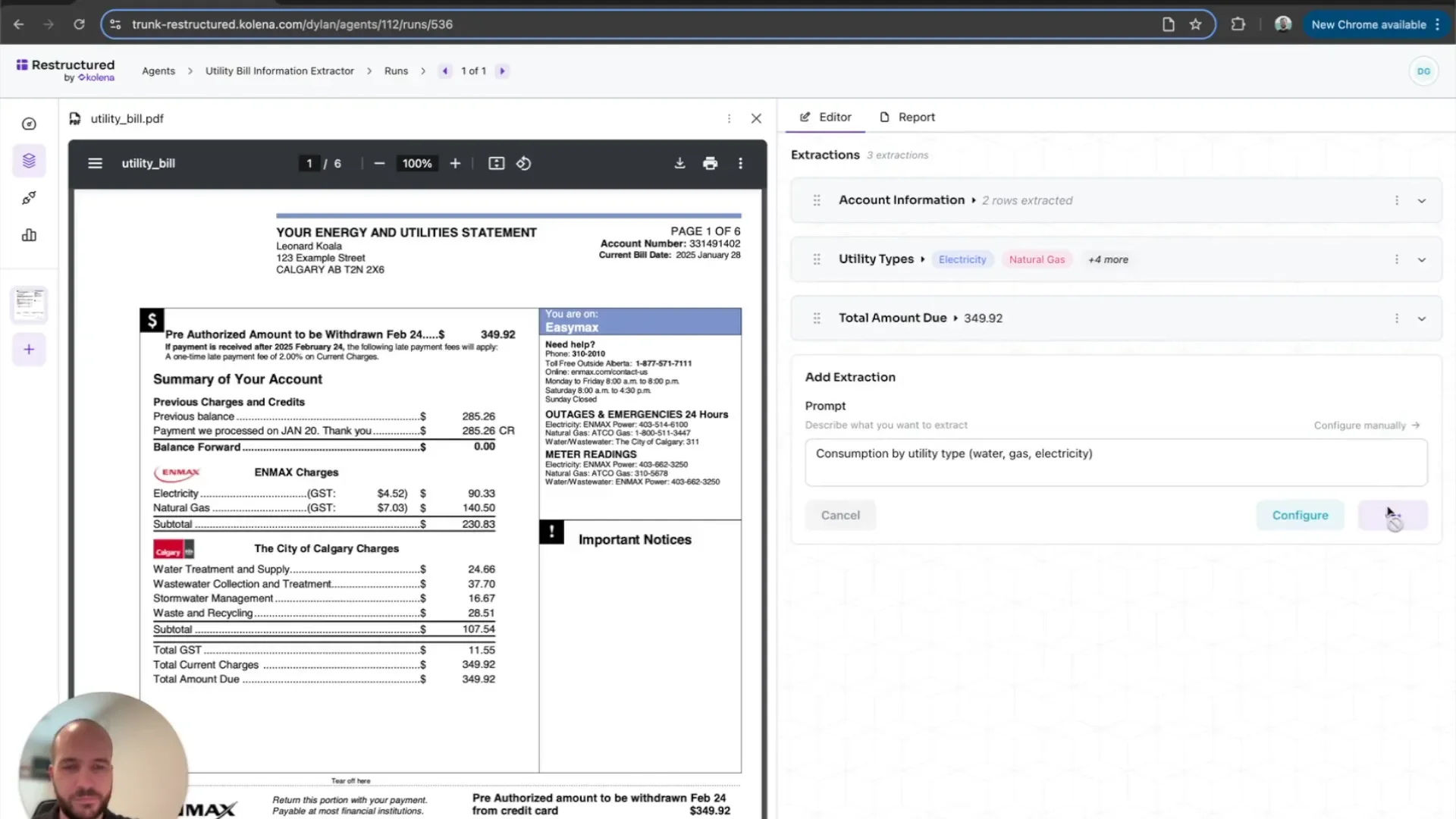
Critical Data Points to Monitor
- Total Cost: Ensure accuracy in the total amount due.
- Consumption Rates: Track usage patterns over time.
- Outlier Detection: Identify any unusual charges that may indicate issues.
Verifying Sample Data Accuracy
Before fully automating your workflow, it’s crucial to verify the accuracy of the extracted data. This ensures that your automation system is working correctly and producing reliable results.
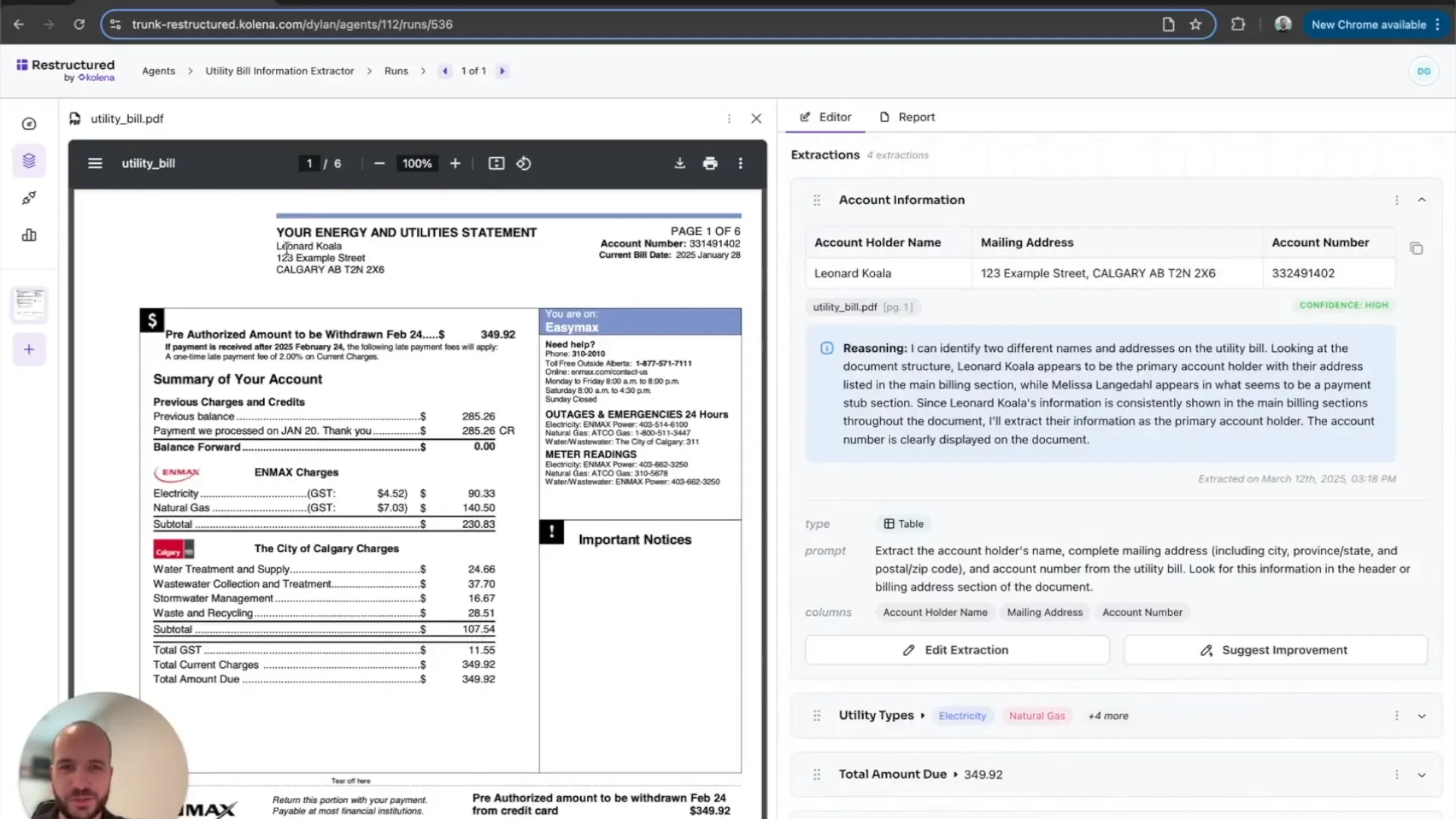
Steps for Verification
- Review the extracted account holder information for correctness.
- Check the classification of utility types to ensure all are tagged properly.
- Confirm the total bill amount and consumption data against the original bill.
Once you are satisfied with the verification process, you can proceed to fully automate the workflow. This will allow your agent to process incoming bills seamlessly.
Fully Automating Utility Billing Workflows
Once you’ve verified the accuracy of the extracted data, the next step is to automate utility billing workflows end to end. This automation will allow your AI agent to process incoming utility bills without any manual intervention. The goal here is to create a seamless experience where data flows from receipt to analysis effortlessly.
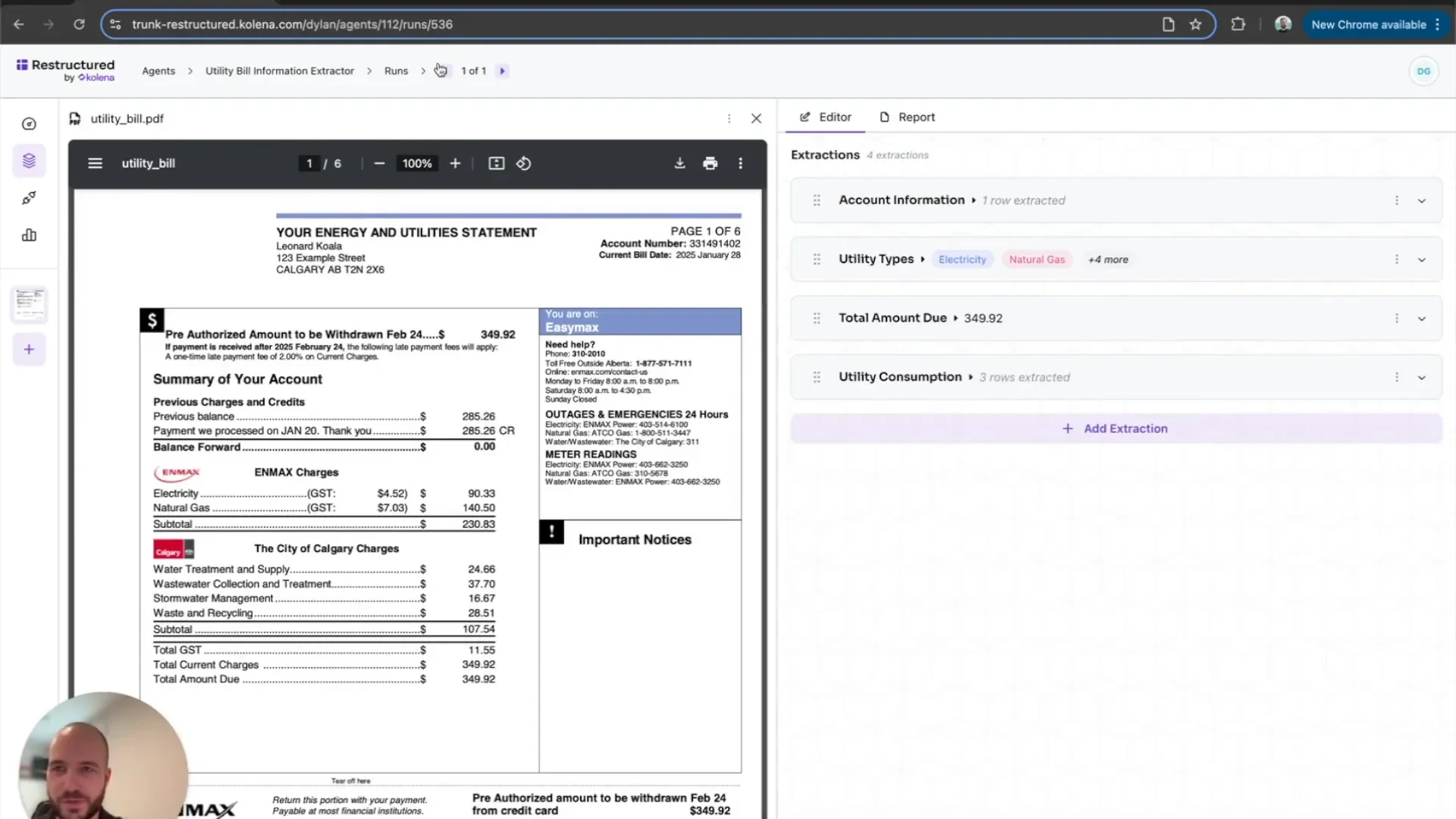
Benefits of Full Automation
- Time-Saving: No more manual data entry or verification.
- Real-Time Processing: Bills are processed as soon as they arrive.
- Increased Accuracy: Reduces the chances of human error.
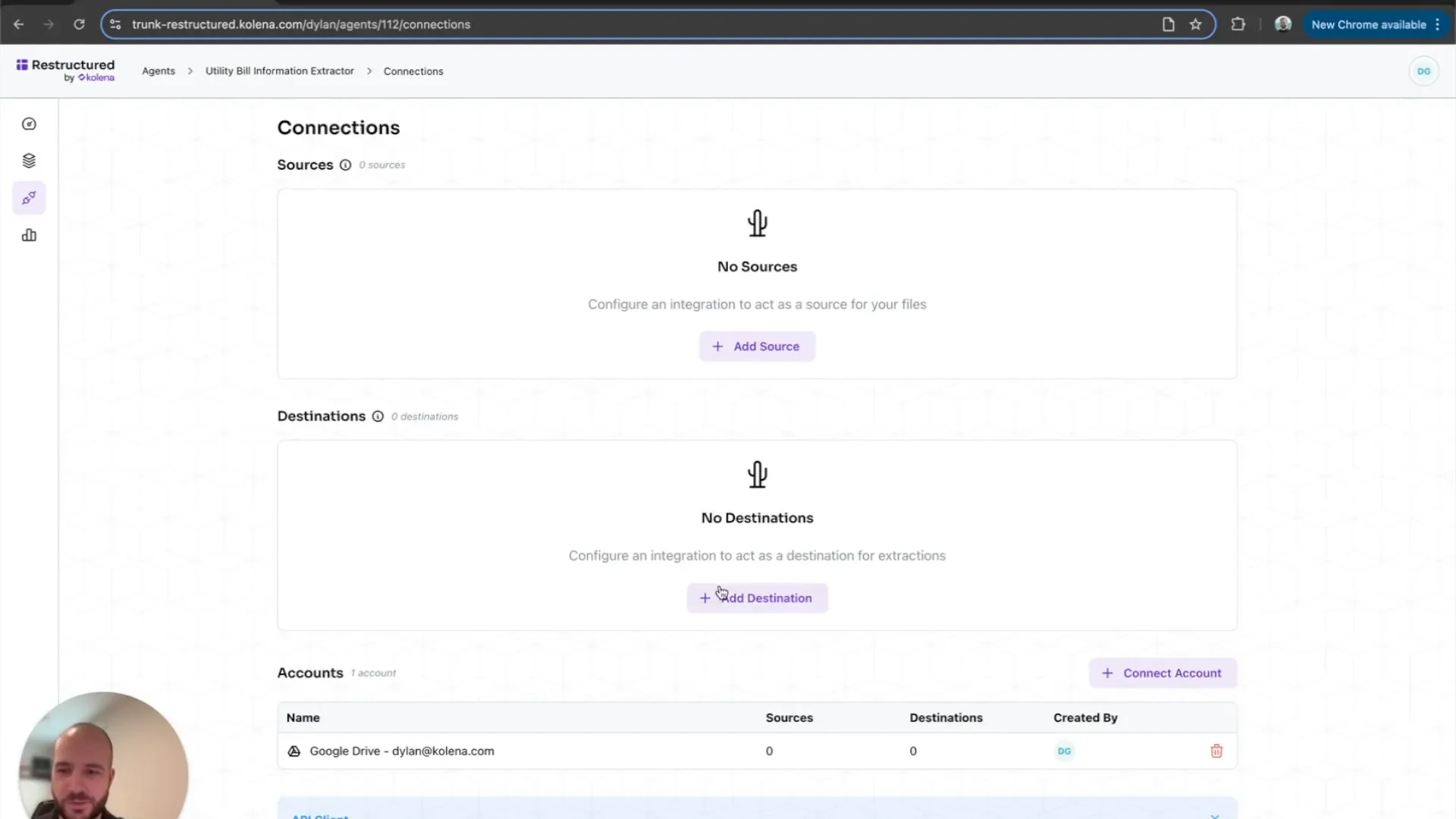
Configuring Data Connections
To ensure that your automation runs smoothly, you need to configure data connections. This involves linking your AI agent to the locations where your data resides. Whether it’s a database or a cloud storage solution, proper configuration is key.
Steps to Configure Connections
- Identify the data source where utility bills will be received.
- Determine the destination for processed data, such as a database or cloud storage.
- Establish a secure connection between your AI agent and these data points.
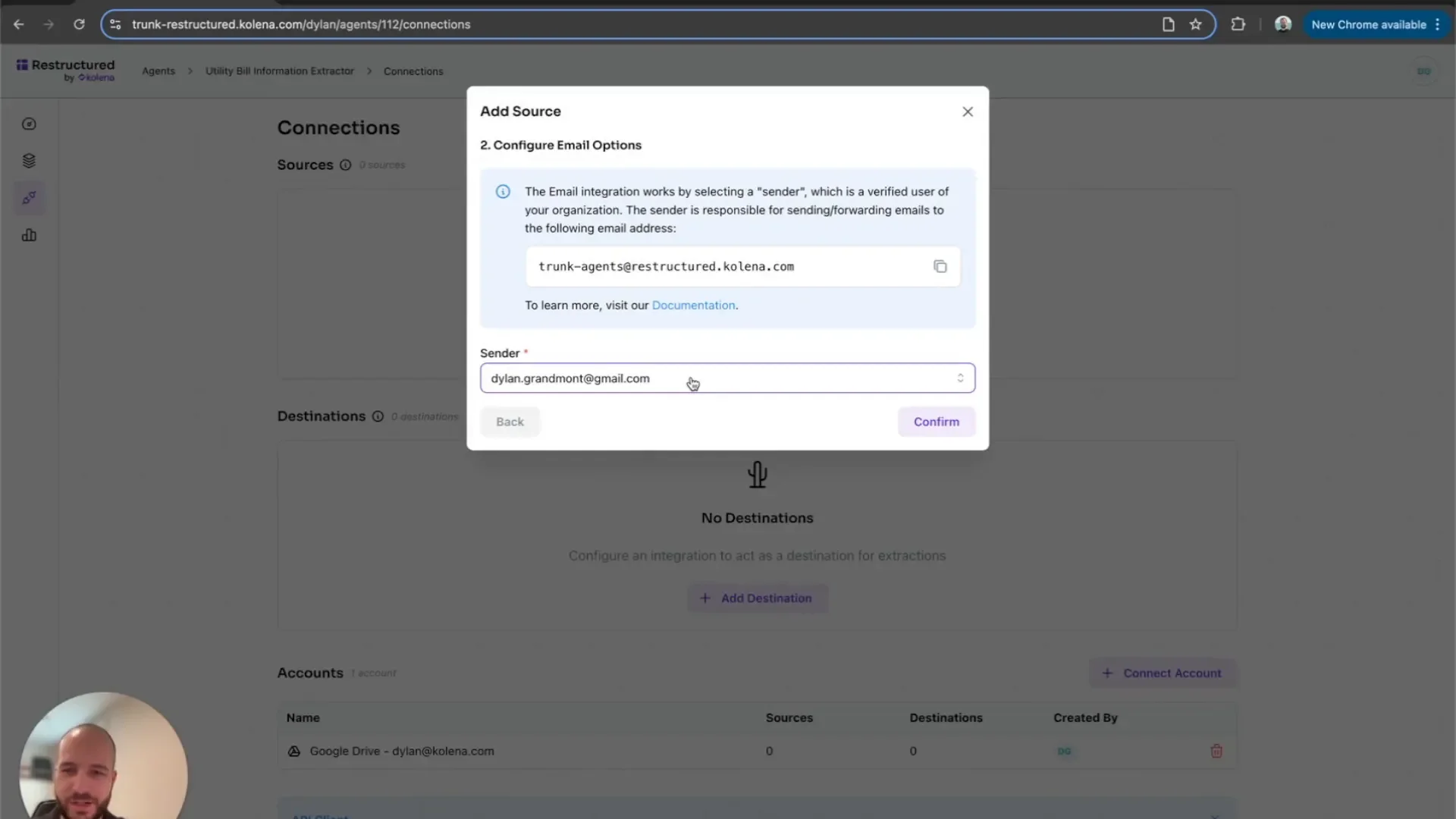
Setting Up Email Integration
Email integration is a vital component of your automation. This feature allows your AI agent to receive utility bills directly via email, making the process even more efficient. Setting this up is straightforward and enhances the workflow significantly.
How to Set Up Email Integration
- Choose an email provider that your AI agent can connect to.
- Create a dedicated email address for sending utility bills.
- Configure your AI agent to monitor this email address for incoming bills.
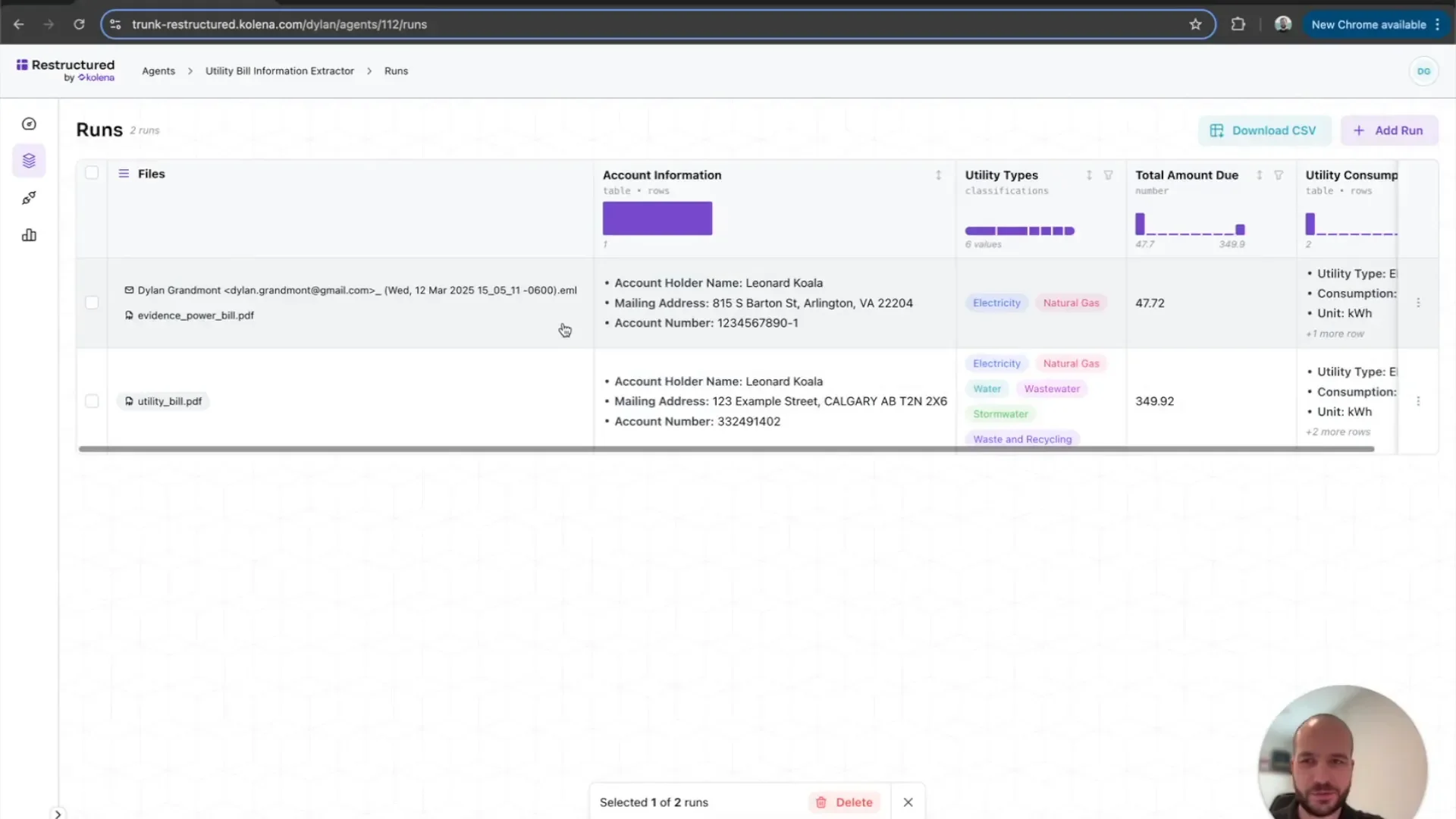
Processing Utility Bills via Email
After setting up email integration, you can start processing utility bills directly from your inbox. This feature allows you to simply attach a utility bill to an email and send it to your AI agent’s designated address.
Steps for Processing Bills
- Attach the utility bill to an email.
- Send it to the configured email address.
- Monitor your AI agent to ensure that the bill is processed correctly.
Continuous Data Processing
Once everything is set up, your AI agent will continuously process utility bills as they arrive. This ongoing data processing means you can keep track of utility usage without any interruptions.
Monitoring and Maintenance
- Regular Checks: Periodically review the processed data for accuracy.
- Update Configurations: Make adjustments as needed based on changes in your utility providers or billing formats.
- Feedback Loop: Use insights gained to refine the extraction process further.
Popular Utility Bill Automation Platforms
If you would rather adopt an existing solution than build your own agent, several established platforms automate utility bill processing end to end:
Arcadia: Manages the entire utility bill lifecycle, from data capture to validation, payment processing, and auditing.
EnergyCAP Bill Capture: Uses AI and expert human review to collect, process, and validate bills from scanned files or vendor portals.
Affinda: Specializes in document automation and data extraction, turning unstructured utility bills into structured data for finance workflows.
Utility Bill Analysis Software: What to Look For
Whether you build your own agent or buy an off-the-shelf platform, the evaluation criteria are much the same. Use this checklist when comparing utility bill analysis software:
Extraction accuracy across formats: Every provider uses a different bill layout, so test any tool against a representative sample of your own bills rather than the vendor demo set.
Multi-site and multi-meter support: If you manage a portfolio, the software should roll consumption and cost up across sites, meters, and utility types, not just single accounts.
Validation and anomaly detection: Look for automatic comparison against historical usage and contracted tariffs, with exceptions flagged for human review rather than silently corrected.
Accounting and ERP integration: Confirm there is a supported connector, or at minimum a documented API, for the systems where the data has to land.
Audit trail and data retention: You should be able to trace any figure back to the source bill image, which matters for cost recovery disputes and tenant recharges.
Many teams end up combining both approaches: a custom AI agent for the bills that arrive in unusual formats, and established utility bill analysis software for high-volume, standardized accounts.
Conclusion and Next Steps
In conclusion, automating your utility bill analysis with AI not only streamlines your workflow but also enhances your ability to monitor and manage utility expenses effectively. The steps outlined above will guide you through the entire process, from setting up your AI agent to continuous data processing.
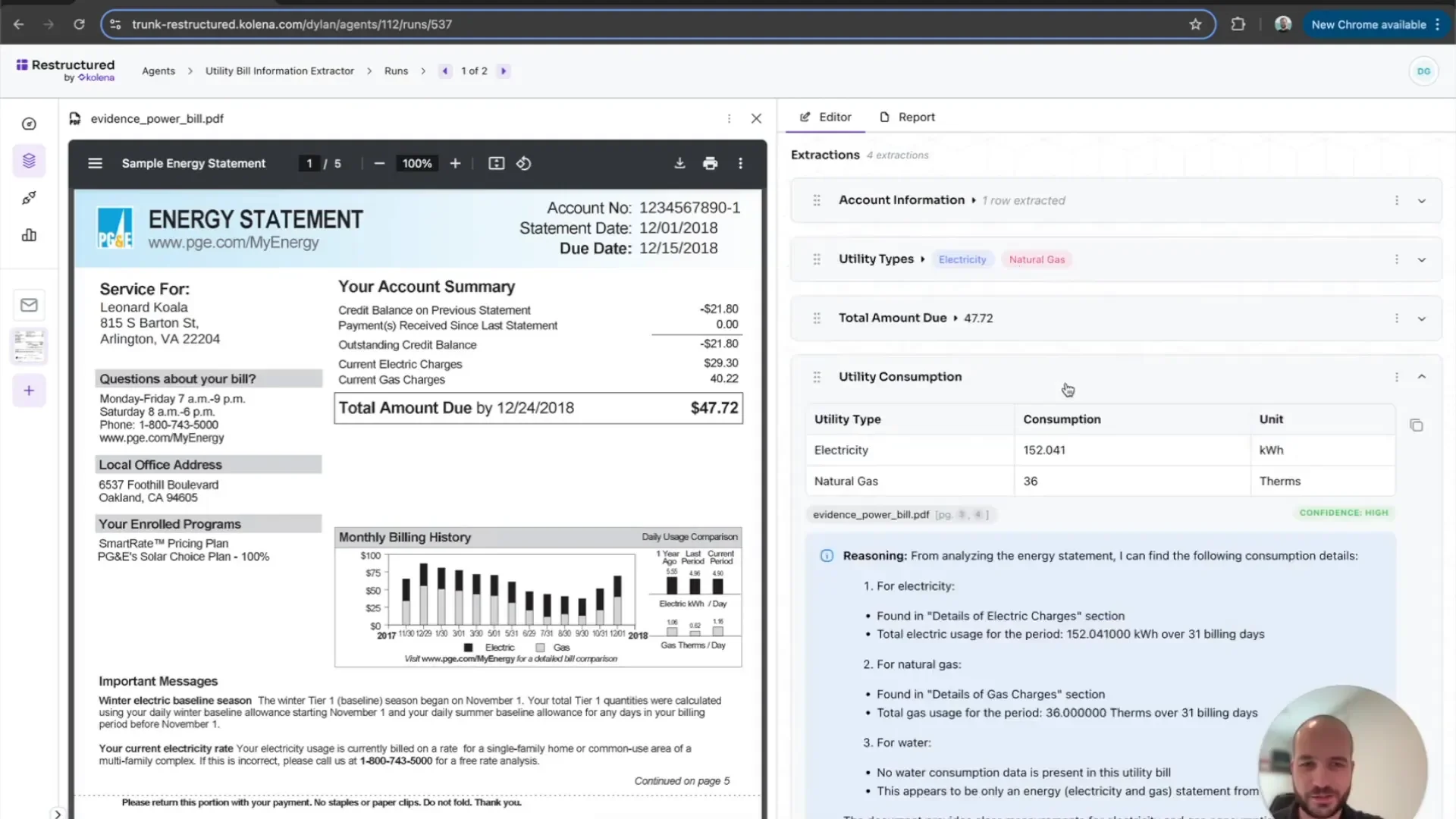
As a next step, consider diving deeper into analytics. By leveraging the data collected through this automation, you can gain insights into utility consumption patterns and identify opportunities for savings.
Want to try it for yourself? See it in action Request Access