What Is the AIA G703 Form?
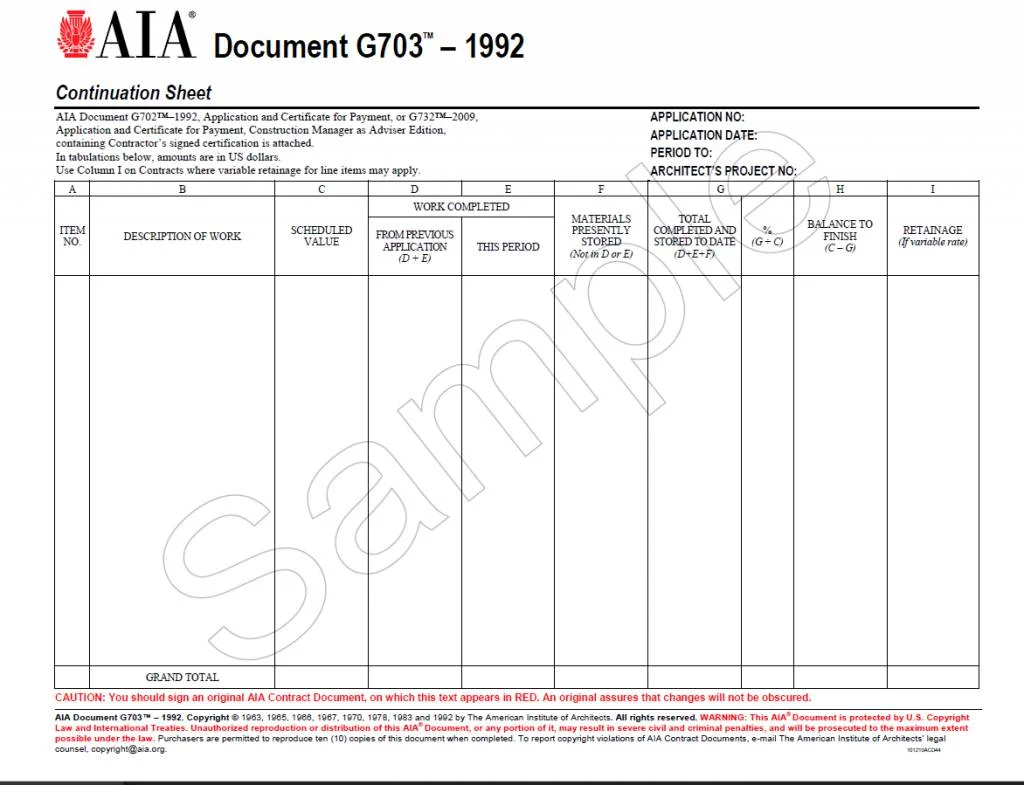
AIA G703 is a standard construction form used as a continuation sheet and detailed schedule of values to support the AIA G702 payment application. It itemizes project line items, tracks completed work, and calculates retainage.
The AIA G703 form is organized around the project’s schedule of values. Each line represents a work item or cost category, allowing the owner, architect, and contractor to see how much has been earned for each item during the current billing period and over the life of the project. This detail helps reviewers verify progress and identify discrepancies before approving payment.
Key sections and tracking columns:
Item number and description: Lists each specific task or phase of work.
Scheduled value: Shows the budgeted dollar amount for each individual line item.
Work completed: Details progress from previous applications and work done during the current billing period.
Stored materials: Accounts for materials kept on-site but not yet installed.
Balance to finish and retainage: Calculates remaining funds required to complete each line item alongside withheld retainage amounts.
How it works with G702:
The AIA G703 supports the AIA G702 Application and Certificate for Payment:
Detailed backup: G703 provides the heavy math and line-by-line proof that feeds directly into the summary totals on the G702 form.
Approval process: Project architects, owners, or lenders review the granular details on the G703 sheet to verify that progress claims are true before signing off on payment.
This is part of a series of articles about Contractor Pay App.
Review a Complete PayApp in Minutes with AI
Kolena's free AI agent analyzes your PayApp in minutes. Upload all G702/G703 forms and let the AI check general contractor and subcontractor submissions for consistency and completeness.
Try It Free NowHow G703 Works With G702
The AIA G703 supports the AIA G702 Application and Certificate for Payment. The G702 provides the summary figures for the contractor’s payment request, while the G703 shows how those figures are calculated across individual work items. The totals from the G703 are carried over to the corresponding fields on the G702.
For each billing period, the contractor updates the G703 with completed work and eligible stored materials. After accounting for retainage and previous payments, these values determine the current amount due. Using the two forms together gives reviewers both a high-level payment summary and the detailed cost information needed to validate it.
The Schedule of Values Behind the G703
The G703 is often referred to as a schedule of values (SOV), but the AIA makes an important distinction: it does not publish a standard schedule-of-values form. Instead, the G703 is a continuation sheet that reflects the schedule of values the contractor prepared and submitted for the project.
Under the AIA’s instructions, the schedule of values breaks the contract sum into individual portions of the work. Those portions can be organized by sections of work or by subcontractor, and the breakdown should remain consistent throughout the project. At the beginning of the job, the total scheduled values should equal the original Contract Sum; as approved change orders are incorporated, that total may be adjusted accordingly.
Because the same line-item structure carries forward from one payment application to the next, the G703 provides a running record of how much value has been earned against each part of the contract. The totals from the continuation sheet then feed into the G702, where the contractor states the overall amount requested and the architect reviews and certifies the amount due.
How to Fill Out an AIA G703 Form (Step-by-Step)
Each AIA G703 form includes multiple columns that must be filled out accurately:
A: Item Number – Sequential number assigned to each line item
B: Description of Work – Brief description of each construction task
C: Scheduled Value – Total cost allocated to that line item
D: Work Completed from Previous Application – Cumulative total of previously approved work
E: Work Completed This Period – New work completed in the current period
F: Materials Presently Stored – Value of materials on site but not yet installed
G: Total Completed and Stored to Date (D+E+F)
H: Percentage Complete (G / C)
I: Balance to Finish (C – G)
J: Retainage – Portion withheld (often 5-10%)
We describe each of the columns in more detail below.
Read our guide on rent roll software.
Learn more about contractor payment software.
What Goes Into a Complete G703 Pay App Package
The G703 rarely travels alone. On most construction projects, a complete G703 pay app package is a bundle of documents that the owner, lender, or general contractor expects to receive together in every billing cycle:
G702 cover sheet: The signed application and certificate for payment that summarizes the totals carried on the G703.
G703 continuation sheet: The line-item schedule of values showing work completed, materials presently stored, and retainage for the current period.
Change order log: Approved change orders, so that added or deducted scope reconciles with the revised contract sum on the G703.
Lien waivers: Conditional or unconditional waivers from the general contractor and from each subcontractor billing in that period.
Certified payroll and compliance documents: Required on prevailing wage jobs and on most publicly funded construction projects.
Supporting backup: Invoices, delivery tickets, and photos that substantiate stored materials and percentage complete claims.
A G703 pay app moves only as fast as its weakest document. When a single waiver is missing or a change order is not reflected in the schedule of values, the entire package goes back for revision and the payment cycle slips by weeks.
Column-by-Column Breakdown of the G703
Columns A and B: Item Number and Description of Work
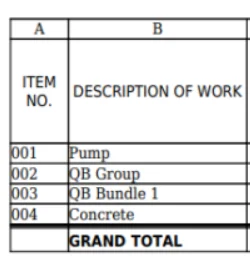
Columns A and B establish the basic structure of the G703 by identifying each portion of the project being tracked. Column A is typically used for an item or reference number, while Column B describes the corresponding portion of the work. Together, they tie each payment line back to the contractor’s schedule of values.
According to AIA’s instructions, the breakdown can be organized by sections of the work, by subcontractors, or by another consistent structure reflected in the schedule of values submitted at the beginning of the project. Once that structure is established, it should generally remain consistent throughout the project so that progress can be compared accurately from one payment application to the next.
For example, separate rows might be created for demolition, concrete, framing, roofing, electrical, plumbing, or other major scopes of work. The level of detail will depend on the project and the schedule of values accepted for use in administering payments.
Column C: Scheduled Value
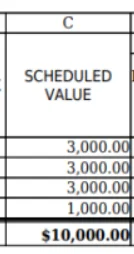
Column C contains the scheduled value assigned to each line item. In practical terms, this is the portion of the Contract Sum allocated to that particular scope of work. If electrical work has been assigned $200,000 in the approved schedule of values, for example, $200,000 would appear in Column C for that line.
AIA instructs users to populate this column consistently with the schedule of values submitted to the architect at the beginning of the project, as subsequently adjusted. When multiple G703 pages are required, Column C should be subtotaled on each page and totaled on the final page. Initially, the total should equal the original Contract Sum.
That total can change as the project progresses. Approved Change Orders can adjust the Contract Sum and, correspondingly, the values being tracked through the payment documents. AIA notes that Change Orders are commonly listed separately rather than continually rewriting the original schedule of values.
Column D: Work Completed from Previous Applications
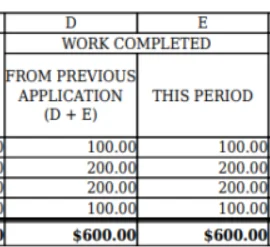
Column D shows the value of completed work that has already been reported in previous payment applications. It provides the historical portion of the calculation, allowing the G703 to distinguish between work completed in earlier periods and work completed during the current billing period.
AIA specifically instructs contractors to enter the completed work from Columns D and E of the previous application into this column. This allows previously earned work to roll forward from one pay application to the next.
There is an important distinction when it comes to stored materials. Amounts previously reported in Column F as “Materials Presently Stored” should not simply be transferred into Column D. Stored materials remain separately tracked until they are actually incorporated into the project. This prevents the same value from being counted twice and keeps installed work separate from materials that are still being stored.
Column E: Work Completed this Period
Column E records the value of work completed during the current payment period. This is where the contractor reports new progress made since the previous application for payment.
The column also captures another important movement within the G703: materials that were previously reported as stored but have now been incorporated into the project. AIA instructs contractors to include the value of those incorporated materials in Column E during the period in which they become part of the work.
For example, suppose $30,000 of HVAC equipment appeared in Column F on the previous application because it had been delivered and stored but not installed. If that equipment is installed during the current period, its value would be removed from Column F and included in Column E.
As a result, Column E represents more than simply new labor performed during the month. It reflects the total value of work newly incorporated into the project during that billing period.
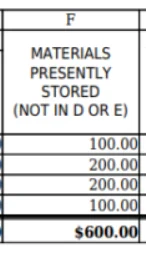
Column F: Materials Presently Stored
Column F tracks the value of materials presently stored for which the contractor is requesting payment but which have not yet been incorporated into the project.
AIA explains that the amount may include both newly stored materials and materials reported as stored in an earlier application that are still awaiting installation. The total must therefore be recalculated at the end of every pay period rather than simply copied forward without review.
One of the most important points in AIA’s instructions is that receiving payment for stored materials does not, by itself, remove those materials from Column F. They stay in the column as long as they remain stored. Only when they are incorporated into the project is their value removed from Column F and transferred into Column E as work completed during the current period.
This treatment helps distinguish physical construction progress from materials that have been purchased or delivered but have not yet become part of the installed work.
Column G: Total Completed and Stored to Date
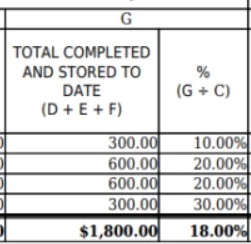
Column G shows the cumulative value of work completed and materials stored to date for each line item. It combines prior completed work, current-period work, and qualifying stored materials into a single running total.
The calculation is:
Column G = Column D + Column E + Column F
AIA also instructs users to calculate the percentage complete by dividing Column G by Column C.
For example, assume a line item has:
Scheduled Value: $100,000
Previous Work Completed: $40,000
Work Completed This Period: $15,000
Materials Presently Stored: $5,000
Column G would equal $60,000. Dividing $60,000 by the $100,000 scheduled value would indicate that the line item is 60% complete and stored to date.
Because Column G combines all recognized progress against a line item, it serves as one of the clearest indicators of how far that portion of the contract has progressed financially.
Columns H and I: Balance to Finish and Retainage
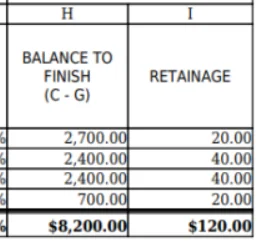
Column H shows the balance remaining to finish each line item. It represents the difference between the amount originally allocated to the work and the amount that has been completed or stored to date.
The calculation is straightforward:
Column H = Column C − Column G
If a scope has a scheduled value of $100,000 and $60,000 has been completed and stored to date, Column H would show a remaining balance of $40,000. AIA specifically instructs users to calculate Column H as the difference between the Scheduled Value in Column C and Total Completed and Stored to Date in Column G.
Column I deals with retainage, but its use depends on how retainage is structured under the contract. According to AIA, Column I is normally used when the contract permits different retainage rates to be applied to individual line items. This makes it possible to calculate and display retainage separately for different portions of the work.
When the project instead uses one constant retainage rate across the overall contract, AIA says Column I generally does not need to be completed. In that situation, retainage can be calculated at the aggregate level on the related G702 payment application.
Taken together, Columns H and I help show what remains financially outstanding on each line item: Column H identifies the value of work still to be earned, while Column I can show the portion of already earned value that is temporarily being withheld as retainage.
Why Contractors Struggle with AIA G703 Forms
The AIA G703 can be challenging because it is cumulative, detail-heavy, and closely tied to the G702, schedule of values, change orders, stored materials, and supporting documentation. Even small errors can carry forward and delay payment review.
Carrying forward previous pay applications: Each G703 builds on prior applications, so previous work, current work, stored materials, change orders, and retainage must roll forward correctly without duplicating or misclassifying amounts.
Keeping stored materials straight: Stored materials remain in Column F until incorporated into the project, then move into Column E. Moving them too early or failing to update totals can create billing discrepancies.
Managing change orders: Approved change orders are typically added as separate line items and must reconcile with the adjusted Contract Sum and the G702. Missing or duplicated changes can throw off the application.
Avoiding documentation errors: The G703 is usually submitted with supporting documents such as lien waivers, sworn statements, or invoices. Missing or inconsistent documentation can slow review and delay payment.
Kolena’s Solution: AI-Powered G703 Review in Minutes, Not Hours
Kolena brings AI-powered automation to AIA pay applications. Instead of relying on error-prone spreadsheets or fillable PDFs, Kolena’s solution:
Parses submitted AIA G703 forms (PDF or Excel)
Cross-verifies scheduled values, previous payments, and retainage
Validates calculations across columns
Flags anomalies or missing data for review
Generates structured output matched to your internal systems
“Kolena customers report a reduced pay app review time from 3 hours to under 10 minutes, with zero manual copy-paste.”
Kolena acts like a tireless project accountant that never misses a line item, helping contractors:
Avoid disputes from inaccurate forms
Accelerate payment cycles
Improve compliance with contract billing standards
Real Results: Accuracy, Speed, and ROI
Our construction and real estate customers consistently report:
80 to 95 percent time reduction in reviewing pay apps
Near-perfect accuracy compared to manual reviews
Higher compliance with internal audit standards
Faster subcontractor payments, improving project morale and timelines
“Kolena’s AI reviewed an entire G703 form in under 2 minutes with greater accuracy than our manual process. What used to take hours now takes seconds.” Head of Construction Finance, National Developer
Use Case Example: Monthly G703 Pay App Review Workflow
Before Kolena:
A project engineer spends 2 to 3 hours per application checking every line item manually
Errors often go unnoticed until the final draw or audit
Late payments trigger subcontractor friction and operational delays
With Kolena AI:
AI agent reviews G702 + G703 package end to end
Errors, duplicates, and missing values flagged automatically
Review and approval completed within 5 minutes
Results exported into client template and routed to DocuSign
Final Thoughts: Speed and Accuracy Matter
Embracing AI automation with Kolena for AIA G703 forms delivers measurable improvements in accuracy, speed, and cost efficiency. Transitioning from manual processing to intelligent automation positions construction firms competitively, enabling them to scale effectively and manage projects more strategically.
AIA G703 forms are essential for progress billing, but they do not have to slow you down. With Kolena, construction firms can:
Get faster G703 pay app reviews
Improve accuracy and compliance
Spend more time building and less time billing
Want to see how Kolena can help your team? Schedule a demo today.