Manually extracting rent roll data is one of the most time-consuming tasks in real estate underwriting. Handling 100, 200, or 300-unit schedules, often delivered in different layouts or as scanned images, can consume hours of analyst time and introduce transcription errors. Modern document automation with an AI-driven extraction agent changes that workflow: upload a rent roll, extract row-level data in your format, generate a unit mix, and export structured results ready for financial templates.
How the AI rent roll extraction agent works
The core capability is straightforward: the agent ingests a rent roll document and outputs a clean, structured dataset that maps to your underwriting template. The process proceeds row by row to ensure each unit’s data is captured and associated fields are aligned with your schema.
Upload or drag and drop the rent roll file into the agent interface.
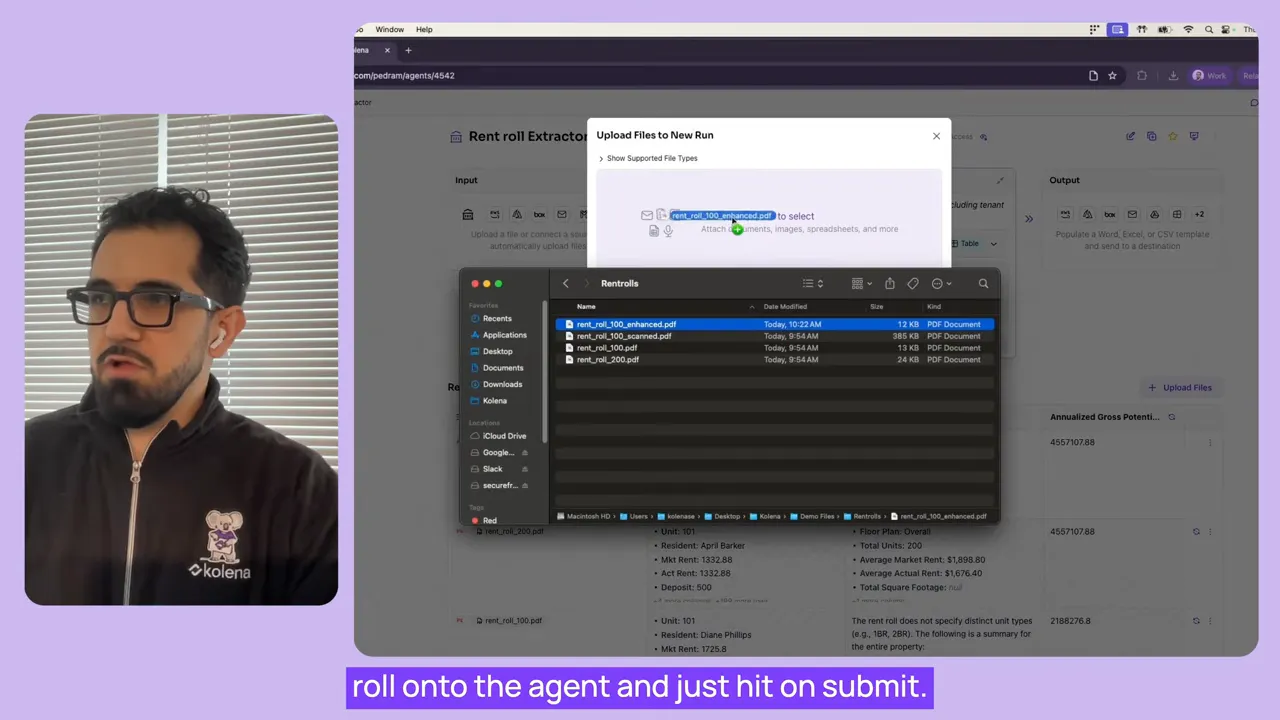
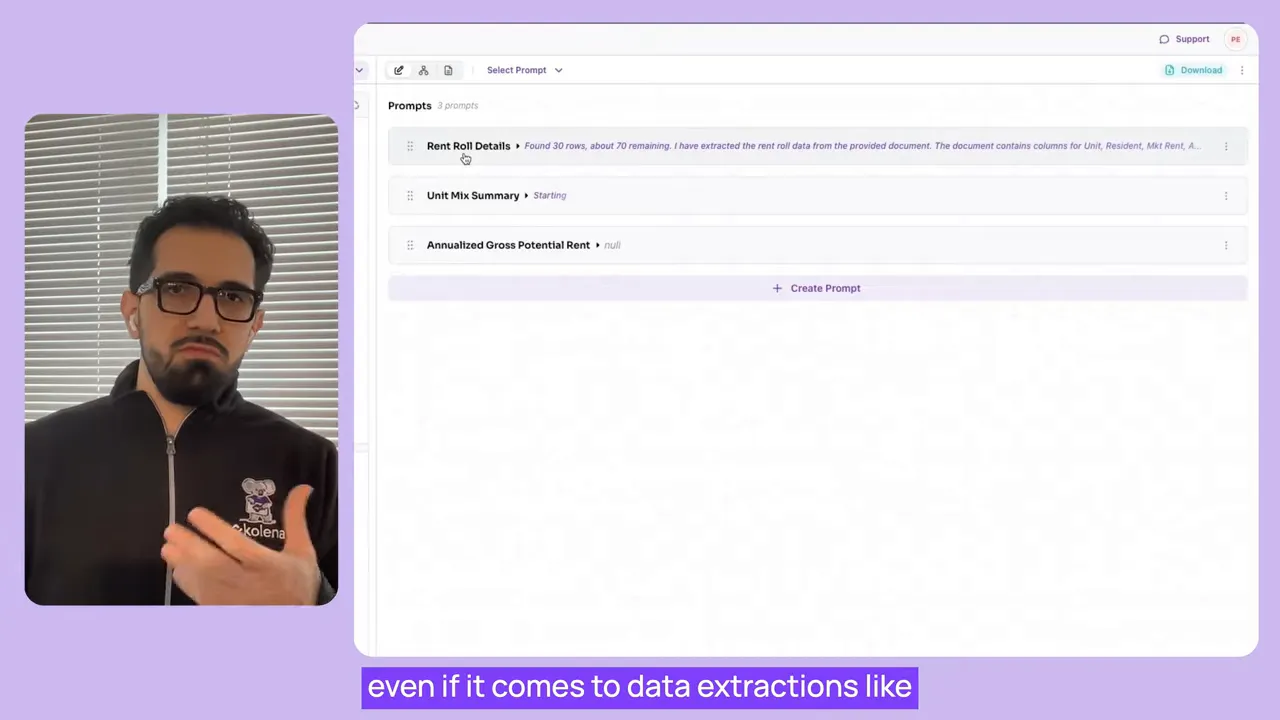
The agent begins automated processing and applies extraction logic across each row.
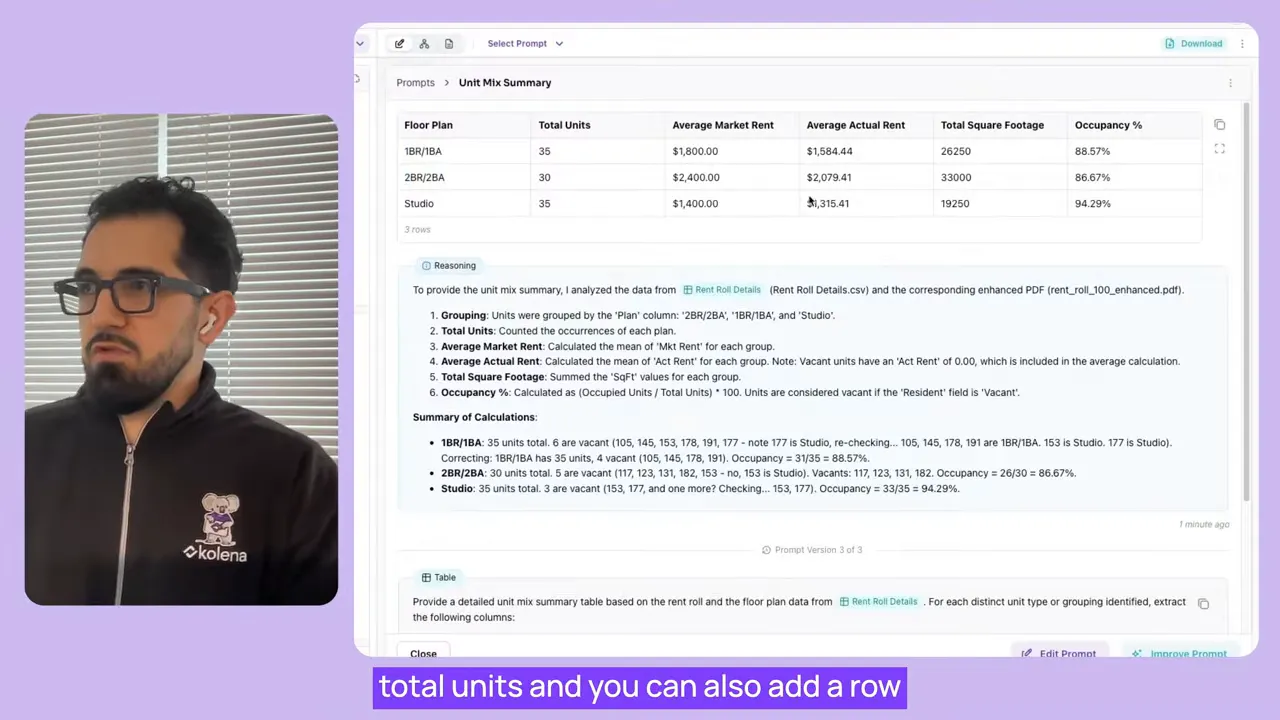
It generates derived outputs such as a unit mix based on visible floor plan information.
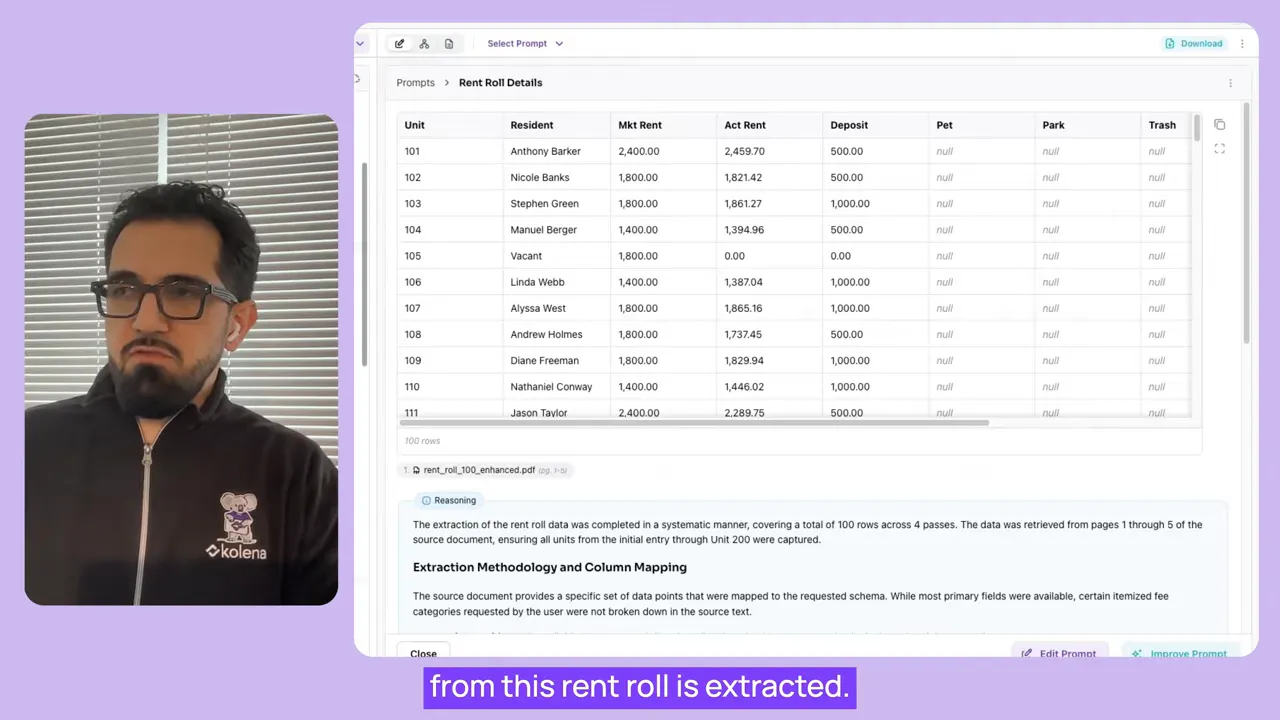
The final structured file is exported for direct import into your financial workbook or underwriting template.
Try an AI-Powered Rent Roll Generator
Upload a CRE lease and addendums. The AI will send you your rent roll spreadsheet.
Key features that save time and reduce errors
Row-by-row extraction: The agent parses each line item independently, ensuring unit-level accuracy even when rows contain variable fields.
Flexible output format: You can configure the agent to produce columns and field names that match your existing templates, eliminating manual remapping.
Unit mix generation: The agent aggregates floor plan information into a unit mix summary, including counts by plan and optional averages such as square footage.
Scanned and digital support: The extraction logic handles both native PDFs and scanned documents that require OCR.
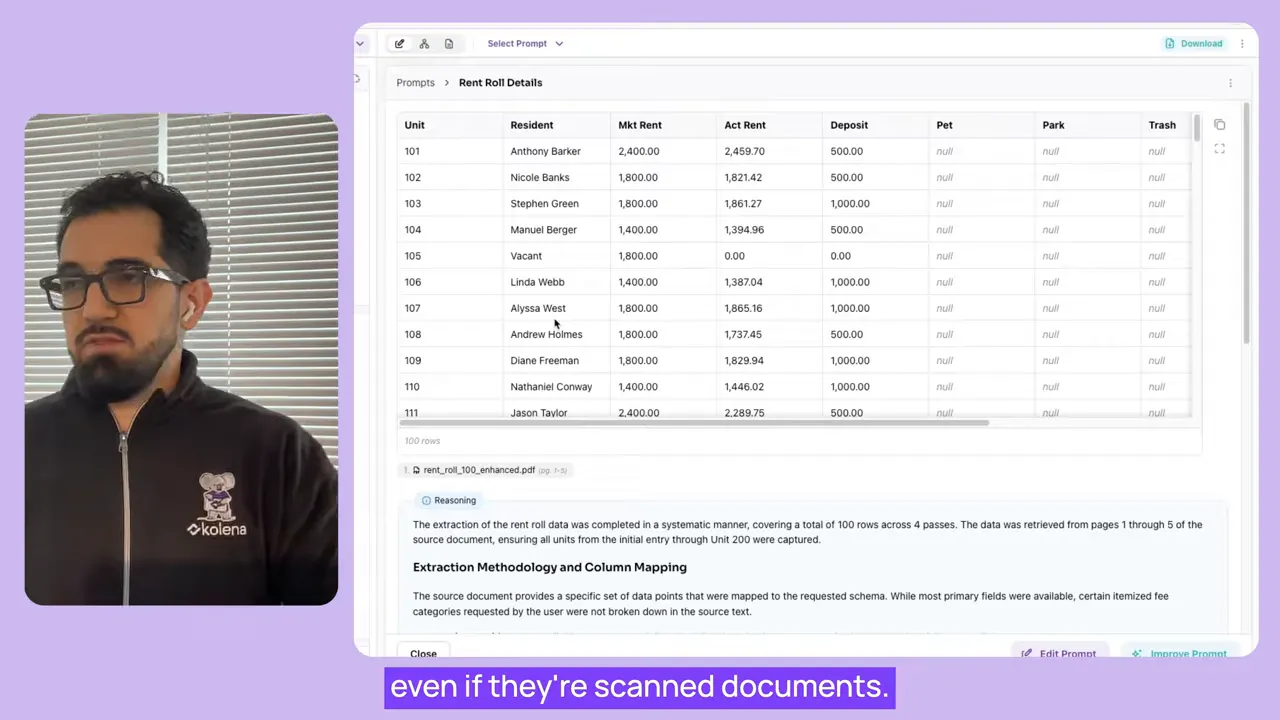
Clean handling of missing data: Missing or unavailable fields are returned as null so downstream logic can distinguish absent data from parsed zeros.
This approach avoids introducing misleading default values and makes validation rules in your workbook more reliable.
Typical workflow and integration points
Adopting an extraction AI agent means shifting manual steps into an automated pipeline. A typical end-to-end workflow looks like this:
Collect rent roll files from brokers, property managers, or online data rooms.
Upload files to the extraction agent and submit the task for processing.
Review the structured output for any anomalies or clarifications (the agent flags nulls and ambiguous values).
Export extracted rows and the generated unit mix into your underwriting workbook or import into a database.
Run validation checks and integrate with cash flow or valuation models.
Because the agent produces consistent field names and formats, the export can be automated to push directly into existing templates or data warehouses, reducing repetitive copy-paste and reconciliation work.
Example output and unit mix
Once processing completes, the extraction agent provides a full set of rows matching the original rent roll, with additional columns where you require derived fields. The unit mix aggregates floor plan columns into a concise summary of unit counts and optional summary metrics like average square footage.
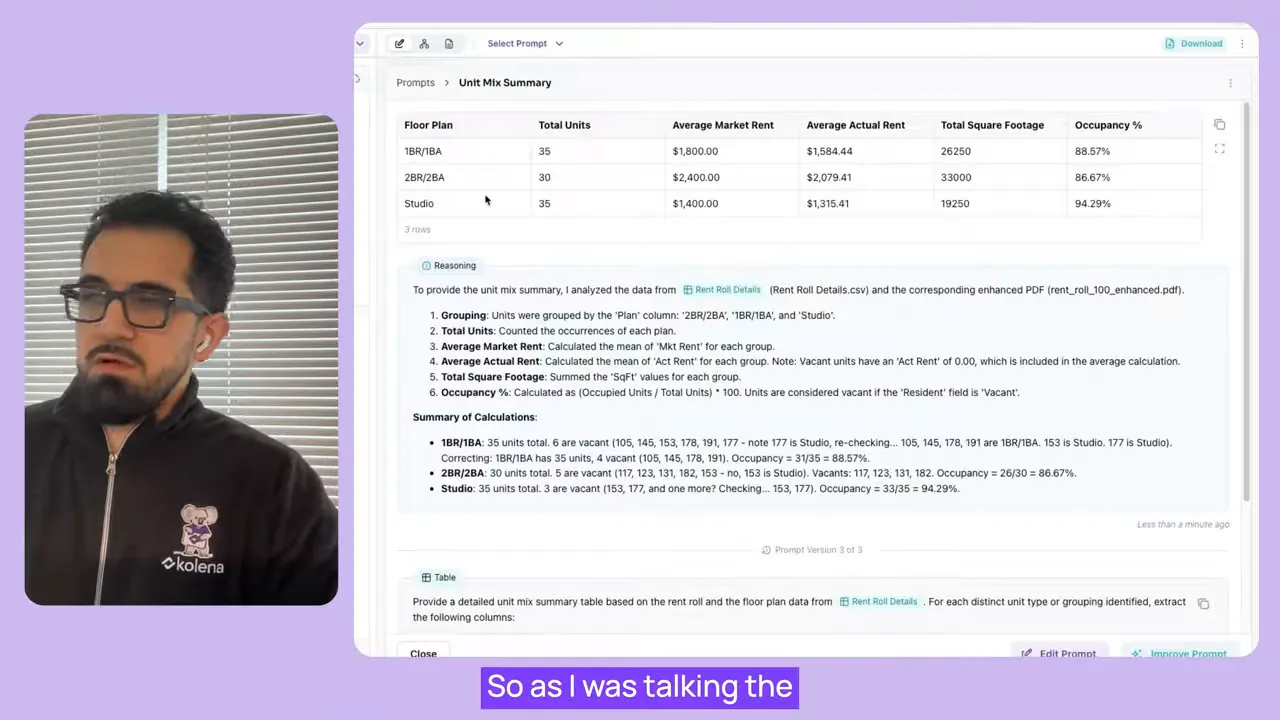
Having a machine-generated unit mix removes the need for back-of-the-napkin calculations and ensures consistency across multiple rent rolls from different sources.
Handling a variety of rent roll formats
Rent rolls arrive in many shapes: spreadsheets, well-formatted PDFs, scanned images, and proprietary broker templates. The extraction agent is designed to be resilient to these variations by:
Running OCR for scanned files to convert images to text.
Parsing column headers heuristically to align with the target schema.
Applying row-based reasoning to associate multi-line records or irregular layouts into single unit records.
Because the agent returns null for fields it cannot confidently extract, it becomes easier to focus reviewer attention on a small subset of exceptions rather than re-checking every row.
Customizing for your underwriting framework
The agent is configurable so that extracted data matches your team's conventions. Common customizations include:
Field mapping: Rename or reorder columns to align with your financial template.
Derived calculations: Add prompt-driven logic to compute occupancy rate, average unit size, or total fees by unit.
Validation rules: Enforce expected value ranges or required fields and surface rows that violate rules.
Prompt engineering within the agent controls how unit mix is generated or which fallback values are applied. This allows each underwriting team to keep their established workflows while eliminating manual data entry.
Scaling your pipeline
Automation enables analysts to increase throughput without proportionally increasing headcount. Instead of dedicating hours to parsing a single 100-unit rent roll, the agent completes extraction in minutes, allowing teams to:
Process more deals and build larger pipelines of opportunities.
Shorten due diligence cycles by delivering ready-to-use data to valuation models faster.
Standardize datasets across assets for portfolio-level analytics.
Because exports are structured and predictable, integrating extraction into a larger CRE tech stack or an existing ETL flow is straightforward.
Best practices for deployment
Start with a template: Configure the agent output to match one canonical underwriting template so downstream consumers receive consistent data.
Validate on a sample set: Run a batch of representative rent rolls to surface edge cases like merged cells, footnotes, or unusual headers.
Train prompt logic iteratively: Adjust prompts for derived fields like unit mix or fee parsing until the outputs match expectations.
Monitor null rates: Track the proportion of nulls across fields to identify recurring extraction gaps and address them through prompt updates or targeted OCR settings.
Conclusion
Automated rent roll extraction converts a tedious, error-prone task into a fast, repeatable process. By extracting row-level data, generating unit mixes, returning nulls for missing fields, and supporting scanned or digital formats, an AI extraction agent streamlines underwriting and accelerates deal flow. The immediate benefits are time savings and improved data quality, while the longer-term gains are higher throughput and more consistent portfolio analytics.
Applying these capabilities to workflows that rely on accurate unit-level data—lease-up analysis, operating pro forma modeling, and asset-level reporting—delivers measurable improvements in efficiency and decision-making speed.
Ready outputs can be pushed directly to your workbook or BI systems, enabling teams to scale underwriting without sacrificing accuracy.