A stalled renewal, a delayed quote, or a mountain of mixed-format PDFs can all trace back to one recurring bottleneck: the loss run. Firms still spend hours manually re-keying, normalizing, and consolidating loss run data into underwriting models. That manual work slows decision-making, blocks concurrent business, and creates risk. The good news: modern AI workflows designed specifically for loss run analysis remove that friction while keeping outputs auditable and export-ready.
This is part of a series of articles about AI for Insurance.
Why loss run processing frequently becomes a bottleneck
Loss run documents arrive in dozens of carrier formats: clean spreadsheets, scanned PDFs, crooked images, or mixed packages with inconsistent labels. Underwriting teams then:
Open multiple files one at a time and copy/paste key fields.
Re-key or normalize claim statuses (C, O, Closed, etc.).
Concatenate different schemas into a single template for analysis.
That manual process can take 15 minutes for a simple package and several hours for multi-carrier renewals or submissions. The delay cascades—quoting and underwriting wait on loss run analysis, new submissions pile up, and teams can’t scale without adding headcount.
Why general chat tools fall short for loss run analysis
Flagship chat models are excellent for ideation and single-document Q&A, but they struggle with document-heavy workflows. Key shortcomings:
One-document-at-a-time: Uploading a file, prompting, repeating—this does not scale to dozens of documents.
Freeform outputs: Bulleted text or paragraphs don’t map cleanly into your underwriting templates or Excel schema.
Normalization gaps: Carrier-specific abbreviations (C, O, R) come back inconsistent unless you manually normalize them.
Context hallucination risk: Large multi-document context increases the chance of incorrect extractions without verifiable citations.
What underwriters need is a repeatable, auditable workflow that can process mixed-format loss run packages in parallel, output normalized fields into a chosen schema, and provide clear citations for every extracted value.
How an agent-based approach fixes loss run triage
Think of the solution as a collection of specialized agents working together: inputs → extraction prompts → structured outputs. Agents are like teammates that run the same workflow reliably every time. Inputs can be:
Email inbox triggers
Manual file drops
Cloud storage (Dropbox, SharePoint)
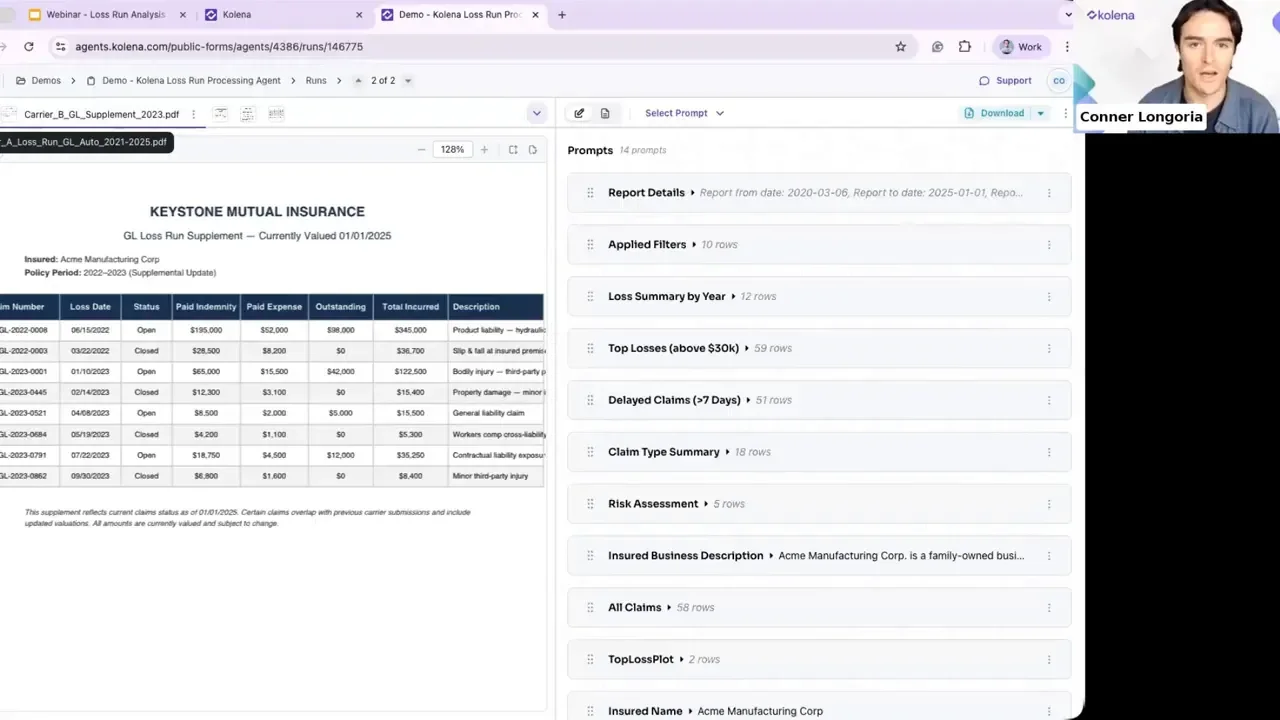
Each agent runs a focused extraction prompt across all documents, producing numeric, table, or text outputs that align to your underwriting template. Multiple prompts run in concert so a single pass yields:
Claim summaries by period and loss type
Normalized claim status and monetary fields
Risk assessments and simple calculations (percentages, totals)
Visual: mixed package upload
What a loss run extraction prompt can do
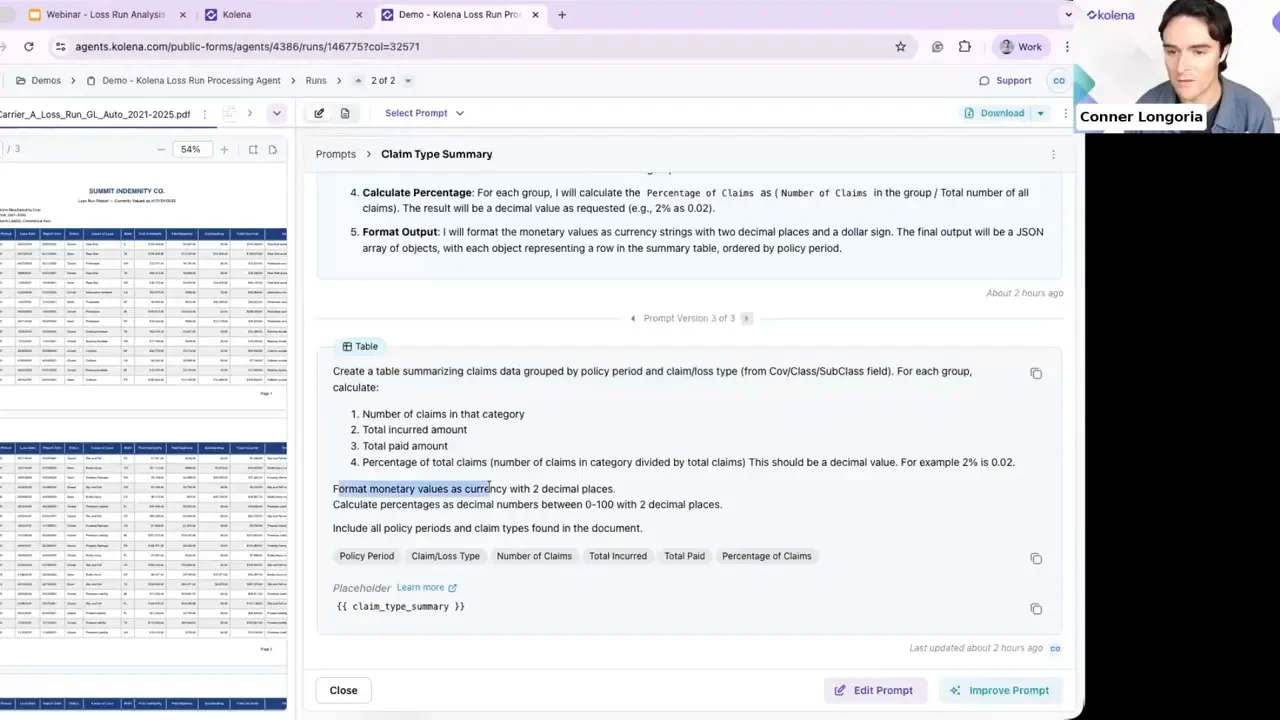
Prompts are not rigid. They are customizable instructions that tell an agent exactly which fields to extract, how to format monetary values, and whether to calculate percentages. Example capabilities:
Table generation summarizing claims by policy period and loss type.
Field normalization to ensure "Closed", "C", or "CL" all map to a single status in your template.
Arithmetic and analytics — calculate total paid, share of paid by loss type, and other KPI metrics.
Risk detection — flag physical altercations, injury patterns, large settlements, or litigation mentions.
Prompt deep dive: claim type summary
A claim type summary prompt can produce outputs like policy period, claim loss type, number of claims, and total paid percentage. Crucially, every extracted value is paired with a citation—click the citation and the system jumps to the exact source page and location.
Learn more about AI in Life Insurance.
Auditability: citations and reasoning traces
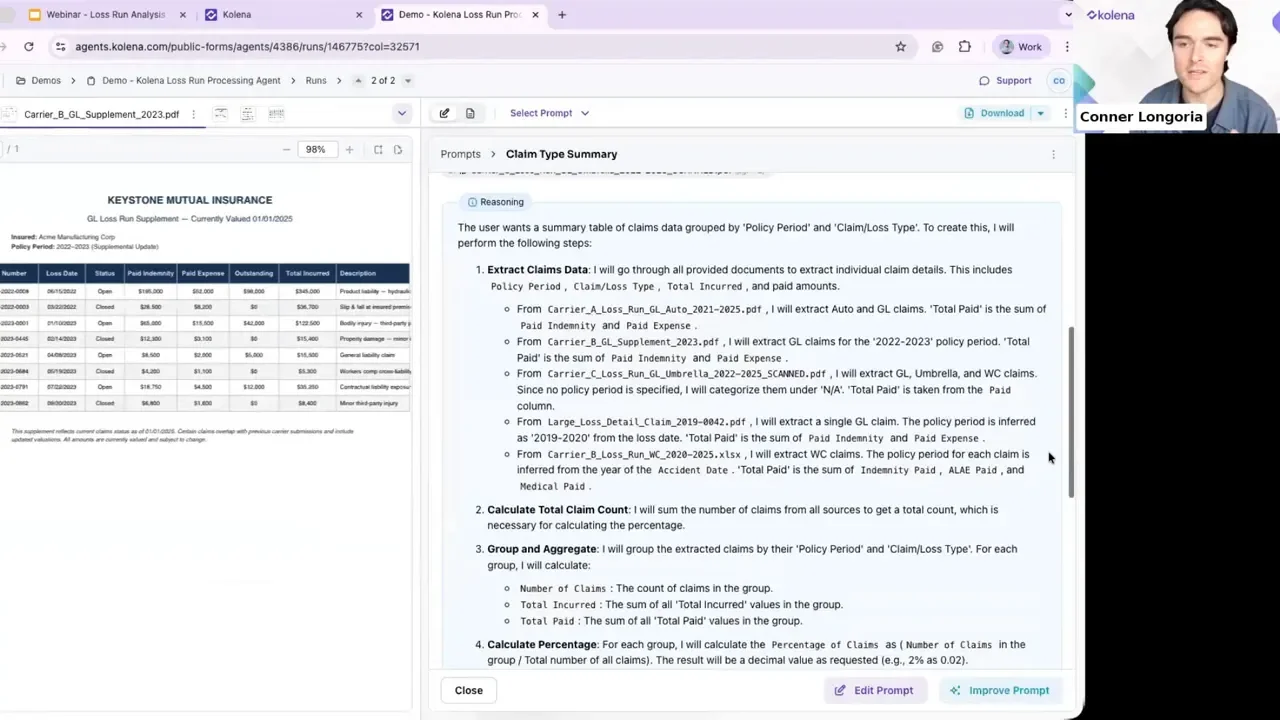
For underwriting and regulatory work, trust matters. Two features that build trust:
Citations: Each extracted field links back to the precise document and page where the value was found. That makes QA fast: verify a number in seconds instead of hunting through pages.
Reasoning trace: An explanation of what the agent looked for, page-by-page notes, and why it included (or excluded) items in the final table. This improves quality assurance and handoffs to underwriters.
Turning loss runs into underwriting insights
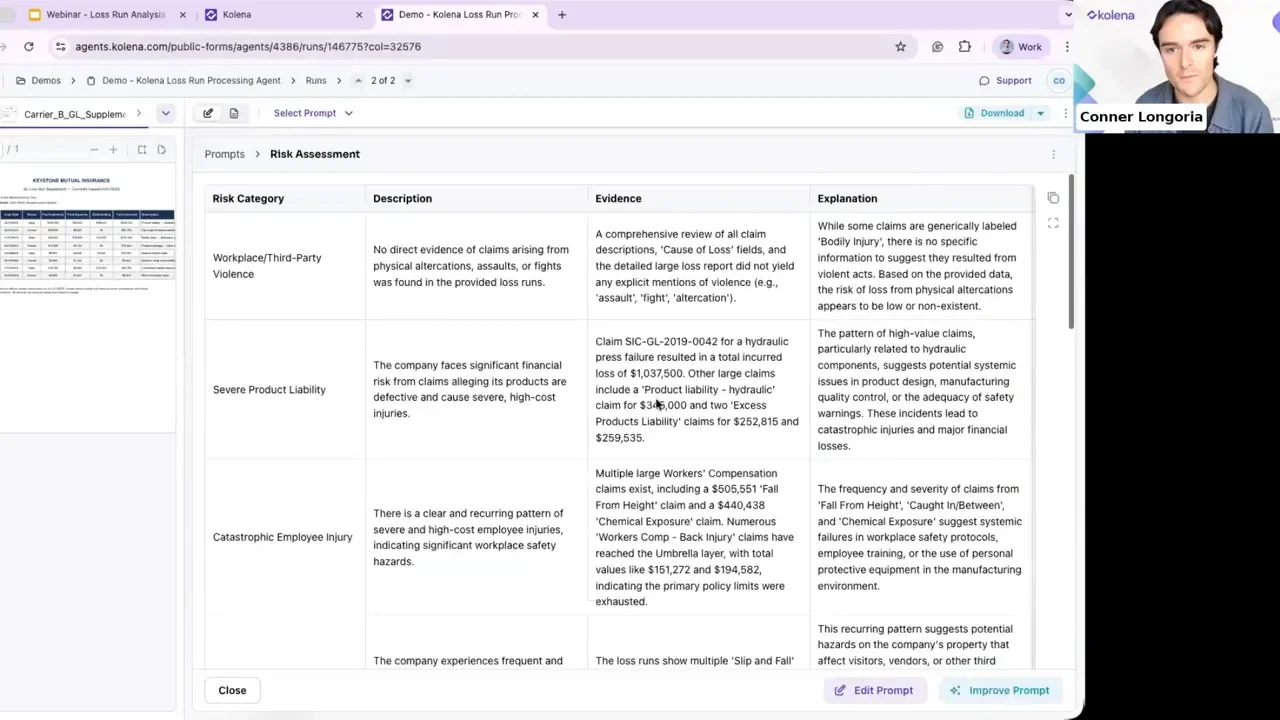
Extraction is only the start. Agents can read descriptive text in loss runs and produce a risk assessment that highlights:
Physical altercations or repeated injury patterns
Large single-loss amounts or increasing claim severity
Litigation mentions or patterns suggesting emerging exposures
The system aggregates evidence across all documents and returns a concise set of risk categories with supporting citations and explanatory text, saving underwriters minutes or hours of manual review.
Customize prompts, add new extractions, and export
Flexibility matters. Users can:
Edit existing prompts or create new prompts to extract custom fields.
Run a single package multiple times with different extraction sets.
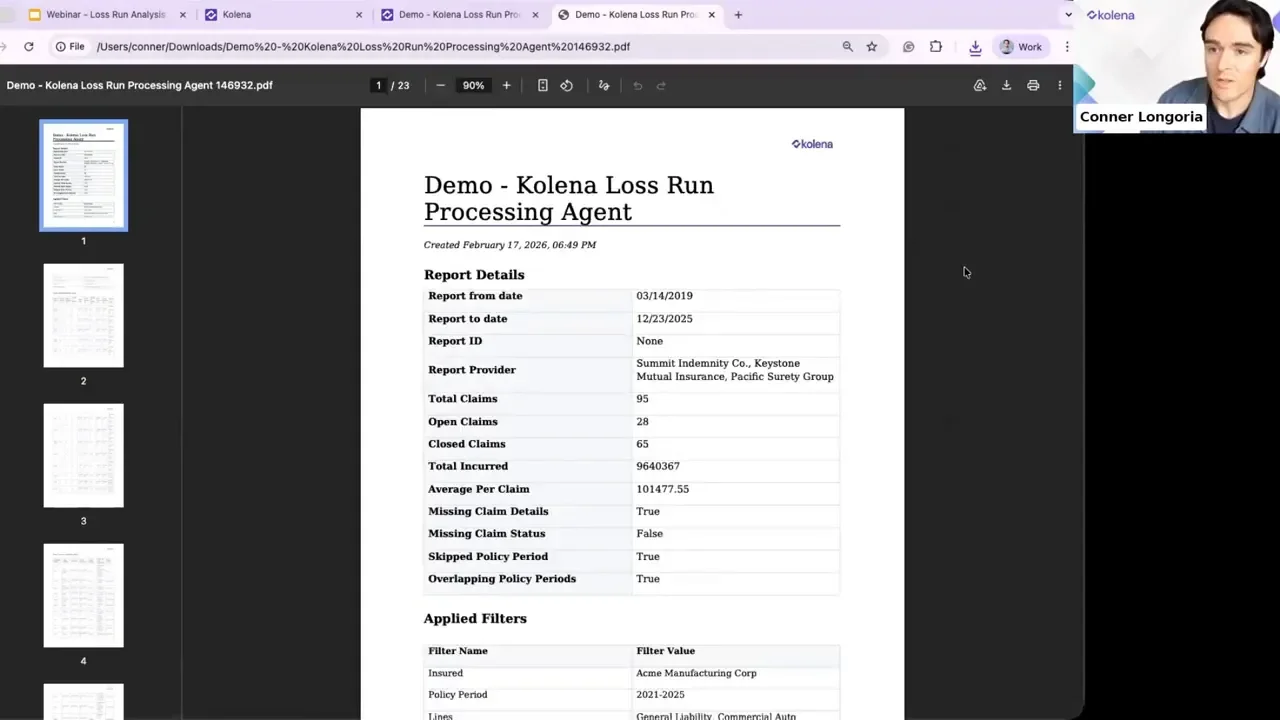
Export the final output into templates, Excel, or direct email destinations.
Typical output is a structured PDF or spreadsheet with every field linked to its source. This allows immediate analysis or direct ingestion into underwriting models.
Security, accuracy, and adoption support
For regulated industries, three operational details matter:
Zero data retention options: documents can be processed without long-term storage.
Continuous benchmarking: models are validated and re-benchmarked regularly to maintain extraction accuracy.
Domain experts: onboarding includes pairing customers with insurance-domain AI architects to design prompts and validate ROI during a proof of concept.
Practical workflow: from inbox to decision
A simple, repeatable flow for loss run analysis:
New loss run package arrives (email, cloud drop, manual upload).
Agent suite runs extraction prompts in parallel across all documents.
System returns a normalized, templated output with citations and reasoning.
Underwriter reviews the reasoning or clicks citations for QA, then exports to their pricing model.
Benefits at a glance
Speed: From hours to minutes for multi-carrier loss run packages.
Scalability: Run concurrent submissions and renewals without proportional headcount increases.
Audit-ready: Every number has a source and a reasoning trail.
Customizable: Tweak prompts to match your schema and reporting needs.
Final thoughts
Replacing manual loss run triage with a purpose-built, agent-driven workflow turns a major underwriting choke point into an advantage. Teams move faster, maintain high-quality audit trails, and free underwriters to make decisions rather than translate documents. If your organization is still spending significant time normalizing loss run data, focusing on an extraction-first, citation-backed workflow will change how quickly you can underwrite and quote.
For teams ready to experiment, try a public loss run agent to see how a mixed package is analyzed, and consider working with a domain-focused AI architect to tune prompts and dashboards for your specific underwriting templates.
Key takeaways
Loss run analysis is a high-value automation target with measurable ROI.
Specialized agents succeed where general chat models struggle: parallel processing, normalization, auditability, and export-ready outputs.
Design prompts to extract, calculate, and reason—then verify quickly with citations.
Transform the loss run from a blocking problem into a scalable, auditable asset for underwriting.