A lease and rent roll audit is the systematic process of comparing lease documents to the rent roll or rent ledger for a property to confirm rents, deposits, fees, and key lease terms are accurate. If you manage acquisitions, asset management, or property operations, a reliable rent roll audit reduces financial risk, corrects data errors, and speeds post-acquisition onboarding.
This article is part of a comprehensive series on Rent Roll.
Who needs a rent roll audit and when to run one
A rent roll audit is essential for:
Acquirers and capital funds verifying seller-provided financials before closing.
Property managers onboarding a newly purchased building to ensure their lease management system matches signed leases.
Portfolio managers running periodic checks (quarterly or semiannual) to catch drift between leases and digital records.
Accounting and compliance teams ensuring security deposits, fee structures, and lease options are recorded correctly.
Why a rent roll audit matters
Protects valuation and underwriting by ensuring scheduled rents and concessions on the rent roll match the leases used to build financial models.
Prevents billing and legal errors by surfacing incorrect security deposits, pet fees, or other charge inconsistencies.
Speeds post-close integration by producing a validated dataset for lease administration systems and accounting uploads.
Common audit scope and data points
At minimum, a rent roll audit should validate these fields per unit:
Unit identifier or number
Tenant name and lease start/end dates
Scheduled monthly rent and any rent escalation schedule
Security deposit amount
Non-refundables such as pet fees and administrative fees
Concessions, special lease addendums, and move-in discounts
Lease amendments and executed riders
Challenges that make rent roll audits hard
Manual audits are time consuming and error-prone. Typical obstacles include:
Volume and length: Hundreds of leases, each dozens of pages, create thousands of pages to check.
Format mismatch: Seller rent rolls arrive in different formats and often contain typos or missing unit keys.
Context limits: Automated NLP tools may struggle to process extremely large combined documents reliably in a single pass.
Key matching: Unit numbers or tenant names may not match exactly between lease PDFs and rent roll spreadsheets.
Leveraging AI for fast and accurate rent roll audits
AI offers a new way to overcome these challenges and perform quick and highly-accurate rent roll audits. But trying to do this with a generic AI chatbot, such as ChatGPT or Copilot, will still be a lengthy and complex process. What's needed is an AI tool purpose-built for this workflow. Fortunately, such tools exist. Meet Kolena AI, which has pre-built AI agents and templates specific to conducting lease and rent roll audits.
Following is a step-by-step guide on how to perform a rent roll audit with Kolena.
Recommended workflow: scalable rent roll audit
To speed audits while keeping accuracy high, Kolena offers a two-stage, template-driven workflow. This approach breaks the job into per-lease extraction followed by a single comparison step against the rent roll.
Collect inputs
Gather each executed lease in any format--PDF, Word, scanned images--and the seller-supplied rent roll spreadsheet. You can drop the documents in a designated folder connected to the AI agent in tools such as SharePoint, Box, Dropbox (and many other storage tools). You can even email the leases to the AI agent as an attachment.
Lease extraction
The AI agent will then process each lease to extract structured fields: unit number, scheduled rent, deposit, fees, lease, amendments, and additional information that goes into a rent roll.
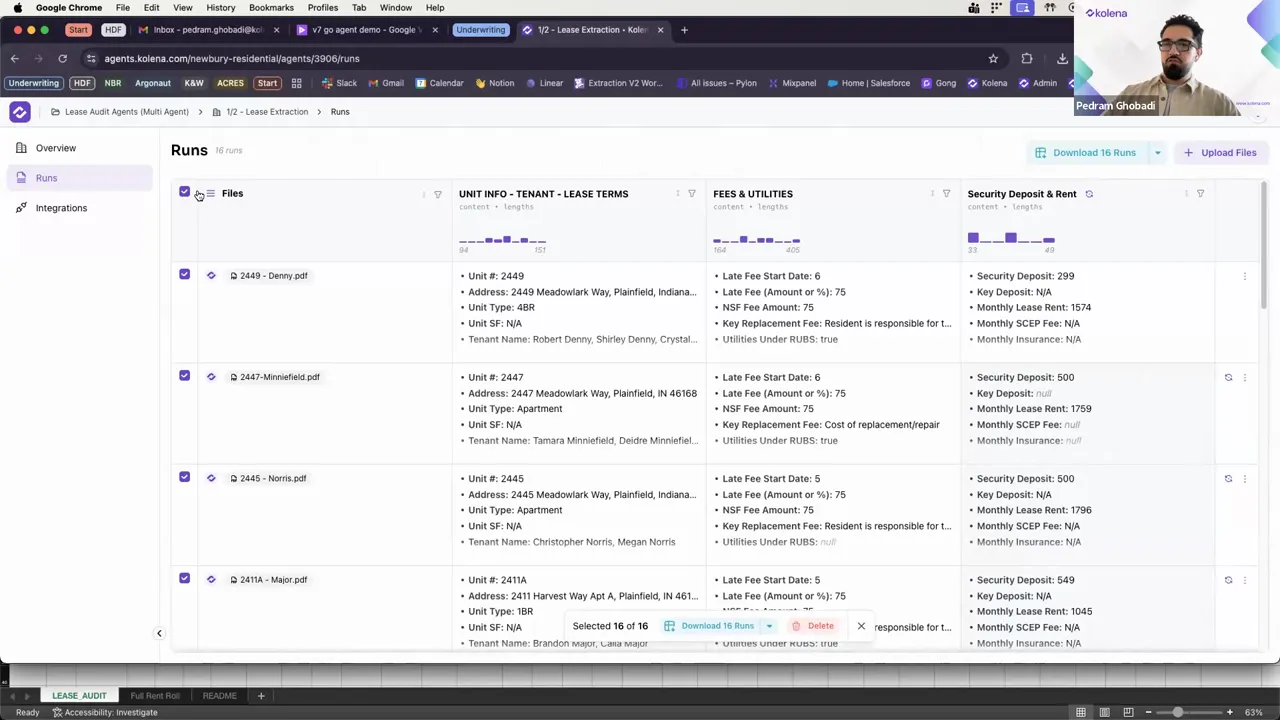
Standard outputs with a rent roll template
The AI agent inserts the data into an Excel template that formats every lease output into the same schema. The template becomes your canonical rent roll row format and includes calculated fields such as monthly effective rent if concessions are present. You will now have the information from all leases.
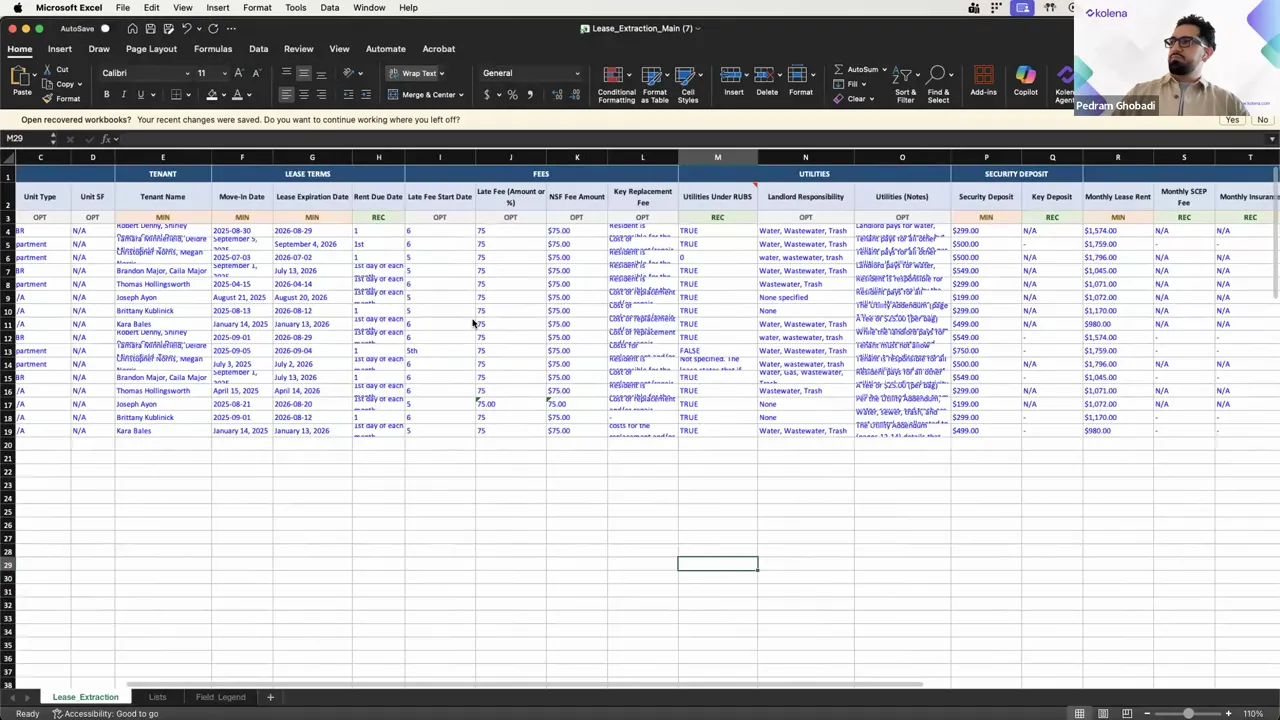
Compare aggregated lease data to the seller rent roll
A second AI agent will run a comparison between the aggregated lease-derived rent roll and the seller rent roll file that needs to be audited. It uses a common key, such as unit number, to match rows and calculate deltas for rent, deposit, and other numeric fields.
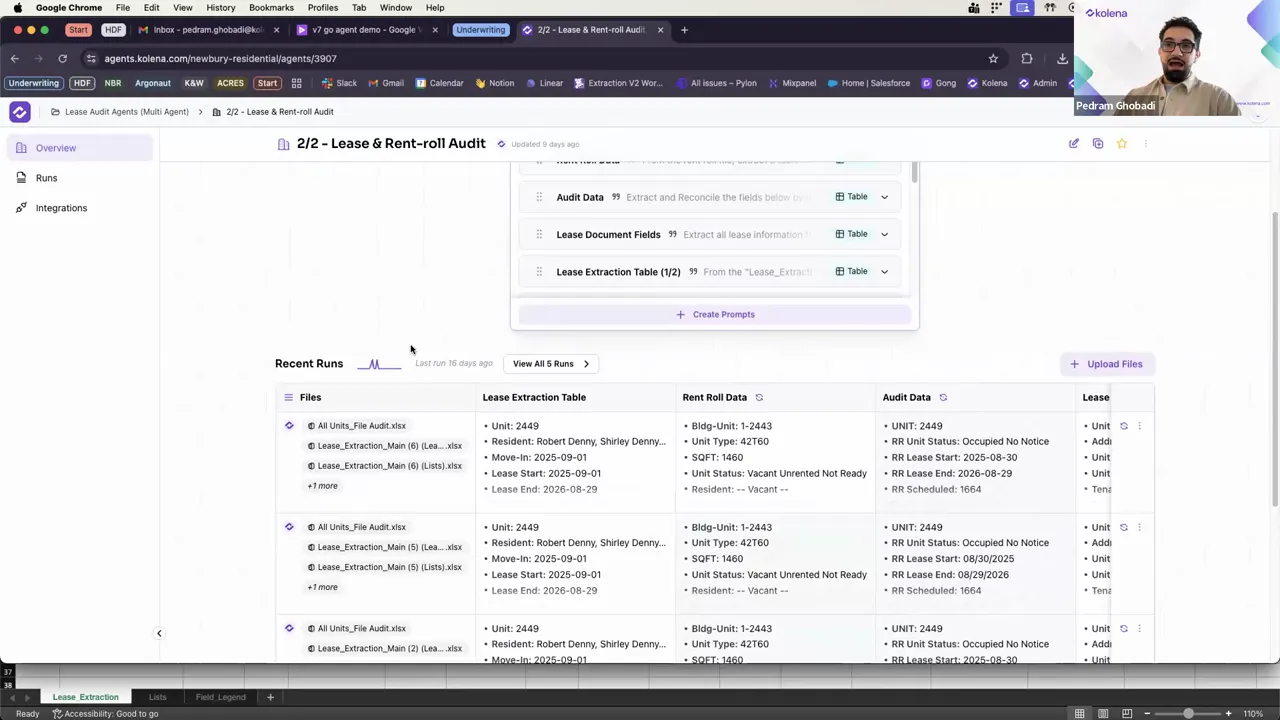
Review exceptions and resolve
The out put if the AI agent flags every mismatch that exceeds tolerance. It allows easily opening the original lease document to confirm whether an amendment or data entry error explains the discrepancy. The AI output provides a triage column to mark changes that require tenant communication, lease amendment, or correction in your lease management system.
Export validated datasets
The AI agent's can be uploaded or sent directly to your property management platform, such as Appfolio, Buildium, or Yardi, and provides an audit report summarizing exceptions, fixes, and adjusted financial assumptions for underwriting.
How the AI spreadsheet produces reliable comparisons
The Kolena AI provides a workbook, specifically designed for a rent roll audit. Here are some of mechanisms it uses for this:
Canonical key
The AI builds a consistent unit key from the lease extraction and seller rent roll. It uses trimmed and uppercased unit identifiers to avoid false mismatches.
Tolerant numeric matching
The AI compares numeric fields with a tolerance threshold rather than exact equality to avoid flagging rounding differences. Example: flag only when ABS(lease_rent - rent_roll_rent) >= 1.00.
Uses INDEX-MATCH or XLOOKUP not VLOOKUP
These formulas are more robust when columns move. XLOOKUP also returns a default if a key is missing.
Automated delta columns and conditional highlighting
The AI's template contains columns that compute the difference and a status column that sets values to Review, Match, or Missing. It applies conditional formatting to make exceptions visible at a glance.
Keeps logic in the workbook
Embedding comparison logic in the workbook lets you re-run audits and share a self-contained file with stakeholders who may not have access to extraction tools.
Example formulas
Here are common formulas the AI utilizes. It auto-populates fields such as [@Unit] and [@ExtractedRent].
=XLOOKUP([@Unit], 'RentRoll'!Unit, 'RentRoll'!Rent, "MISSING")
=ABS([@ExtractedRent] - [@RollRent])
=IF([@Delta] > 1, "REVIEW", "MATCH")
Practical checklist for a single rent roll audit
Gather all lease documents and the seller rent roll spreadsheet.
Run per-lease extraction using a consistent template.
Aggregate extracted rows into a single sheet.
Normalize unit keys and date formats.
Run lookup formulas and compute deltas for key fields.
Flag exceptions using thresholds and conditional formatting.
Manually verify flagged leases and document corrections.
Export corrected rent roll to lease management or accounting systems.
Store audit logs and the validated files for compliance.
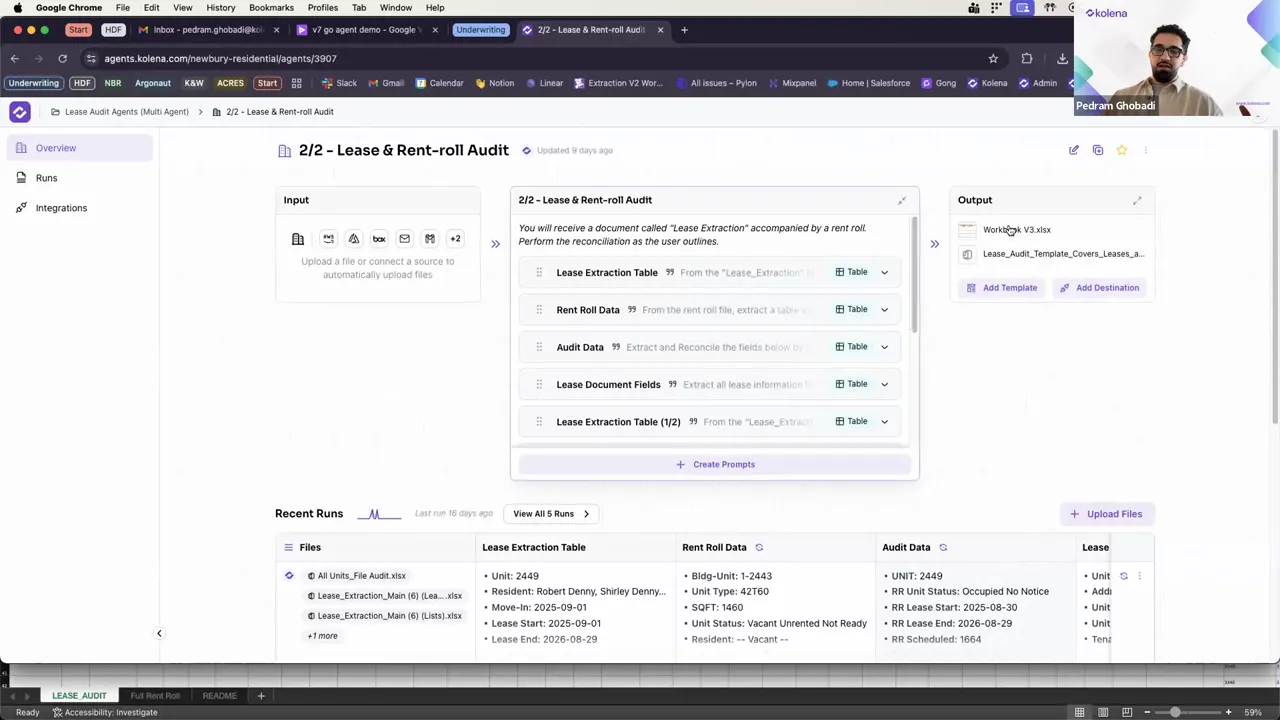
What to do with audit exceptions
Not every mismatch requires the same follow-up. Use an exception matrix to standardize actions.
Data entry errors on seller rent roll: Correct the rent roll and document the correction in the audit log.
Lease amendment or executed rider found: Attach amendment to the lease in your system and update the rent roll.
Missing documentation: Request documentation from the seller or operations team before closing or before posting to your system.
Discrepancies affecting underwriting: Re-run your financial model with corrected numbers and adjust pro forma if needed.
Automation and scaling tips
Parallel processing: Run extractions in parallel batches to reduce clock time.
Single-extractor, multiple-outputs: Configure the extractor to emit several outputs: an audit schema, an ETL schema for uploads, and a clause/lease clause extraction file for legal review.
Save templates: Maintain and version your runs template so audits are consistent across properties and teams.
Store raw outputs: Keep document citations and extraction outputs so any future disputes can be rechecked quickly.
Common mistakes in rent roll audits and how to avoid them
Relying only on seller spreadsheets: Always verify against signed leases. The seller rent roll can be inaccurate.
No canonical key: Always normalize and validate a unit key. Missing or inconsistent unit identifiers cause most false mismatches.
Exact-equals for numeric comparison: Use tolerances to avoid false positives from rounding or currency formatting differences.
No exception workflow: Without a defined escalation path, exceptions pile up and audits stall. Assign owners and deadlines for every exception.
Frequently asked questions
How long does a rent roll audit take?
Manual audits can take 15 to 20 minutes per lease plus time to cross-check the rent roll, which adds up to several hours. With an AI-powered two-stage workflow, extraction and comparison for a lease cluster can be reduced to minutes, with the overall audit process taking no more than 10 minutes.
Can the AI extract-and-compare process handle hundreds of leases?
Yes. Using per-lease extraction runs and aggregating outputs allows you to scale to hundreds of leases without hitting single-document processing limits.
What if unit numbers do not match?
The AI Implements normalization rules and fuzzy matching. Where automated matching fails, rows are flagged as unmatched and can be handled manually through a reconciliation step.
Summary
A robust rent roll audit reduces risk and accelerates integration of new properties. Leverage AI tools, such as Kolena, that extract data per lease, standardize outputs with a template, then compare the generated rent roll to the seller file using tolerant spreadsheet logic. The AI embeds exception workflows and keeps a versioned template set so audits are repeatable and auditable. Follow the checklists and formulas here to move from a slow manual process to a scalable, repeatable rent roll audit that saves time and protects value.