What Is a Loss Run Report?
A loss run report is a document generated by insurance carriers that provides a record of all claims made against an insurance policy over a defined period. This report is used by businesses and insurance professionals because it summarizes the claims history, including both open and closed claims, and their current status.
Loss run reports are commonly requested during policy renewals, when switching insurers, or as part of routine risk management assessments. They serve as the official claims history for a policyholder and are a key input for underwriters when evaluating risk or determining premiums.
These reports are not limited to one type of insurance; they are used across commercial insurance lines, such as general liability, workers’ compensation, property, and auto insurance. The information in a loss run report provides a clear view of past incidents, the financial impact of claims, and trends that may affect future insurability.
This is part of a series of articles about insurance claims processing
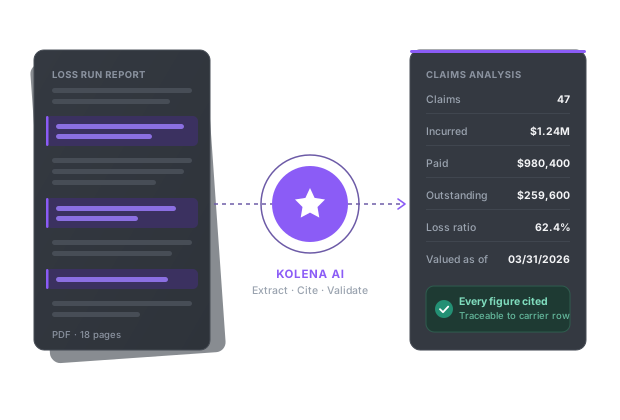
Turn loss runs into a clean spreadsheet in minutes with AI
What Does a Loss Run Report Include?
Policyholder and Policy Information
The first section of a loss run report typically contains policyholder and policy information. This includes:
The name of the insured business or individual
The policy number
The type of insurance
Effective and expiration dates
Contact details
Accurate identification of the policyholder ensures the report is tied to the correct account and reflects the appropriate coverage period.
This section may also specify the insurance carrier and the broker or agent responsible for the policy, creating a record of all parties involved. Policy information sets the context for interpreting claims data. For example, knowing the policy period helps determine which incidents fall within the scope of the report. It also aids in tracking changes in coverage or carriers over time.
Claim Details
Each claim entry typically lists:
The date of loss
The date the claim was reported
The claim number
The type of incident
A brief description of what occurred
This information provides the timeline and circumstances of each event, allowing insurers and policyholders to assess the nature and frequency of claims.
In addition to basic claim data, loss run reports may include the status of each claim, such as open, closed, or pending, and related notes or updates. These entries help stakeholders track the progression of claims and understand the resolution process. Detailed claim information supports risk management and communication between insurers, brokers, and insured parties.
Financial Information
Financial information in a loss run report outlines the monetary aspects of each claim. This typically includes:
The total incurred amount, which is the sum of paid losses and reserves
The estimated future payout on open claims
A breakdown of the amount already paid and any outstanding reserves.
This provides a picture of the insurer’s current and potential financial obligations.
Accurate financial data in loss run reports supports underwriting and risk management. It helps underwriters determine premiums and coverage terms based on historical loss experience. For policyholders, this information highlights areas where losses have been most significant and can inform decisions about risk mitigation, claims prevention, or coverage changes.
Related content: Learn more about how AI is changing insurance underwriting.
Loss Run Report Example Format
A loss run report example format may vary by insurance carrier, but most reports follow a structured table that allows claims information to be reviewed quickly. The format usually begins with policy-level details, followed by a claim-by-claim breakdown and financial totals. Below is a simplified example of how a loss run report may be organized:
Policy holder | Policy Number | Policy Period | Claim Number | Date of Loss | Claim Type | Claim Status | Paid Amount | Reserve Amount | Total Incurred |
ABC Construction LLC | GL-458921 | 01/01/2023–01/01/2024 | CLM-1001 | 03/14/2023 | General Liability | Closed | $8,500 | $0 | $8,500 |
ABC Construction LLC | GL-458921 | 01/01/2023–01/01/2024 | CLM-1002 | 07/22/2023 | Property Damage | Open | $12,000 | $6,000 | $18,000 |
ABC Construction LLC | GL-458921 | 01/01/2023–01/01/2024 | CLM-1003 | 10/05/2023 | Bodily Injury | Closed | $4,250 | $0 | $4,250 |
In this example, the report shows the insured business, policy number, policy period, claim numbers, dates of loss, claim types, claim statuses, and financial amounts associated with each claim. The “paid amount” reflects money already paid by the insurer, while the “reserve amount” represents funds set aside for expected future payments. The “total incurred” amount combines paid losses and reserves, giving underwriters and policyholders a clearer view of the overall claims cost.
A complete loss run report may also include additional fields, such as the date the claim was reported, claimant name, claim description, cause of loss, deductible amount, litigation status, and adjuster notes. Some reports also include summary totals at the bottom, such as total paid losses, total reserves, total incurred losses, and the total number of claims
Loss Run Report Example by Insurance Type
1. Workers’ Compensation Loss Run Example
A workers’ compensation loss run report focuses on employee injury and illness claims that occurred during the policy period. It typically includes the injured employee’s name or identifier, date of injury, claim number, injury type, body part affected, claim status, paid medical costs, paid indemnity or wage replacement benefits, reserves, and total incurred amount.
These reports help employers, carriers, and underwriters evaluate workplace safety trends and determine whether certain job roles, locations, or activities are producing repeated losses. For example, a workers’ compensation loss run may show that an employee suffered a back strain while lifting materials, resulting in medical treatment and temporary wage replacement payments.
Another claim may involve a slip-and-fall injury that remains open because the employee is still receiving treatment. By reviewing these claims, a business can identify recurring hazards, improve employee training, update safety procedures, or modify work practices to reduce future injuries and control insurance costs.
A simplified workers’ compensation loss run example may include fields such as:
Employee/Claimant | Claim Number | Date of Injury | Injury Type | Claim Status | Medical Paid | Indemnity Paid | Reserve Amount | Total Incurred |
Employee A | WC-2041 | 02/10/2023 | Back strain | Closed | $3,200 | $1,500 | $0 | $4,700 |
Employee B | WC-2098 | 06/18/2023 | Slip and fall | Open | $8,750 | $4,000 | $6,500 | $19,250 |
2. General Liability Loss Run Example
A general liability loss run report summarizes third-party claims made against a business for bodily injury, property damage, personal injury, or advertising injury. These claims often involve customers, vendors, tenants, or members of the public rather than employees. The report typically lists the date of loss, claim number, claimant information, description of the incident, claim status, paid amount, reserve amount, and total incurred losses.
For example, a retail business may have a general liability loss run showing a customer slip-and-fall claim in a store aisle. A contractor may have a claim involving damage to a client’s property while performing work. These examples help insurers evaluate whether the business has recurring safety issues, inadequate procedures, or exposure to high-severity claims.
A simplified general liability loss run example may include:
Claimant | Claim Number | Date of Loss | Claim Type | Description | Claim Status | Paid Amount | Reserve Amount | Total Incurred |
Customer A | GL-3102 | 04/05/2023 | Bodily Injury | Slip and fall on premises | Closed | $7,800 | $0 | $7,800 |
Client B | GL-3187 | 09/12/2023 | Property Damage | Damage to client equipment | Open | $5,500 | $3,000 | $8,500 |
3. Commercial Auto Loss Run Example
A commercial auto loss run report details claims involving vehicles used for business purposes. These may include accidents involving company-owned vehicles, leased vehicles, hired vehicles, or employee-driven vehicles covered under the policy. The report usually includes vehicle information, driver details, date of loss, accident description, claim type, claim status, paid losses, reserves, and total incurred amounts.
For example, a commercial auto loss run may show a rear-end collision involving a delivery van, a property damage claim from backing into a parked vehicle, or a bodily injury claim resulting from an at-fault accident. Underwriters review these reports to evaluate driver safety, fleet management practices, accident frequency, and claim severity.
A simplified commercial auto loss run example may include:
Vehicle/Driver | Claim Number | Date of Loss | Accident Type | Claim Status | Liability Paid | Physical Damage Paid | Reserve Amount | Total Incurred |
Delivery Van 12 | AUTO-4420 | 01/28/2023 | Rear-end collision | Closed | $9,500 | $4,200 | $0 | $13,700 |
Truck 7 | AUTO-4489 | 08/16/2023 | Backing accident | Open | $2,750 | $6,100 | $2,500 | $11,350 |
4. Property Insurance Loss Run Example
A property insurance loss run report summarizes claims related to damage to buildings, business personal property, inventory, equipment, or other insured property. Common causes of loss include fire, theft, vandalism, wind, hail, water damage, equipment breakdown, or natural disasters. The report typically includes the property location, date of loss, cause of loss, claim status, paid amount, reserves, deductible, and total incurred amount.
For example, a property loss run may show a water damage claim caused by a burst pipe at an office location, a theft claim involving stolen equipment, or a fire damage claim at a warehouse. These reports help insurers evaluate the condition of insured properties, the effectiveness of maintenance practices, and the policyholder’s exposure to future property losses.
A simplified property insurance loss run example may include:
Location | Claim Number | Date of Loss | Cause of Loss | Claim Status | Paid Amount | Reserve Amount | Deductible | Total Incurred |
Main Office | PROP-5510 | 03/03/2023 | Water damage | Closed | $18,000 | $0 | $2,500 | $18,000 |
Warehouse B | PROP-5574 | 11/19/2023 | Theft | Open | $10,500 | $4,000 | $1,000 | $14,500 |
Related content: Read our guide to loss runs insurance
Manual vs. AI-Powered Loss Run Analysis
Manual loss run analysis involves reviewing reports by hand, typically using spreadsheets or printed documents. This process is time-consuming, especially for businesses with large volumes of claims data spanning multiple years or insurance lines. Human error is also a risk, as manual data entry and analysis can lead to missed trends or inaccurate conclusions. The manual approach often lacks real-time insights and can delay decision-making when compiling loss runs from multiple carriers.
AI-powered loss run analysis automates data extraction, aggregation, and trend identification using machine learning algorithms. These tools can process large volumes of claims data, highlight anomalies, and generate insights. Automation reduces human error and supports real-time reporting, enabling faster underwriting, risk assessment, and policyholder communication. As a result, AI-driven solutions are increasingly adopted by insurers and large commercial policyholders.
What to Look for in a Loss Run Automation Solution
Choosing the right loss run automation solution can reduce underwriting workload, improve accuracy, and speed up decision-making. AI-driven platforms automate data extraction, normalization, and reporting across multiple insurance carriers and file formats. When evaluating a solution, focus on features that improve efficiency, reduce manual effort, and integrate into existing workflows:
Automated data extraction: The solution should automatically extract claims data from PDFs, Excel spreadsheets, scanned documents, and email attachments.
Data normalization across carriers: Loss run reports often use different formats and field structures depending on the carrier. The platform should standardize data into a consistent structure for analysis and comparison.
Accurate categorization and validation: The system should separate paid losses, reserves, expenses, and total incurred amounts. Validation features reduce errors caused by missing rows, incorrect classifications, or duplicate entries.
Fast processing and analysis: AI-powered solutions should complete analyses in minutes rather than hours.
Excel and spreadsheet integration: The solution should export data directly into configurable Excel templates without requiring major workflow changes or retraining.
Support for mixed file formats: The platform should handle structured and unstructured documents within the same workflow.
Email and workflow integration: Some platforms allow users to submit loss runs through email and automatically route processed outputs to shared drives or internal systems.
High accuracy and reduced manual errors: AI-driven workflows should reduce mistakes caused by manual compilation, spreadsheet entry, or missed claim records.
Scalability for large volumes of data: The solution should support high submission volumes across multiple years of claims history and multiple insurance lines.
Security and compliance features: The platform should include security features such as SOC 2 compliance, access controls, and secure data handling practices.
Transparent reporting and auditability: Underwriters and compliance teams should be able to review how the system processed and categorized claims data.
Business impact and time savings: The solution should demonstrate measurable operational benefits, such as reduced analysis time, improved underwriting capacity, faster onboarding, and lower administrative costs.
How to Automate Loss Run Report Analysis with Kolena
Reviewing loss run reports by hand is slow and error-prone, especially when claims data is spread across multiple carriers and PDF formats. Kolena is an AI document automation platform that turns this manual work into a fast, repeatable workflow. With Kolena's free AI loss run analysis tool, you simply upload a loss run report PDF and generate a structured loss run spreadsheet in minutes—ready for claims analysis. Real estate firms, insurers, banks, and financial institutions use Kolena to cut document turnaround times by more than 95%.
Key capabilities of Kolena's loss run analysis tool:
Instant PDF-to-spreadsheet conversion: Upload a loss run report PDF and download—or receive by email—a structured loss run spreadsheet ready for claims analysis.
Results in minutes, not hours: Generate a complete loss run spreadsheet in minutes, helping teams cut document turnaround times by 95% or more.
Customizable AI agent: Clone the loss run analysis agent into your own account and tailor it to your exact workflows, policies, templates, and documents.
Accurate extraction at scale: Replace legacy OCR systems with precise, reliable extractions across high volumes of documents.
Secure by design: Your data stays secure and is never used to train AI models.
Try Kolena's free AI loss run analysis tool to see how quickly you can turn loss run reports into analysis-ready spreadsheets.