Microsoft 365 Copilot is built to make knowledge workers faster inside the apps they already use. It drafts emails, summarizes meetings, and answers questions about files in SharePoint and OneDrive. For day-to-day productivity, that is genuinely useful.
But when the work is a document-heavy operational workflow — lease abstraction, loss run analysis, loan file diligence, estoppels, appraisal extraction — productivity AI is the wrong tool for the job.
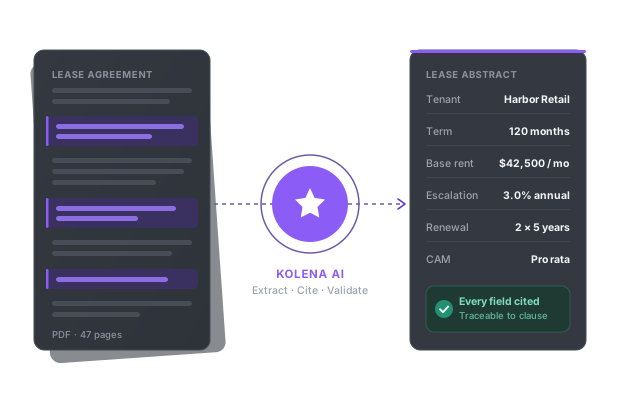
Kolena is built for that work. It runs fully automated, agentic workflows that extract structured fields, validate them with proprietary quality models, cite every output back to its source page, and deliver results directly into the systems your business already runs on.
Microsoft Copilot Is a Productivity Assistant, Not a Document Workflow Engine
Copilot is excellent at the work it was designed for: drafting, summarizing, and answering questions inside Word, Excel, Outlook, Teams, and SharePoint. For one-off questions about a document or a quick rewrite of an email, it is fast and convenient.
That utility breaks down when the work becomes repeatable, structured, and operational. Copilot was not built to abstract 200 commercial leases overnight, reconcile 1,500-page loan files against investor underwriting guides, or process loss runs across dozens of inconsistent carrier formats. The moment outputs need to be structured, validated field-by-field, and routed into downstream systems — spreadsheets, deal sheets, lender templates, asset management platforms — productivity AI becomes a bottleneck.
The core limitation is the same as any chat-style tool: Copilot answers questions. It does not run workflows.
Even with strong AI capabilities, Copilot still requires the user to do the hard work. You have to know which document to upload, what to ask, how to phrase the request, how to validate the answer, and where to copy the result. Independent reviews of Copilot's document handling note that it struggles to maintain structure across long documents, that schemas are not strictly enforced unless explicitly configured, and that scanned PDFs degrade extraction quality significantly. For ad hoc productivity that is fine. For production workflows that touch hundreds or thousands of documents a month, it is not.
Nine free AI document tools — pick your workflow
What About Copilot Studio? Doesn't That Solve Workflow Automation?
This is the right question to ask, and it deserves a direct answer.
Copilot Studio is Microsoft's low-code platform for building custom agents and workflows on top of the Copilot foundation. Recent releases have added agent nodes inside workflows, agent-to-agent communication, and tighter integration with Power Platform. On paper, it overlaps with what Kolena does. In practice, the gap is significant.
Copilot Studio is a toolkit. Kolena is a finished workflow.
With Copilot Studio, your team is responsible for designing the agent, configuring the knowledge sources, defining the output schema, wiring up the connectors, testing the prompts behind each agent node, and maintaining the whole stack as documents and requirements evolve. That work typically falls on a Power Platform admin or a developer, and it gets harder — not easier — as the document set grows. The Copilot retrieval API is capped at 25 results per query, which creates a practical ceiling on how much context an agent can pull from a large document set in a single pass.
Kolena is the opposite model. The agents for lease abstraction, loss run analysis, loan file diligence, and appraisal extraction are already built, tuned, and validated against thousands of real-world documents. You do not build them. You use them. Day one looks like a working production workflow, not a six-month internal build.
The other difference is what the agents are built for. Copilot Studio is a horizontal platform — it can be configured for many use cases, none of them deeply. Kolena's agents are vertical, purpose-built for document-heavy operations in commercial real estate, lending, and insurance. They understand what a lease amendment is, how a loss run is structured, and what an investor underwriting guide requires. That domain depth is the difference between an output that looks right and an output that actually is right.
Your AI Adoption Partner, Not Just a Platform
The biggest reason Copilot Studio projects stall is not the technology. It is the assumption that your team will figure out the rest.
Kolena does not make that assumption. Every Kolena customer gets a dedicated team that does the work most platform vendors leave to you, including:
Use case discovery. Kolena's AI architects work with your operations team to identify the workflows where AI agents will deliver the biggest ROI, in the order that compounds value fastest.
Agent design and deployment. We build the agents for your specific documents, schemas, and downstream systems — not generic templates.
Ongoing optimization. As volumes grow and patterns shift, Kolena tunes the agents in production so accuracy and throughput keep improving instead of decaying.
Maintenance as documents evolve. New investor guidelines, new carrier formats, new lease templates — the maintenance burden stays with Kolena, not your team.
Performance monitoring. We track every workflow against the outcomes that matter — accuracy, cycle time, throughput, exception rate — and surface what to fix before it becomes a problem.
A dedicated account manager for the whole relationship.
Kolena does not just build agents. We work with you to make sure every use case is ROI-positive and stays that way. That is what the budget holder cares about, and it is the difference between a successful AI rollout and a project that gets quietly shelved after six months.
Microsoft is a platform vendor. Kolena is a workflow partner. We deploy with you, tune with you, and scale with you.
The Time Difference Is Transformational
In a Copilot or Copilot Studio workflow, lease abstraction looks something like this: upload the lease to SharePoint, prompt Copilot for the key fields, refine the prompt when the output is inconsistent, manually validate every field against the source, copy the result into a spreadsheet, and repeat for the next document. Even with a well-designed Copilot Studio agent, a single lease typically takes an hour or more once you factor in agent maintenance, schema corrections, and human validation.
With Kolena, the same lease takes roughly one minute.
The difference is that Kolena runs the workflow end to end. No prompt tweaking. No agent rebuilding. No manual validation pass. Documents come in, structured outputs go out, citations attach automatically. Cycle times compress, throughput scales, and accuracy stays consistent across the portfolio.
Kolena Delivers Fully Automated Agentic Workflows
Kolena is not a chat interface bolted on top of a foundation model. It is a full automation platform built specifically to run production document workflows.
Day one with Kolena includes:
Fully integrated AI agents for your specific use case
Automated extraction, structuring, and validation
Outputs delivered directly to final destinations
Custom templates populated automatically
Source-linked citations on every field
Instead of spending weeks or months building agents inside Copilot Studio, configuring Power Automate flows, and stitching together connectors, your team is operational in hours.
Built to Fit Into Your Existing Workflow
Automation only works if it fits how teams already operate. Kolena integrates directly with the systems organizations actually use — Google Drive, Microsoft SharePoint, Box, and enterprise cloud storage — for both intake and output delivery.
Copilot fits beautifully inside the Microsoft ecosystem and very little else. If your firm runs on Google Workspace, Box, or a mix of cloud storage solutions, Copilot's value drops sharply. Kolena was designed from the start to be storage-agnostic on intake and destination-agnostic on output, so documents flow in and structured results flow out without manual downloads, uploads, or copy-and-paste.
Accuracy You Can Trust
Kolena is built for decision-grade AI. Accuracy and traceability are foundational, not optional.
Every Kolena workflow is backed by proprietary quality-checking models and automated validation layers that prevent hallucinated fields and ensure consistent outputs across the portfolio. Every extracted field includes clear reasoning and a source-level citation linked to the exact page of the source document — so analysts, underwriters, and auditors can verify any value in seconds.
Copilot grounds its responses with retrieval-augmented generation and provides citations to source documents, which is meaningfully better than ungrounded generation. But grounding is not the same as field-level validation. Copilot's underlying models can still produce confident-sounding but incorrect values, particularly across long documents, scanned PDFs, and inconsistent formats. Without a purpose-built validation layer, the burden of catching those errors falls back on your team.
This is why teams trust Kolena with high-impact workflows. We are AI you can trust.
Agent Building Is a Hidden Cost That Kolena Eliminates
Chat tools assume users know how to write prompts. Copilot Studio assumes your team can design agents, configure schemas, wire up connectors, and maintain the system as documents evolve. In both cases, the work becomes an ongoing maintenance burden owned by your team.
Kolena removes that burden. Customers describe what they want in natural language, and Kolena's platform handles agent construction, prompt optimization, model routing, and quality validation behind the scenes. No Power Platform admin required. No internal AI engineering team required.
Enterprise-Grade Security Built In
Kolena meets the security and compliance requirements of regulated industries. Customer data is never used to train models, zero data retention policies are enforced, and the platform complies with standards such as HIPAA, SOC 2 Type II, and PCI.
Your data remains yours, always.
Kolena vs. Microsoft Copilot vs. Copilot Studio at a Glance
Capability | Kolena | Microsoft 365 Copilot | Copilot Studio |
|---|---|---|---|
Primary purpose | Production document workflows | Personal productivity inside M365 | Low-code platform for building custom agents |
Who builds and maintains the workflow | Kolena's AI architects, with you | N/A — direct chat with the model | Your Power Platform admins and developers |
Time to first production workflow | Hours to days | Not designed for production workflows | Weeks to months |
Vertical depth (CRE, lending, insurance) | Purpose-built per use case | None | Horizontal — you build the depth |
Field-level citations + validation layer | Every field linked + proprietary quality models | Response-level grounding only | Whatever you choose to build |
Storage and system integration | Storage-agnostic (Drive, SharePoint, Box, enterprise cloud) | Microsoft 365 primarily | Microsoft ecosystem + connectors |
The Bottom Line
Microsoft Copilot makes individual knowledge workers more productive inside Microsoft 365. That is real, and for many tasks it is the right tool.
Kolena does something different. Kolena runs the document workflows your business depends on — lease abstraction, loss run analysis, loan diligence, appraisal extraction, estoppels — end to end, with accuracy you can defend, speed you can scale, and a partner that owns the outcome with you.
If your operation is document-heavy, accuracy-critical, and built for repeatable production work, Kolena is purpose-built to deliver it.