TL;DR
AI lease abstraction uses optical character recognition (OCR), natural language processing (NLP), and large language models (LLMs) to extract structured data — tenant names, dates, financials, options, clauses — from commercial lease documents in minutes instead of hours. Real-world deployments at firms managing billions in commercial real estate have reduced per-lease review time by 85% (from 2 hours to 17 minutes) and outsourcing costs by 50–90%, while maintaining accuracy above 95%. For commercial real estate teams running acquisitions, due diligence, asset management, or audits at portfolio scale, AI lease abstraction has shifted from an emerging capability to a deal-timeline requirement.
This guide explains what AI lease abstraction is, how it works, what it costs, how to evaluate vendors, and what real teams have achieved. It includes the full Real Capital Solutions deployment story, ROI math you can apply to your own portfolio, and an FAQ covering the most common buyer questions.
Try our AI-powered lease abstraction tool
What is AI lease abstraction?
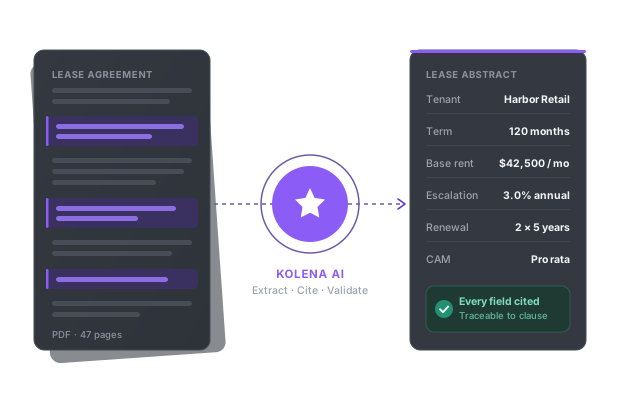
AI lease abstraction is the automated extraction and summarization of key terms from commercial lease documents using artificial intelligence. Where a traditional abstract requires an analyst to read each lease page-by-page and manually transfer terms — tenant, dates, base rent, escalations, options, exclusions, defaults — into a structured format, AI lease abstraction software performs the same task in minutes by combining several underlying technologies:
Optical character recognition (OCR) to convert scanned or image-based PDFs into machine-readable text.
Natural language processing (NLP) to identify clauses, entities, and obligations in lease language.
Large language models (LLMs) to reason about how lease provisions interact (for example, reconciling a base rent schedule against subsequent amendments to produce a single effective rent table).
Document-grounding layers that link every extracted data point back to the source page and clause, enabling human verification.
The category is distinct from generic OCR (which produces text but no structure), from lease management software like Yardi or RealPage (which stores lease data but does not extract it from documents), and from outsourced lease abstraction services (which use human reviewers and typically charge per-lease).
The four approaches to lease abstraction, compared
Approach | Time per lease | Cost per lease | Scale ceiling | Accuracy |
|---|---|---|---|---|
Manual (in-house analyst) | 2–8 hours | $50–$400 in labor | Limited by headcount | Variable; high cognitive load on reviewer |
Outsourced services | 24–72 hour turnaround | $200–$600 | Constrained by vendor capacity | Variable across vendors; QA-dependent |
Generic OCR + manual review | 1–4 hours | $30–$200 | Limited by reviewer | Low; text extraction without structured logic |
AI lease abstraction | 1–10 minutes | $0.50–$5 in compute | Effectively unlimited; batch parallel | 95%+ on standard fields with verification |
The last row is what this guide is about. The cost and time advantages are dramatic, but the meaningful question for CRE teams is whether the accuracy holds on real lease documents — including amendments, embedded rent tables, and the complex commercial leases that have historically defeated automated tools. Recent advances in LLM-based extraction have made the answer "yes," with caveats that this guide will cover.
Why commercial real estate teams need AI lease abstraction
The math behind the lease abstraction problem hasn't changed in twenty years; what's changed is what's possible to do about it. A commercial real estate team running acquisitions, asset management, or audits at portfolio scale faces a predictable cost structure:
Read about Scalable AI Lease Abstraction Providers.
Read about abstract commercial leases with ai.
An experienced lease abstractor takes 3–8 hours per lease for a typical 30-50 page commercial lease, longer for leases with multiple amendments or unusual provisions.
Acquisition due diligence on a 100-lease portfolio at 4 hours per lease consumes 400 analyst-hours, or roughly 10 working weeks of one full-time reviewer.
Outsourced lease abstraction typically costs $200–$600 per lease, with output quality that varies significantly across vendors and consistency that requires internal QA on top.
Deal timelines have compressed. Acquisition windows of 30–45 days for due diligence are now common; manual abstraction simply cannot move at that pace on portfolios above 50 leases.
Industry data from Deloitte, CBRE, and JLL reports has consistently shown that automation can compress lease review timelines by 70–80% while improving consistency. Industry-wide benchmarks suggest AI tools reduce abstraction labor by 70–90%, with accuracy rates above 95%. The economic argument is now strong enough that the question for most CRE firms is not "should we automate lease abstraction" but "which tool, and how fast can we deploy it."
The use cases that benefit most:
Acquisition due diligence, where speed compresses the time-to-bid and time-to-close on competitive deals.
Portfolio-wide audits, where extracting consistent data fields across hundreds or thousands of leases would be prohibitive manually.
Renewal and notice tracking, where missing a notice window because a critical date was buried in an amendment can cost six or seven figures.
Rent roll reconciliation, where lease abstracts feed rent rolls and discrepancies surface as cash flow errors.
Third-party lease abstraction services, where firms providing lease abstraction as a service can multiply their throughput without proportional headcount.
For teams in commercial real estate, insurance, banking, or financial services handling lease documentation, AI lease abstraction has become a baseline capability rather than a competitive differentiator.
Read about claude ai lease abstraction.
How AI lease abstraction works
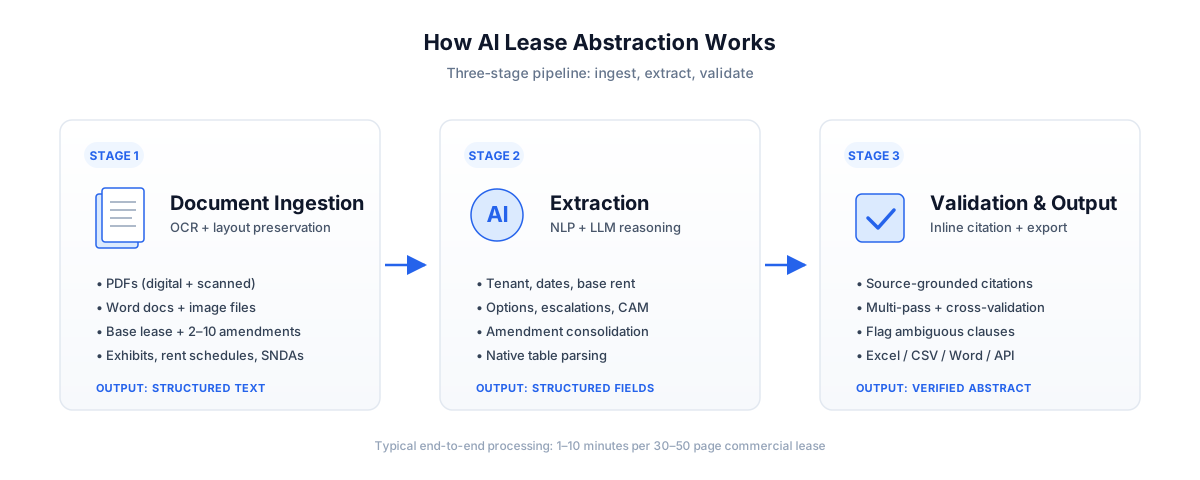
Modern AI lease abstraction follows a three-stage process. Understanding each stage matters because the failure modes of older tools all happen at specific stages, and modern vendors differentiate primarily on how they handle the hard problems within each.
Stage 1: Document ingestion
The system accepts lease documents in their native formats — PDFs (digital or scanned), Word documents, image files, and amendments delivered as separate files. The key technical challenge at this stage is batch ingestion of related documents: a commercial lease often arrives as a base lease plus 2–10 amendments, each in a separate file, sometimes including exhibits like rent schedules, work letters, and SNDAs. A capable AI lease abstraction tool ingests these as a related document set, not as isolated files.
Documents are processed through OCR to handle scanned content (still common in CRE despite the move to digital documents), with attention to preserving table structure and document layout. The output of this stage is a clean, structured text representation of each document.
Stage 2: Extraction
The system identifies and extracts specific data points based on either a predefined template or natural-language instructions from the user. Standard extraction fields include:
Tenant and landlord parties
Premises description (square footage, suite, building, address)
Lease commencement, expiration, and rent commencement dates
Base rent schedule and escalations
Operating expense and CAM provisions
Renewal and termination options with notice windows
Use clauses and exclusivity provisions
Security deposit, letters of credit, guarantees
Default and remedies provisions
Assignment and subletting restrictions
The extraction stage is where modern AI tools differ most dramatically from earlier OCR-plus-rules approaches. LLM-based systems reason about lease language in context, so they can correctly identify "Tenant" even when the lease defines that role under a defined-term like "Lessee" or "Occupant," and they can reconcile contradicting provisions across the lease and amendments to produce the currently effective value, not a list of historical values.
Stage 3: Validation and output
Every extracted data point should link back to the exact page and clause in the source document. This is sometimes called inline citation or document grounding, and it's the feature that separates production-quality AI lease abstraction from impressive demos.
Validation includes:
Multi-pass extraction (running the same query against the document multiple times to confirm consistency)
Cross-validation against a second model
Flagging of unusual or ambiguous clauses for human review
Confidence scoring
Output is exported in the format the team needs: Excel-ready abstracts, CSV files for system imports, Word documents for legal review, or direct API integration into lease administration platforms. The format-flexibility part matters more than it sounds — a lease abstract that can't be opened in the firm's existing Yardi or MRI workflow without manual reformatting is operationally useless, no matter how accurate.
Related articles: AI Solutions for Lease Processing.
AI lease abstraction for commercial real estate (CRE)
Commercial real estate is where AI lease abstraction earns its keep. CRE lease portfolios combine the two document features that defeat most automated tools: long amendment chains executed over years, and rent economics buried in tables that lose their structure when flattened to text. AI CRE lease abstraction addresses both — consolidating amendments into currently-effective terms and reading rent tables natively — which is why it has become a baseline capability for acquisitions, due diligence, asset management, and audit teams operating above 50 leases per quarter. The same workflow extends across the CRE document stack: loan documents for DSCR testing, fee agreements, estoppels, and tax and notice processing.
Read about AI Tools for Automating Lease Review.
AI lease abstraction in practice: how Real Capital Solutions cut review time by 85%
Real Capital Solutions, a private equity commercial real estate investment manager with $2.8 billion in assets under management across the US, Mexico, and Canada, faced the same lease abstraction problem most firms above $500M AUM hit eventually: manual review was slow, outsourcing was expensive and inconsistent, and the firm had already trialed more than a dozen lease abstraction products without finding one that handled real-world lease complexity.
The triggering event was an acquisition of a mall with 150 tenants. The acquisitions team needed fast, accurate economic data from leases and amendments to underwrite the deal. Outsourced abstracts cost between $375 and $450 per lease — and even at that cost, outputs varied wildly: some reports were overly verbose, others returned unreadable spreadsheets, and amendments were inconsistently reconciled. Internal review by an analyst could take two hours or more per lease, and the firm had reasons grounded in deal mathematics for not absorbing those hours.
The two problems that defeated previous tools
Real Capital Solutions had identified two specific technical hurdles that previous tools couldn't reliably handle:
Amendments and versioning. Commercial leases routinely include 5–10 amendments executed over years. The question that matters for underwriting isn't "what did the original 2014 lease say about base rent?" — it's "what is the currently effective base rent after the 2017 amendment that modified Year 5 and the 2021 amendment that exercised an option?" Previous tools either treated each document in isolation (producing 10 different answers to the same question) or attempted to consolidate amendments but did so unreliably.
Rent tables and lease economics. Rent tables are notoriously hard to parse. Tools that collapse tabular content to text and then try to reconstruct the table produce errors in column headers, missed amounts, and merged columns. Accurate AI lease abstraction requires reading tables as tables — preserving their structure — and clearly delineating multiple rent schedules where they exist.
Kolena succeeded where others had failed by reliably consolidating multiple documents and reading rent tables natively. That meant accurate economics for the acquisition model and a consistent output format that flowed into the firm's downstream workflows without reformatting.
The deployment
From contract signing to a working environment took three days. The team created AI agents — reusable templates configured for specific lease abstraction tasks — in minutes, then duplicated and adapted them for loan documents, fee agreements, and tax notices.
Integration into the firm's existing systems used the SharePoint and Microsoft Teams connector: a designated input folder accepts documents, agents process them automatically, and outputs land in a designated output folder. Paralegals and property accountants were able to self-service new abstraction projects without engineering support.
The results
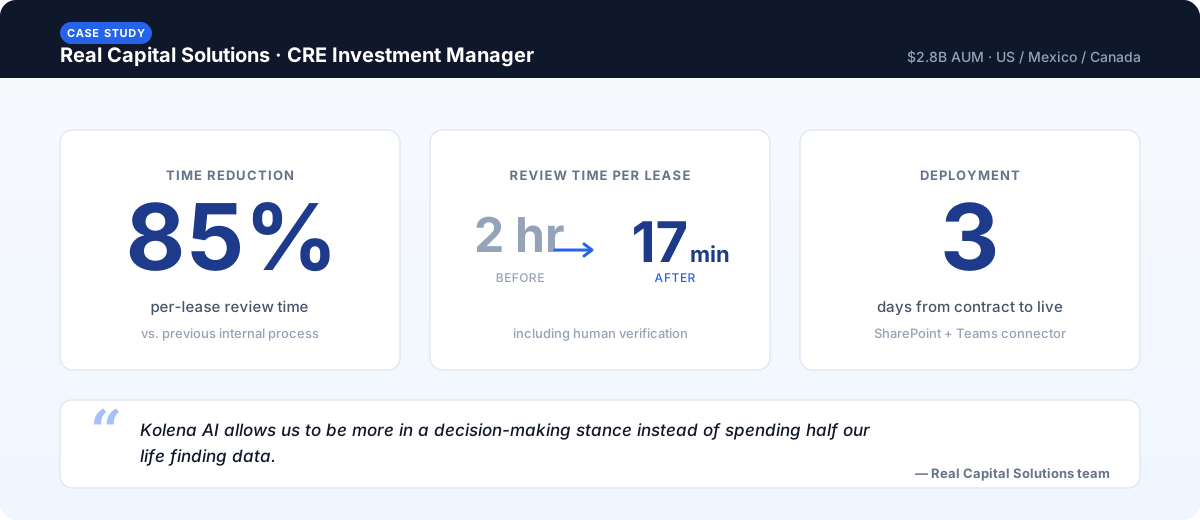
Internal review time dropped from an average of two hours per lease to roughly 17 minutes — a reduction of about 85%. That single metric turned lease abstraction from a bottleneck into a scalable capability.
In the words of Real Capital Solutions' team:
"Kolena AI allows us to be more in a decision-making stance instead of spending half our life finding data."
"We've cut processing time with other tools from 2 hours per internal review down to 17 minutes per internal review."
The downstream effects compounded. Because Kolena handled amendments correctly and parsed rent tables reliably, outputs could be fed directly into acquisitions models and forecasting systems without manual correction. What started as an acquisitions use case expanded to fee agreements for asset management, commercial loan documents for DSCR testing, tax and notice processing, and rent roll reconciliation across property managers.
For the full story including operational lessons learned during deployment, see the Real Capital Solutions case study.
ROI of AI lease abstraction: a worked example
The economic case for AI lease abstraction is straightforward, but most general estimates undercount the savings because they ignore opportunity cost and downstream rework. Here is the math, with assumptions you can replace with your own.
Baseline assumptions
Portfolio: 200 commercial leases under review (typical for a mid-sized acquisition or an annual portfolio audit)
Manual abstraction time: 4 hours per lease average
Internal analyst fully-loaded cost: $75 per hour (salary + benefits + overhead)
Outsourced abstraction cost: $400 per lease (mid-range)
AI abstraction time (including human verification): 20 minutes per lease
AI tool cost: $25,000 annual license, amortized over expected lease volume
Cost comparison
Approach | Time | Direct cost | Notes |
|---|---|---|---|
Manual in-house | 800 hours (≈20 weeks of one FTE) | $60,000 in analyst time | Delays acquisition timeline; opportunity cost not included |
Outsourced | 2–3 weeks calendar time | $80,000 | Plus internal QA time of ~30 minutes per lease = $7,500 |
AI lease abstraction | ~67 hours of verification time | $5,025 in verification + amortized tool cost | 4–7 day calendar time including QA |
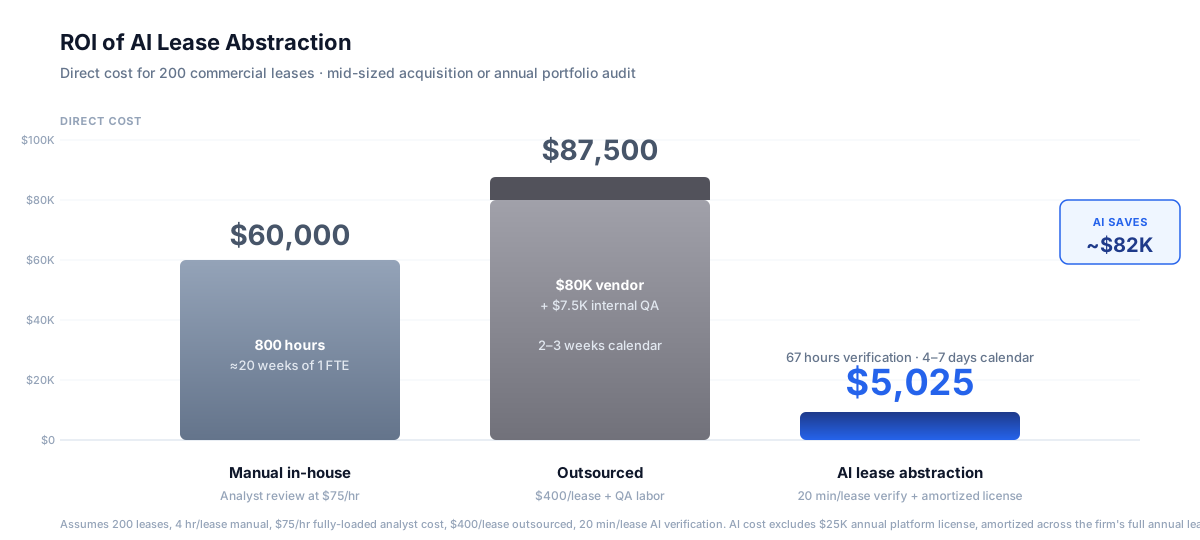
The savings on a single 200-lease portfolio fund the annual AI lease abstraction license three times over compared to outsourcing, and twelve times over compared to manual review. For firms doing 4–6 acquisitions per year plus annual portfolio audits, the per-lease payback is measured in weeks of license cost recovered, not quarters.
What the basic math leaves out
The direct cost savings are the easy case to make. The harder-to-quantify benefits often matter more:
Deal timeline compression. A 4–7 day acquisition due diligence instead of a 2–3 week one lets acquisitions teams bid more competitively on time-sensitive opportunities.
Throughput at fixed headcount. A team that previously could underwrite 4 deals per quarter can now underwrite 8–12, without adding analysts.
Reduced rework. Consistent output format means fewer manual corrections when feeding data into Yardi, MRI, RealPage, or acquisition models.
Notice-window risk reduction. Missed renewal or termination notice windows can cost six or seven figures per occurrence. Reliable extraction catches these systematically.
Analyst retention. Lease abstraction is the work analysts most often cite as why they leave. Reducing tedious abstraction work in favor of judgment-based analysis improves retention.
What to look for in AI lease abstraction software
After dozens of conversations with CRE firms that have evaluated 10+ tools, a consistent set of criteria predicts which deployments succeed and which stall. The following checklist captures the operationally important ones — not the marketing-deck criteria.
Read about leasing software.
Amendment consolidation. The tool must reconcile a base lease and its amendments into a single set of currently effective values, not produce a list of historical values per document. This is the single most common failure mode of older tools.
Native table parsing. Rent tables, escalation tables, and percentage rent schedules must be read as tables, not collapsed to text and reconstructed. Verify with one of your own complex leases during evaluation.
Inline citation per extracted field. Every extracted data point should link back to a specific page and clause in the source document. Without this, verification is impractical at scale.
Explainability. The tool should show its reasoning — why it extracted a particular value — not just the value itself. This affects how fast a human reviewer can verify outputs.
Multi-model validation. Single-model extraction is more fragile than multi-pass validation across different models or queries. Look for vendors that explicitly run validation passes.
Batch processing. Document sets of 100–500+ should run in parallel, not serially. Throughput matters more than single-document speed.
Template-first outputs. Outputs should land in the exact Excel, Word, or CSV format the team uses downstream — ideally configurable per project. Reformatting kills the time savings.
Existing system integration. Connectors for Yardi, MRI, RealPage, CoStar, SharePoint, and Microsoft Teams matter operationally even if they don't matter in evaluation.
Security and data handling. SOC 2 Type II at minimum; explicit non-training of vendor models on customer data; data residency controls if relevant.
Self-service agent creation. Non-engineering team members should be able to create and modify extraction templates. If every new use case requires vendor engineering time, the tool won't scale across the organization.
Documented customer outcomes. Specific named-customer case studies with hard numbers, not just logo walls.
Pricing transparency. Per-document or per-page pricing structures favor predictability over per-seat models for variable-volume workflows.
Manual vs. outsourced vs. AI lease abstraction: which to choose
The right approach depends on volume, time sensitivity, and how lease abstraction fits into broader workflows.
Manual in-house abstraction makes sense when:
Lease volume is genuinely low (fewer than 20 leases per quarter)
Leases are unusual one-offs requiring deep legal judgment
The firm has senior analysts who treat abstraction as a learning vehicle for newer hires
Outputs feed directly into legal opinions where the abstractor's interpretation matters
For most teams above this threshold, the analyst time spent on abstraction is better redeployed to judgment work that AI cannot do well.
Read about lease abstraction services.
Outsourced lease abstraction services make sense when:
Lease volume is variable and there's no consistent internal capacity
Time-to-output is less critical than predictable per-lease cost
The firm prefers contractual SLAs over operational capability
Volume is too low to justify an AI tool license
Outsourcing remains a defensible choice for firms with under 100 leases per year and no plans to scale, but it scales worse than AI and offers worse turnaround times.
AI lease abstraction makes sense when:
Lease volume is 50+ per quarter, with periodic acquisitions or audits pushing it higher
Time-to-output matters (acquisition due diligence, time-sensitive renewals, regulatory deadlines)
Lease data flows into downstream systems (Yardi, MRI, RealPage, acquisition models, rent rolls)
The firm intends to grow without proportional headcount additions
Internal control over data and process matters more than offloading work
Real Capital Solutions' decision criteria — high volume, time-pressured acquisitions, downstream integration requirements, internal data control — are typical of the firms where AI lease abstraction delivers the strongest ROI.
How AI lease abstraction integrates with existing systems
Most CRE teams aren't starting from scratch. Lease data already lives in Yardi, MRI, RealPage, CoStar, AppFolio, or Excel-based spreadsheets, and lease abstraction needs to feed those systems without manual reformatting.
The integration patterns that work in practice:
Output-format flexibility. A capable tool can produce CSV files matching the column structure of your Yardi import template, Excel files matching your acquisitions model template, or Word documents in your standard legal abstract format. Configuration happens once per template and is then reusable across documents.
Direct system connectors. For Yardi and MRI specifically, modern AI lease abstraction tools offer API integrations that push extracted data directly into the lease record. CoStar integrations are common for portfolio analytics workflows.
Cloud storage triggers. SharePoint, Microsoft Teams, Google Drive, and Dropbox connectors enable automated processing: documents dropped into a designated input folder are processed automatically, and outputs land in a designated output folder. Real Capital Solutions used this pattern to let paralegals and accountants self-service abstraction projects.
Email and review workflows. Some teams use email-in submission (forward a lease to a dedicated address, get the abstract back as a reply), often layered into a Slack or Teams review channel where the team reviews and approves outputs before they're committed to system of record.
Integration choices matter operationally but rarely change the abstraction outputs themselves. Choose the pattern that fits how your team already works.
See AI lease abstraction in action
To see how AI lease abstraction works on a real lease document, you can try Kolena's free AI lease abstraction tool — upload a lease, get a structured abstract back in under a minute, no signup or credit card required.
The free tool runs on the same underlying platform as the enterprise Kolena deployment, with a streamlined interface for one-document use. The full platform adds batch processing, template management, system integrations, multi-user access, and the workflow automations that Real Capital Solutions used to scale across acquisitions, asset management, and finance teams.
For teams looking at portfolio-scale deployments rather than single-document use, request a demo to discuss your specific lease portfolio, integration requirements, and timeline.
Frequently asked questions
What is AI lease abstraction?
How accurate is AI lease abstraction compared to manual review?
How much does AI lease abstraction cost?
What lease information can AI extract automatically?
Can AI handle complex commercial leases with amendments and exhibits?
How long does AI lease abstraction take per document?
Does AI lease abstraction integrate with Yardi or RealPage?
What are the best AI tools for lease abstraction?
How do I compare AI options for lease abstraction?
Is AI lease abstraction secure for confidential lease documents?
What ROI can I expect from AI lease abstraction?
How does AI lease abstraction work for CRE portfolios specifically?
Can AI lease abstraction output match a CoStar template?
Ready to try AI lease abstraction?
The fastest way to evaluate AI lease abstraction is on one of your own leases.
Try Kolena's free AI lease abstraction tool →
Upload a real commercial lease, get a structured abstract back in under a minute. No signup, no credit card.
For portfolio-scale deployments, talk to our team about your lease portfolio, your existing systems (Yardi, MRI, RealPage, SharePoint), and your timeline.